In 2026, checking Airbnb prices by hand is a waste of your time. If you want to beat your competitors, you need more than just a quick look at a few pages. You need a list of hundreds of homes, their cleaning fees, and their guest ratings. This guide shows you how to collect all that data for free. You do not need to write a single line of code. We will use a tool called Automa to do the hard work for you.
What is Airbnb web scraping?
Airbnb web scraping is the process of using software to copy information from the Airbnb website. Think of it as a digital robot that visits pages for you. Instead of you clicking and typing, the robot does the work. It reads the price, the name of the house, and the ratings. Then, this robot writes the details into a spreadsheet like Excel or Google Sheets. In the past, people had to copy and paste data by hand. This was slow and humans made many mistakes. Now, scrapers use code or tools to "read" the code of the website.
When you look at a listing on your screen, you see pictures and text. But the computer sees something different. It sees a structured language called HTML. A scraper scans this HTML to find specific markers, such as the price tag or the house name. Once the scraper finds these markers, it saves the text into a clean table. This process allows you to gather thousands of rows of data in a very short time. It turns a messy website into a neat, organized database.
What data can you get from Airbnb?
When you scrape Airbnb, you are after structured, repeatable pieces of information that can be stored in a sheet or database. Depending on the page type, you can extract:
Total Price
Airbnb uses a complex pricing system.The scraper can extract the "total price" which includes all hidden costs. This gives you a clear answer instantly, so you don’t have to calculate fees yourself.
Organic Listing Results
Listing title and name: The public name of the property.
Unique listing ID and URL: The specific identity and web link for the home.
Property type: For example, “Entire guest suite” or “Private room.”
Room details: The number of beds, baths, and bedrooms available.
Key amenities: Important features like Wi-Fi, pool, or free parking.
Location Data
Neighborhood name: The specific area within a city.
City and region: The broader geographic location.
GPS coordinates: Latitude and longitude for mapping.
Proximity to landmarks: Distance to local attractions where shown.
Reviews and Ratings
Average star rating: The overall quality score from guests.
Total review count: How many guests have stayed and left feedback.
Detailed rating categories: Scores for Cleanliness, Accuracy, and Value.
Guest feedback text: The actual text written by past visitors.
Availability and Calendar
Booked vs. available dates: See which nights are still open for rent.
Minimum stay requirements: The shortest trip a host will allow.
Instant book status: Whether the home can be booked without host approval.
Who uses Airbnb data?
Almost anyone making decisions based on revenue and market demand can benefit from structured data extracted from Airbnb.
Property Managers: To monitor competitor prices, track occupancy rates, and adjust their own rates.
Real Estate Investors: To identify high-yield neighborhoods and see which property types earn the most.
Revenue Analysts: To map seasonal trends, identify peak demand dates, and build pricing models.
Travel Platforms and Agencies: To build price history charts and show the best value deals to users.
Market Researchers: To analyze how professional hosts are growing compared to individual hosts.
Local Governments: To track short-term rental density and monitor compliance with local housing rules.
How to scrape Airbnb data without coding skills?
Step 1 Planning the scraping
Let’s look at a typical user journey. A visitor enters the destination and desired dates, then clicks a search button. The Airbnb ranking engine then outputs some results. This is a search page — it shows multiple listings at once with only brief info on each of them.
After browsing for a while, our visitor clicks on a listing and gets redirected to a detail page where they can find information about the selected accommodation, like the full price breakdown and all amenities.
We are interested in scraping all useful information, so we will process both types of pages: search and detail.
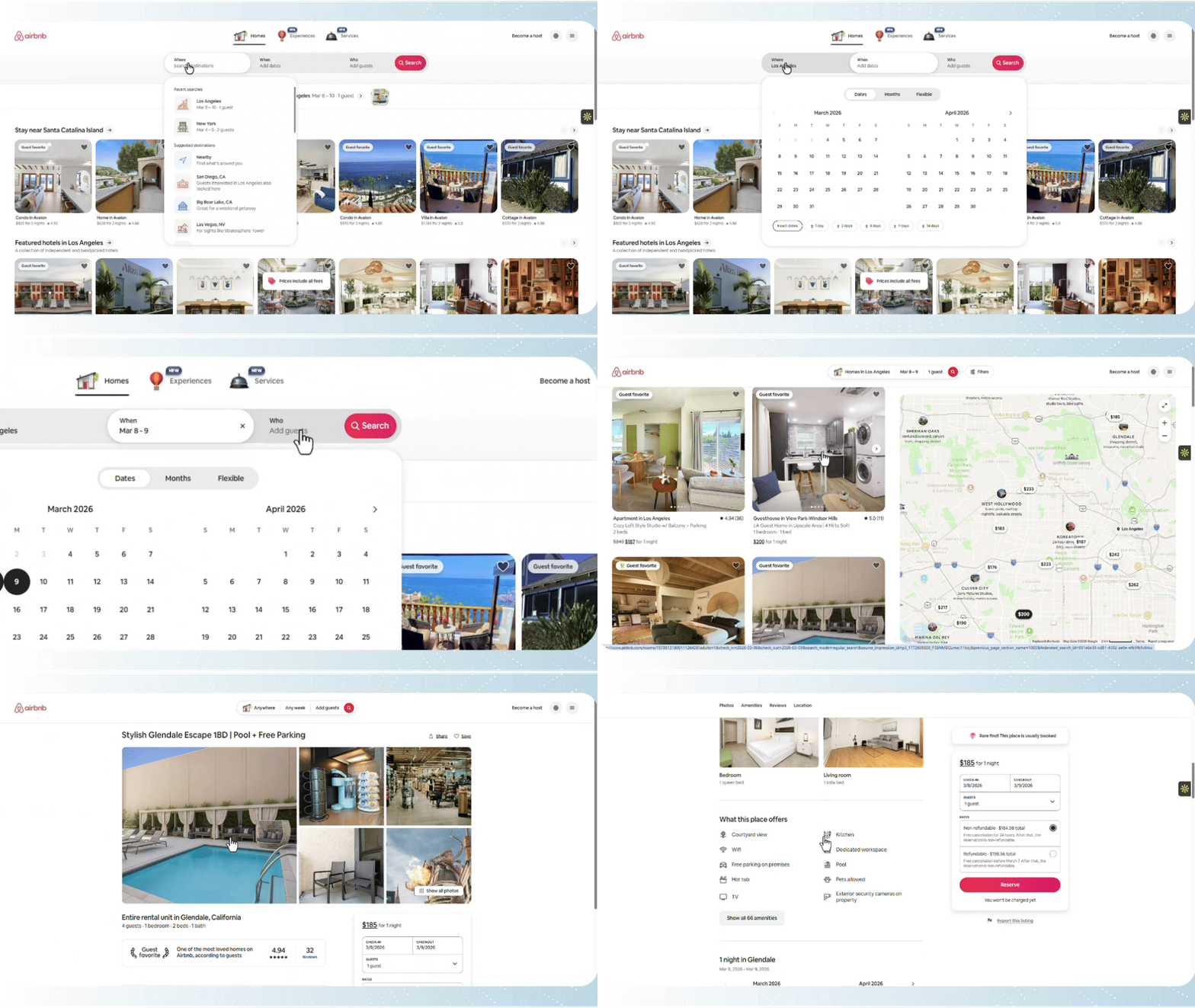
The manual operation steps are as follows:
Go to the Airbnb homepage. Enter the destination, check-in/check-out dates, and the number of guests.
Click the "Search" button. Browse the results and click on a listing that fits your research goals to open its detail page.
Open the detail page and collect the following information.
Step 2 Set up Automa
First, go to the Automa to download the application.
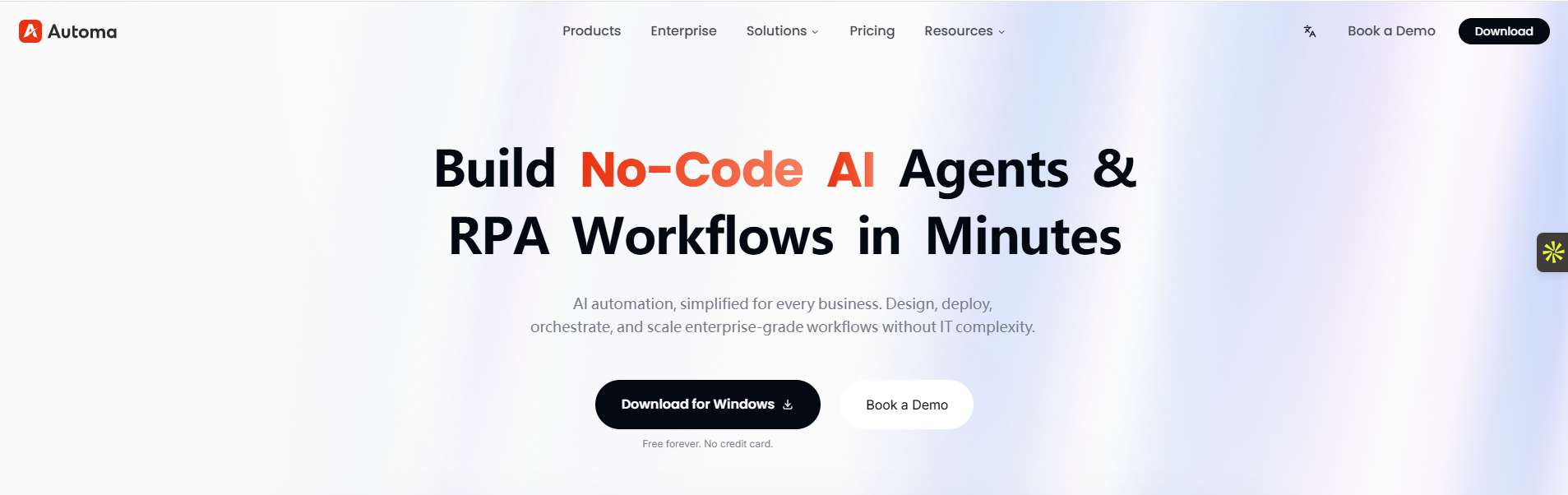
Open the desktop app once it finishes downloading. You can create a new account or sign in quickly. We recommend using your Google or GitHub account to log in.
After you log in to the dashboard, you must install the browser extension. Without this extension, your Automa programs will not work.
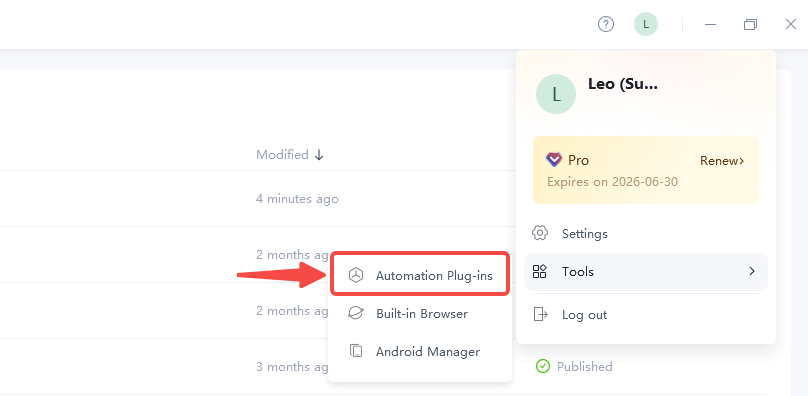
Move your mouse to the top right corner. Hover over "Tools" and click "Automation Plug-ins." We suggest installing the extension on Google Chrome. Once the extension is ready, you can start building. We will create the "Airbnb Scraper."
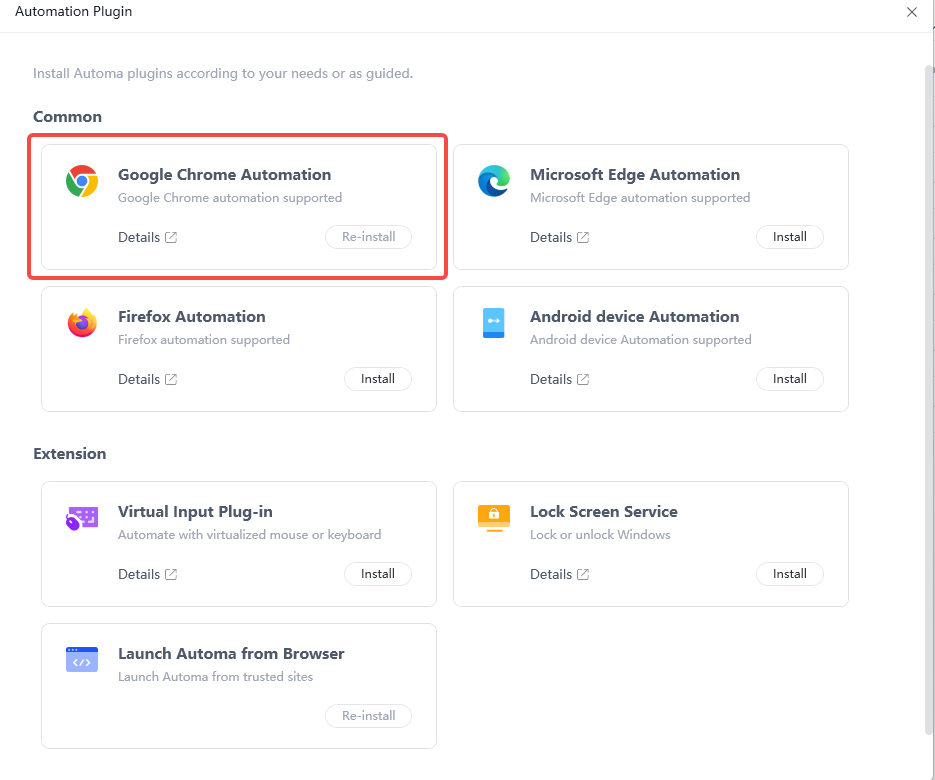
Step 3 Autofill Stay Information
After you decide on the location, dates, and number of guests, use Automa commands to build this workflow.
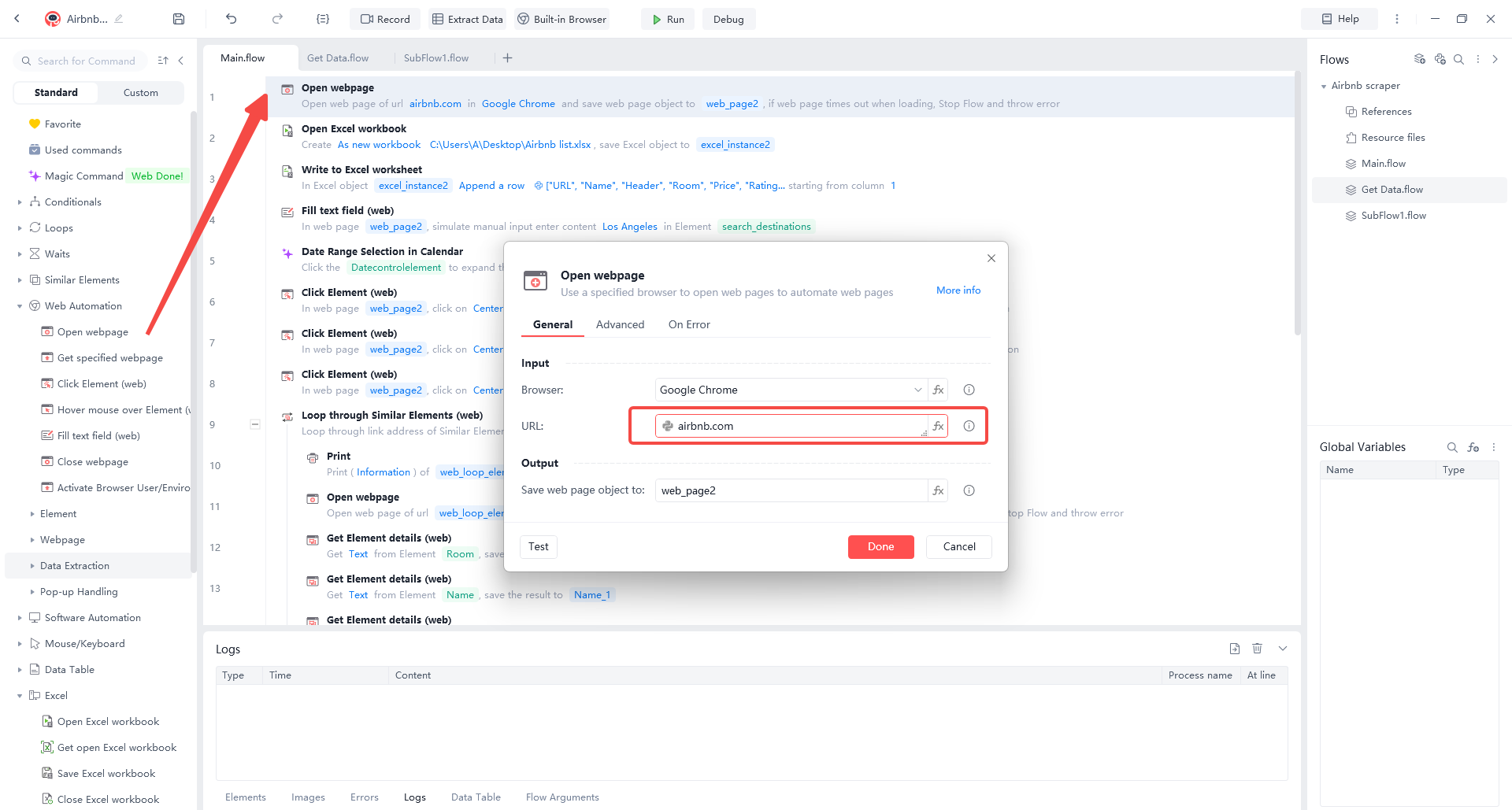
Open the Airbnb Homepage. Find the "Open webpage" command in the "Web Automation" category. Select "Google Chrome" as the browser and enter "airbnb.com" as the URL. The tool will then open the site automatically.
Enter the Destination. Use the "Fill text field (web)" command to find the search box. Name this step "search_destination".
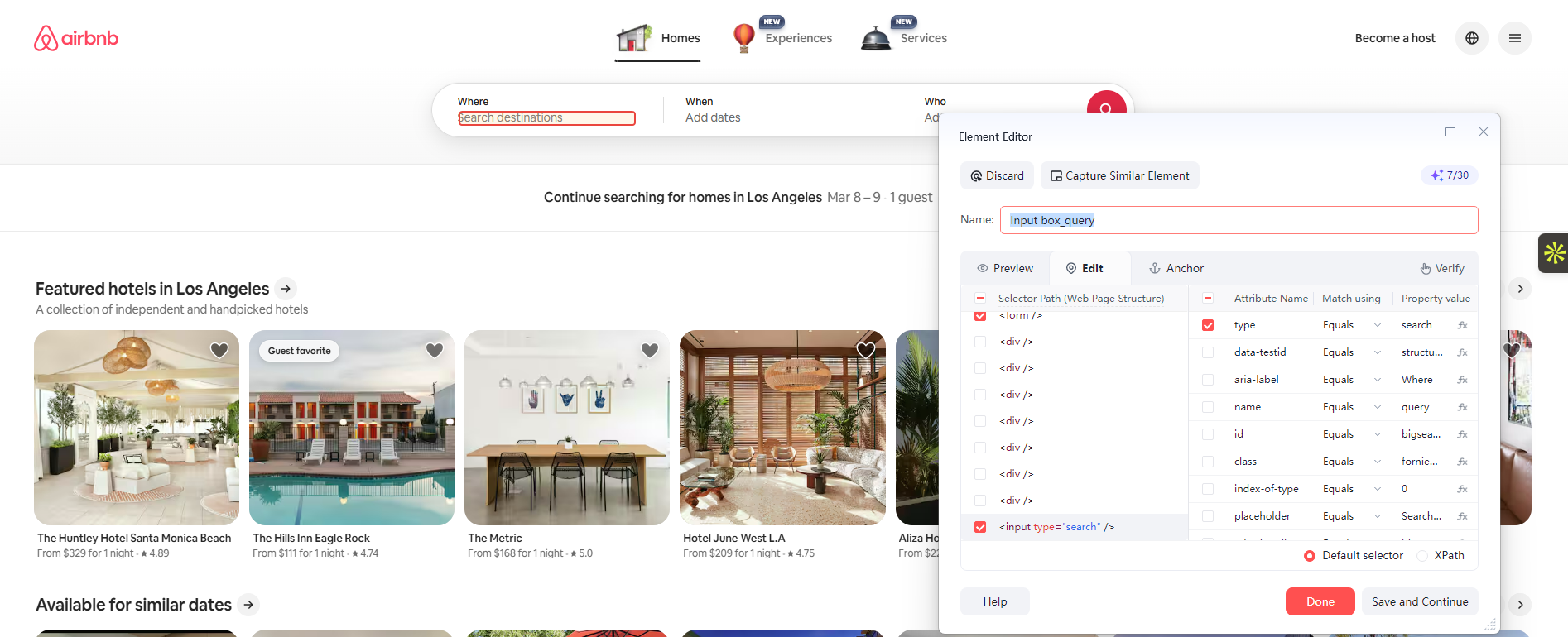
Enter "Los Angeles" in the "Content" box.
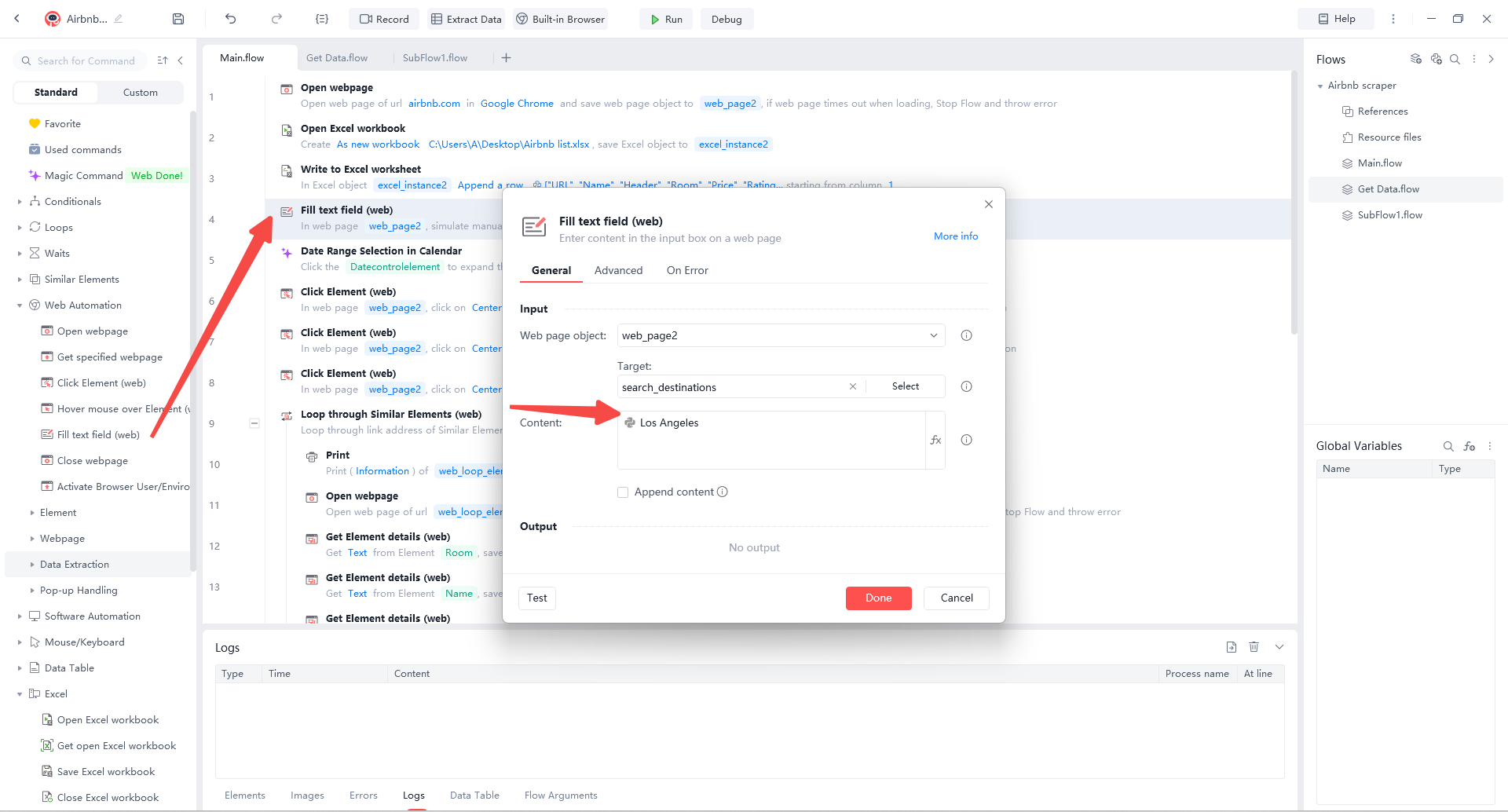
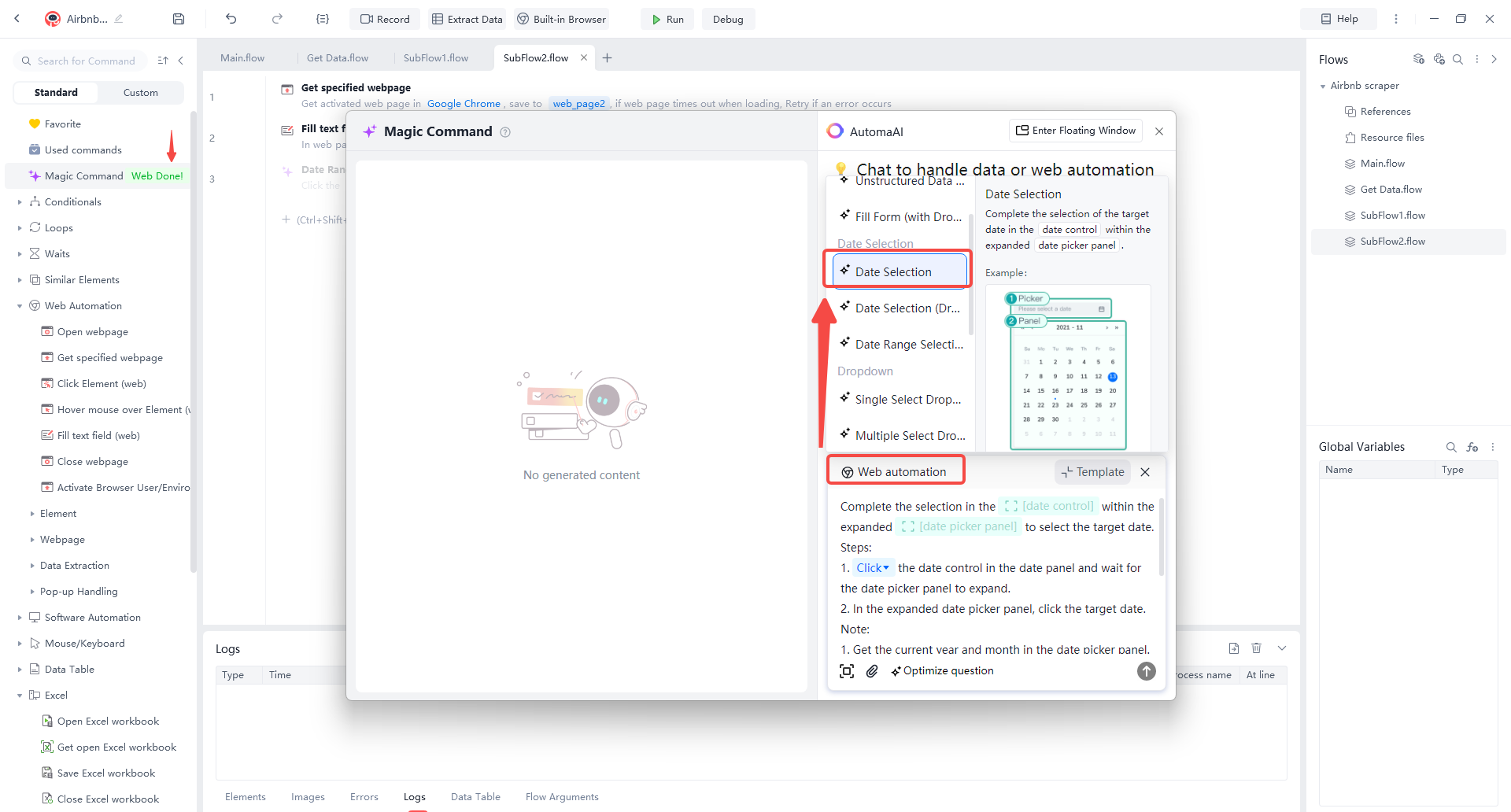
Select Dates with AI. Use the "Magic Command" feature. Choose the "Date Selection" preset from the menu. Hover your mouse over the green box and select the date element on the page.
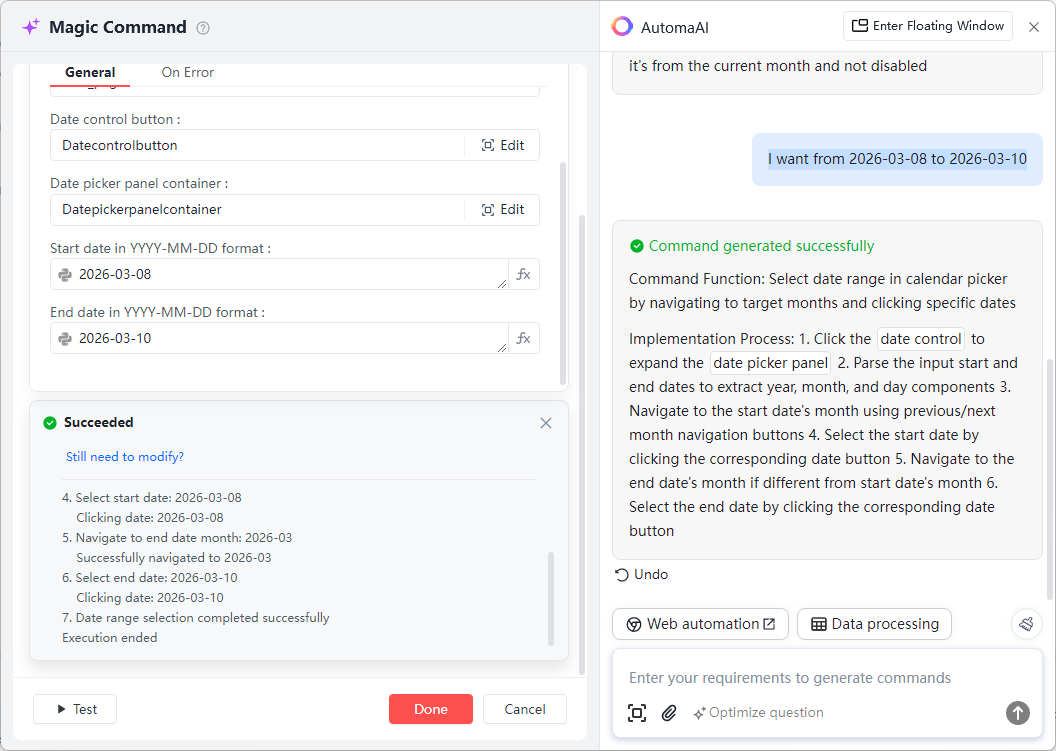
Refine the AI Command. To select a range, tell the AI: "I want from 2026-03-08 to 2026-03-10." The command window will update. Test the step to ensure it works.
Set Guest Count. Use the "Click Element (Web)" command to mimic a real person.
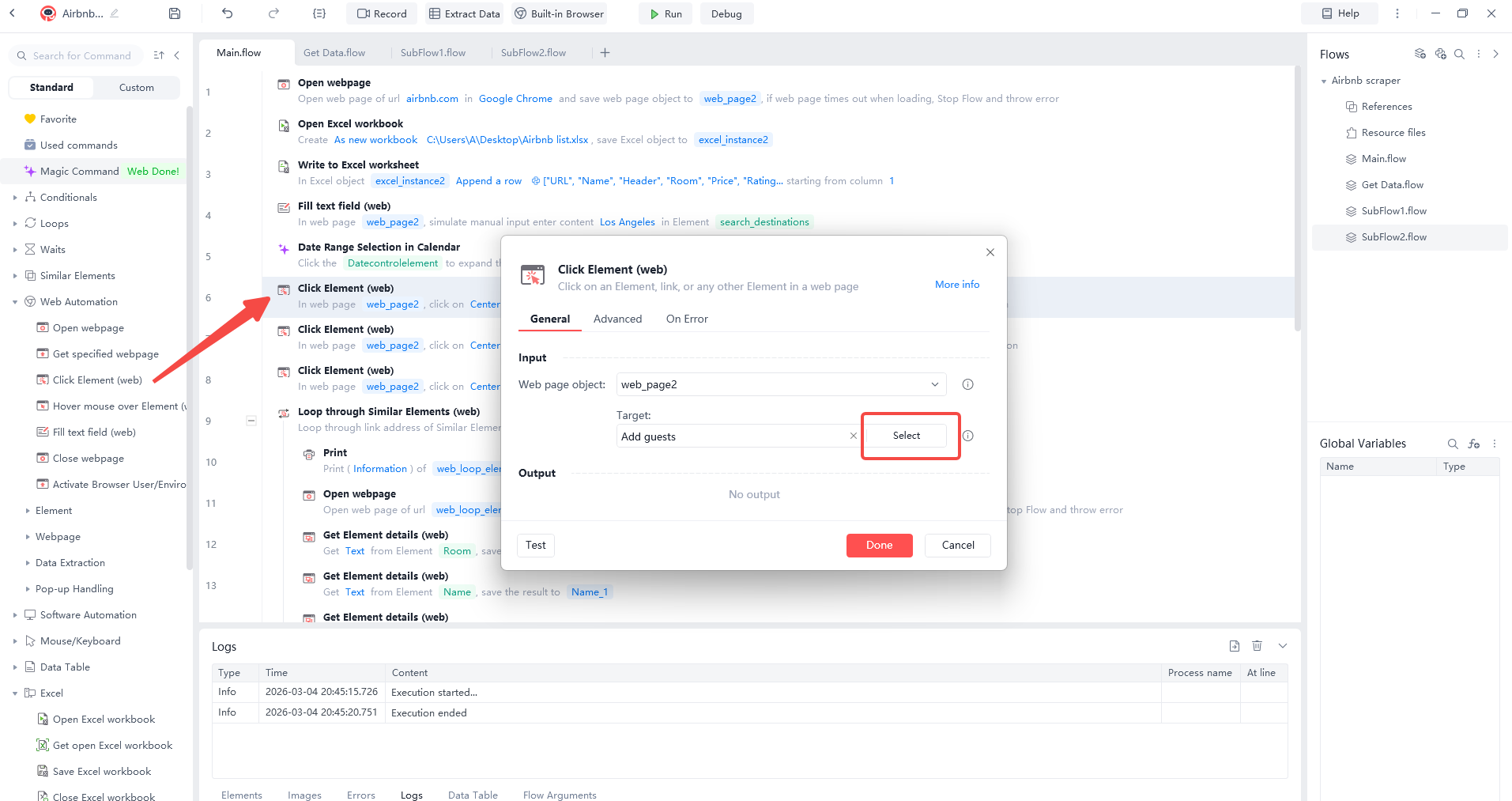
Use three "Click" commands in a row: first click "Add guest," then the "+" button, and finally "Search."
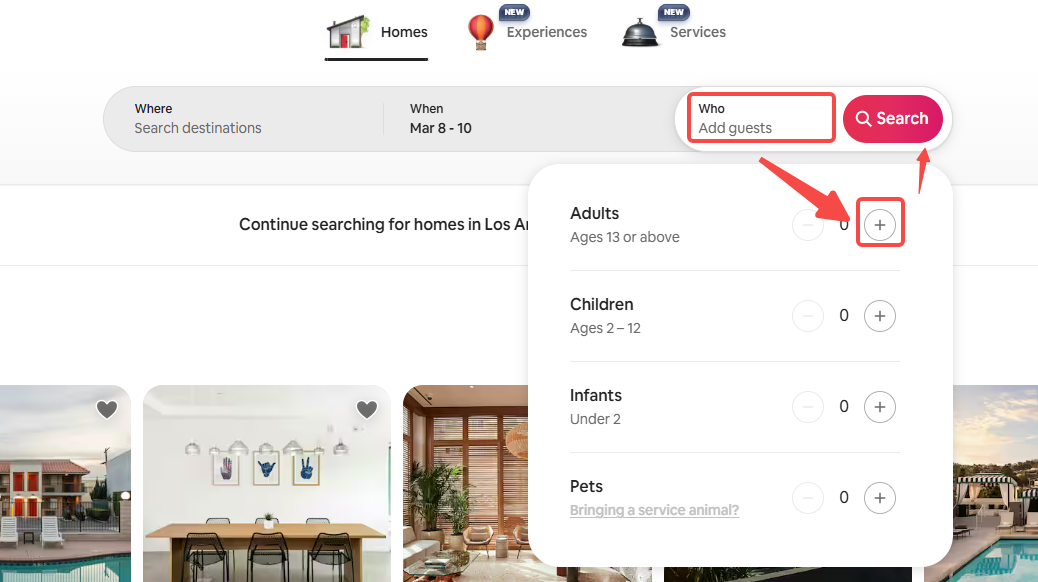
The process runs smoothly, and finally automatically fills in the check-in information on the Airbnb homepage and redirects the user to the Airbnb search results page.
Step 4 Scrape Listing Details
To scrape many homes at once, first capture data from one page. Then, set a loop for the links found in the search results. In this guide, we will grab the URL, Name, Header, Room, Price, Rating, Reviews, and Host.
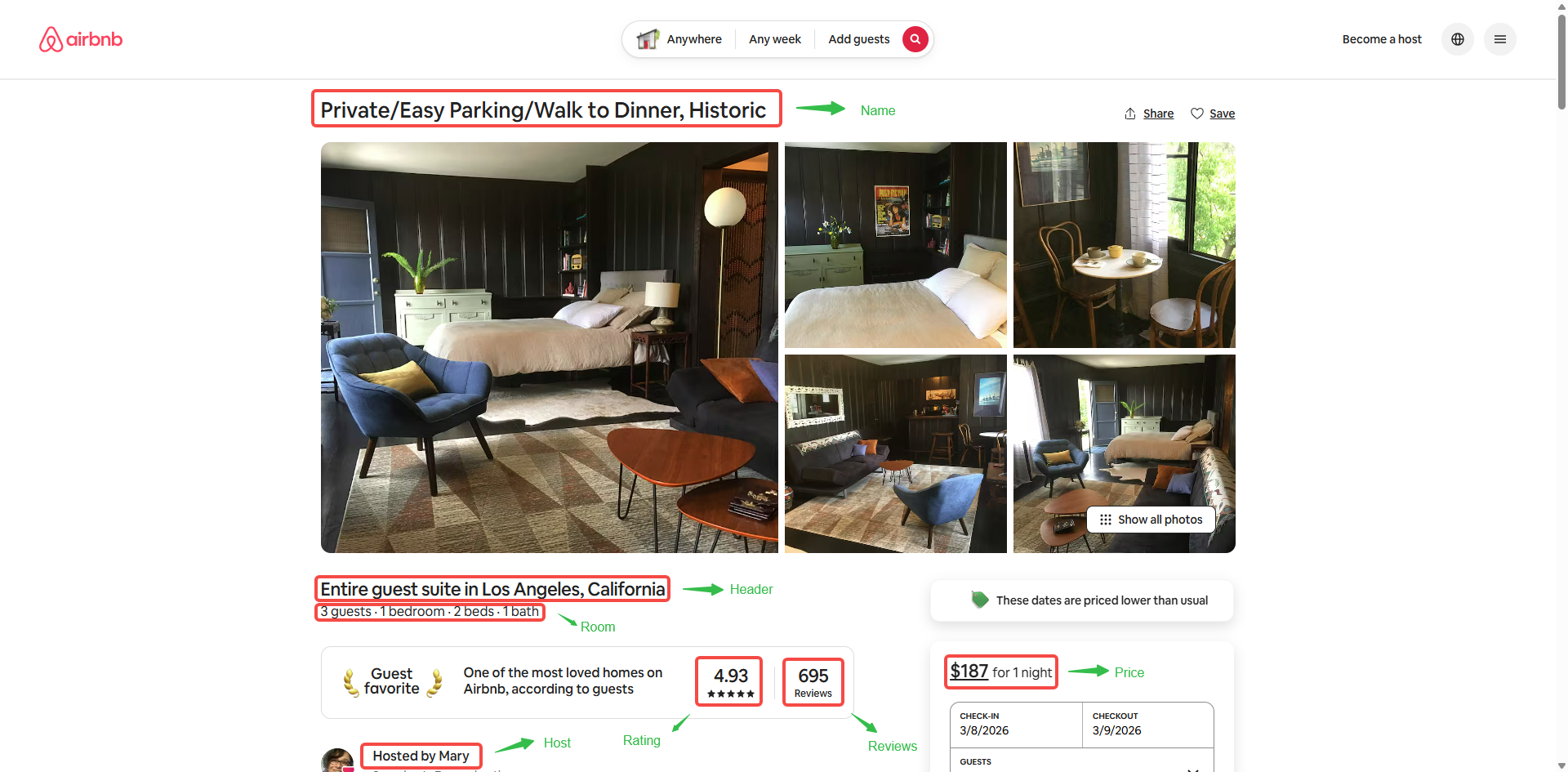
Use “Open webpage” to go to a detail page. Then use “Get Element details (web)” to find your data. For example, click “Select” on the “Room” section. Grab the text to see details like “3 guests · 1 bedroom · 2 beds · 1 bath.” Use this same step for the name, price, and other fields.
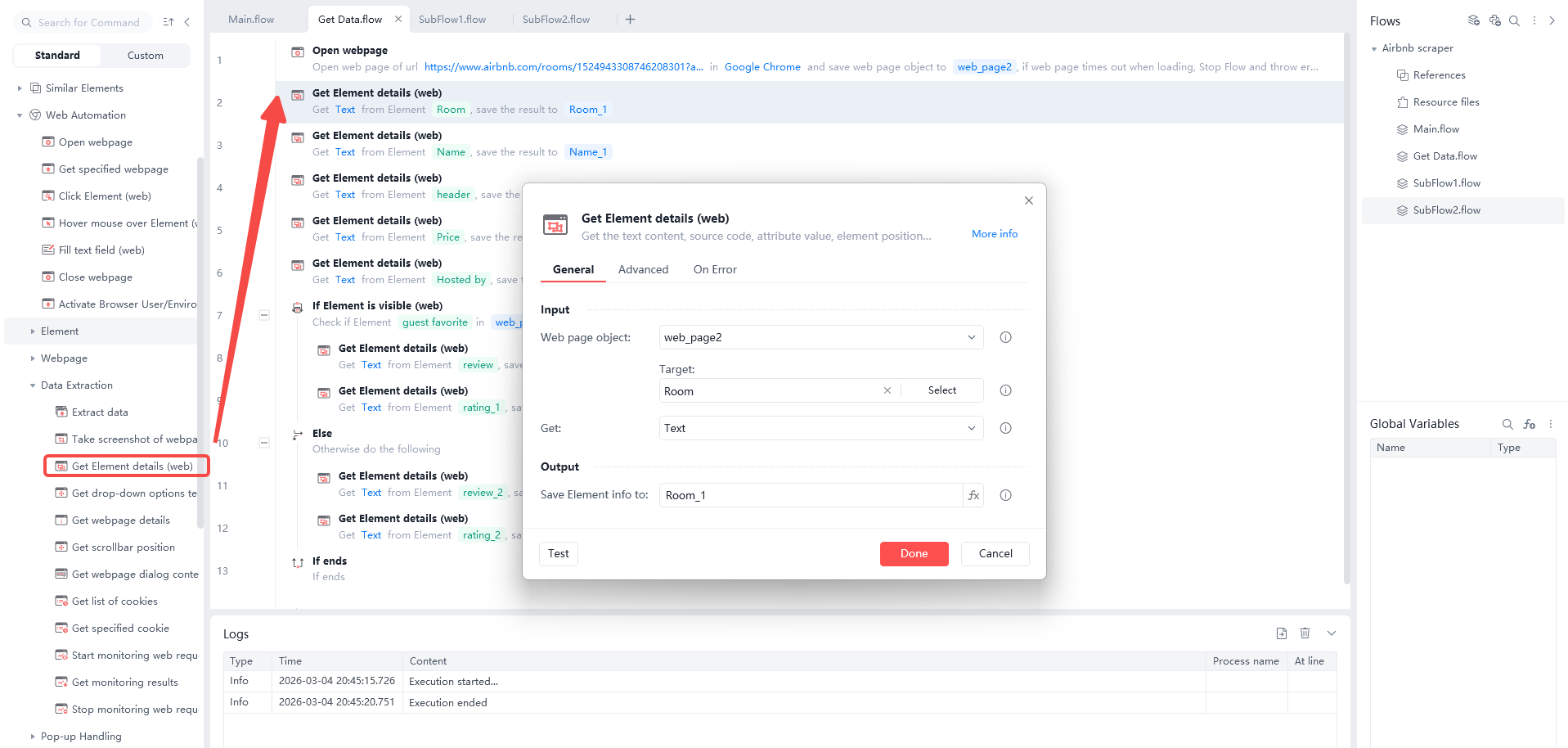
Note:
Sometimes a page will miss an element. To keep the flow running, click “On Error.” Under “Action to take,” pick “Continue Flow.” Set the “Room_1” variable as shown. If the room info is missing, the box will stay empty. Do this for all other commands.
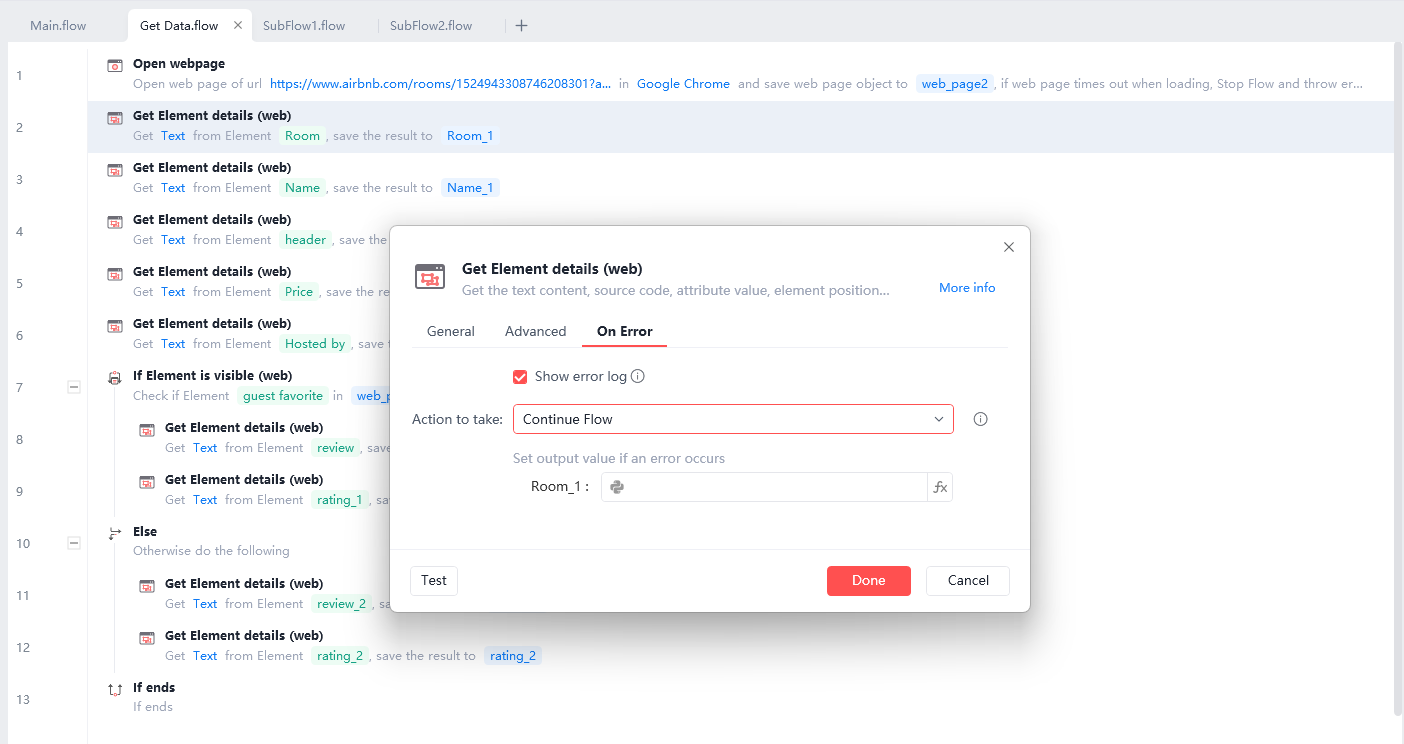
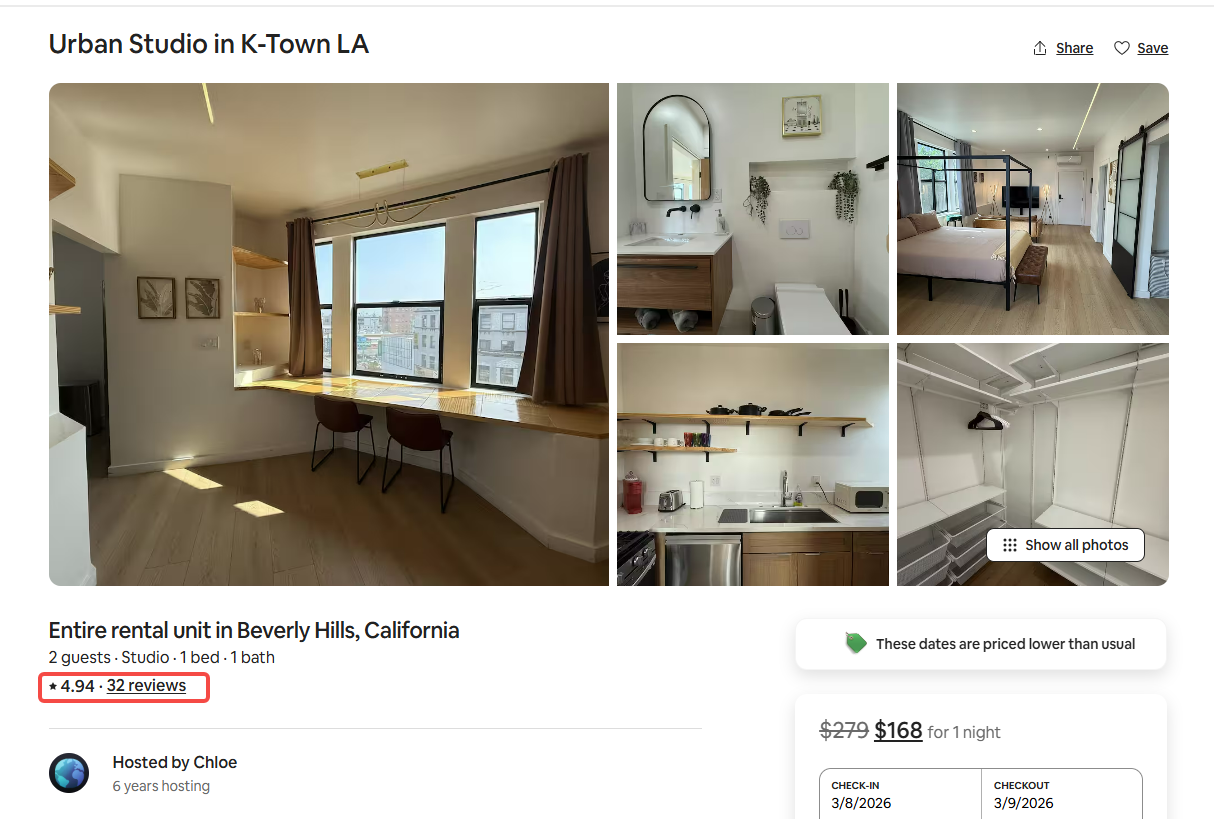
Ratings and reviews show up in two different ways. Use “If Element is visible (web)” to check the layout. If you see “Type 1,” grab that data. If not, grab the data from “Type 2.”
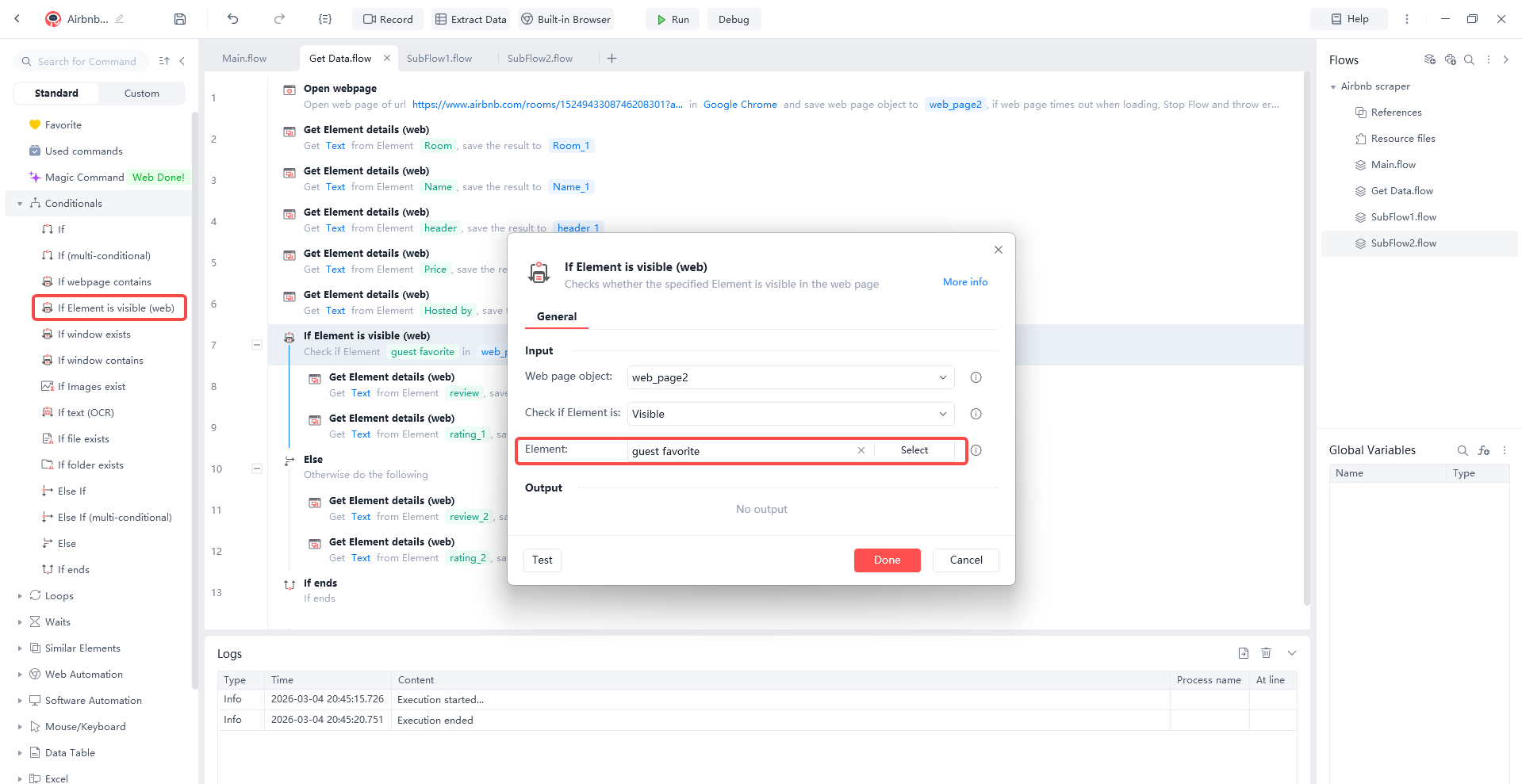
Type 1
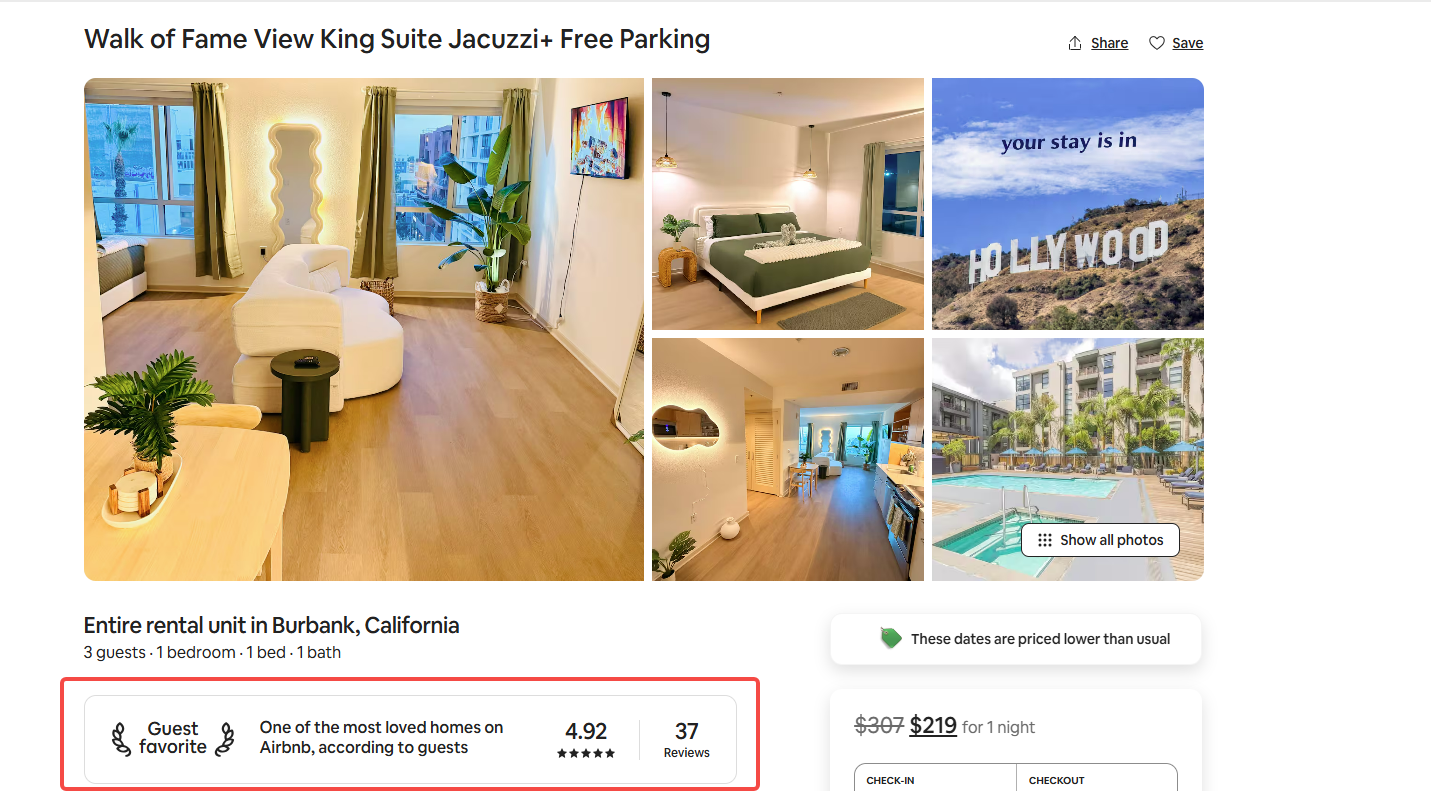
Type 2
Add a “Print” command to show the data in the log. This lets you test if the flow works.
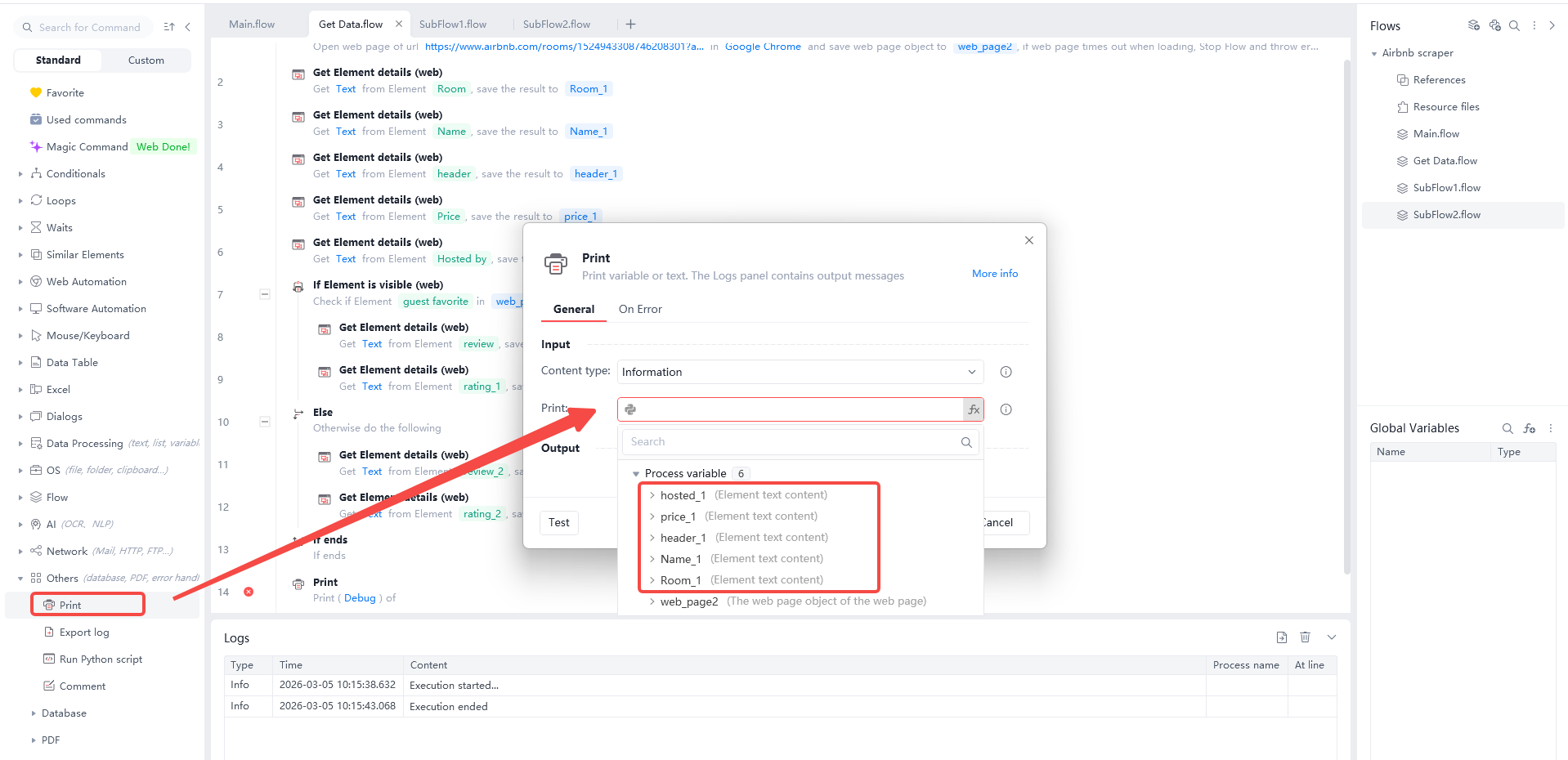
Step 5 Batch Extract Data
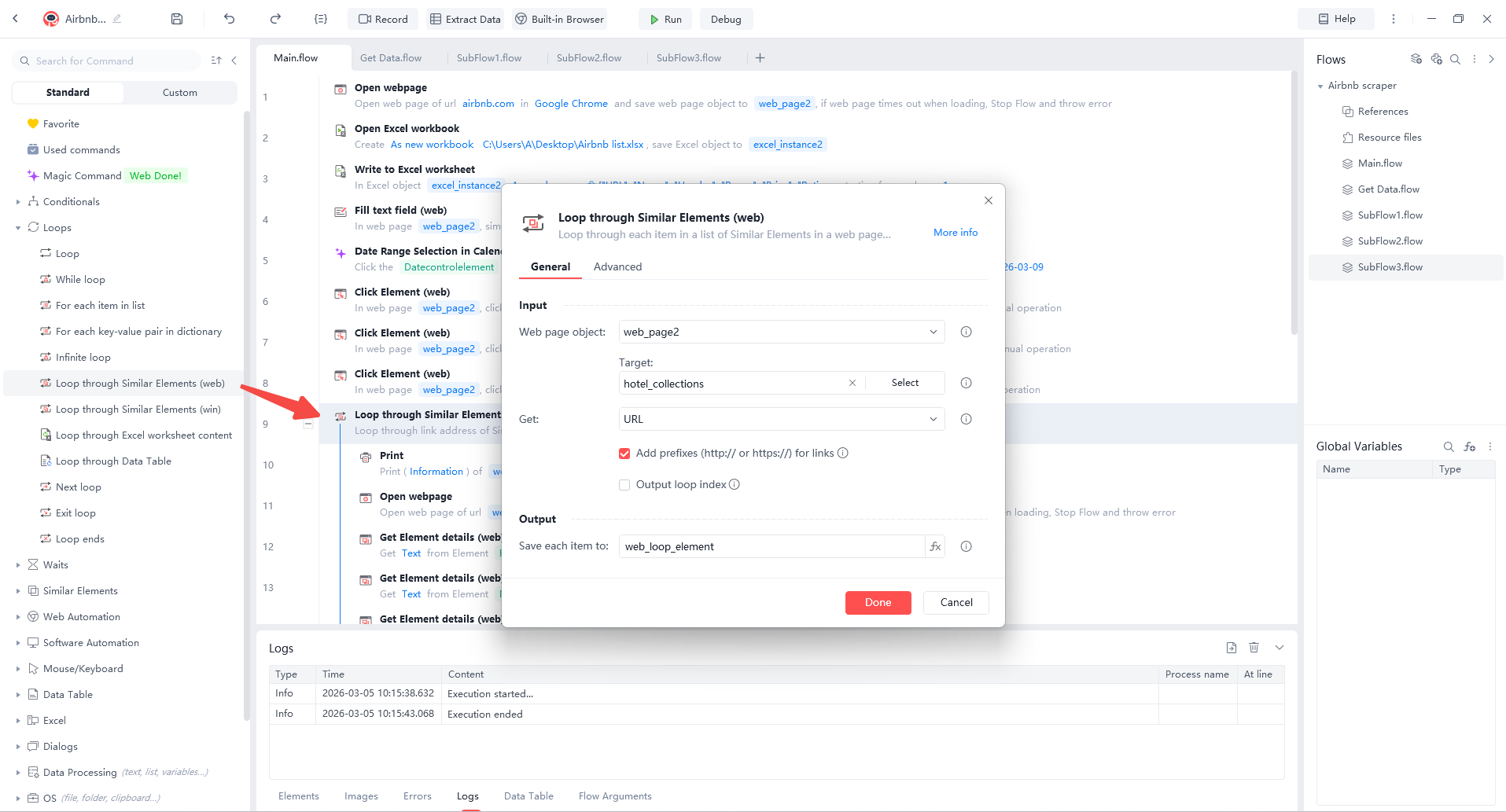
Now that one page works, collect all the detail page links. Use “Loop through Similar Elements (web)” to find the URLs. Save them in a list called “web_loop_element.”
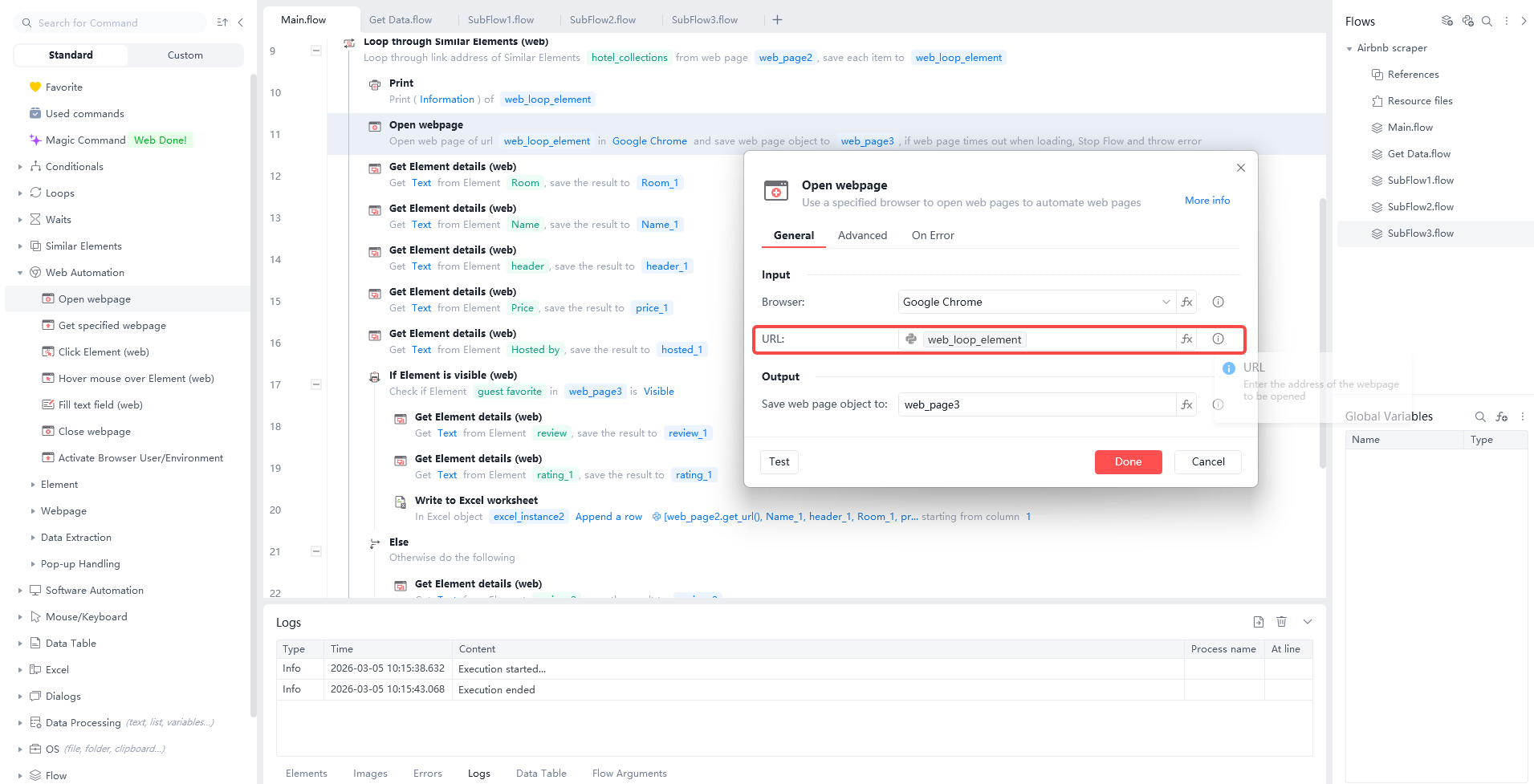
Use the “Open webpage” command for each link in the list. Follow the same steps to scrape each page.
Step 6 Export Data to Excel
Collecting data is just the start. To analyze your facts, you must save them to an Excel file.
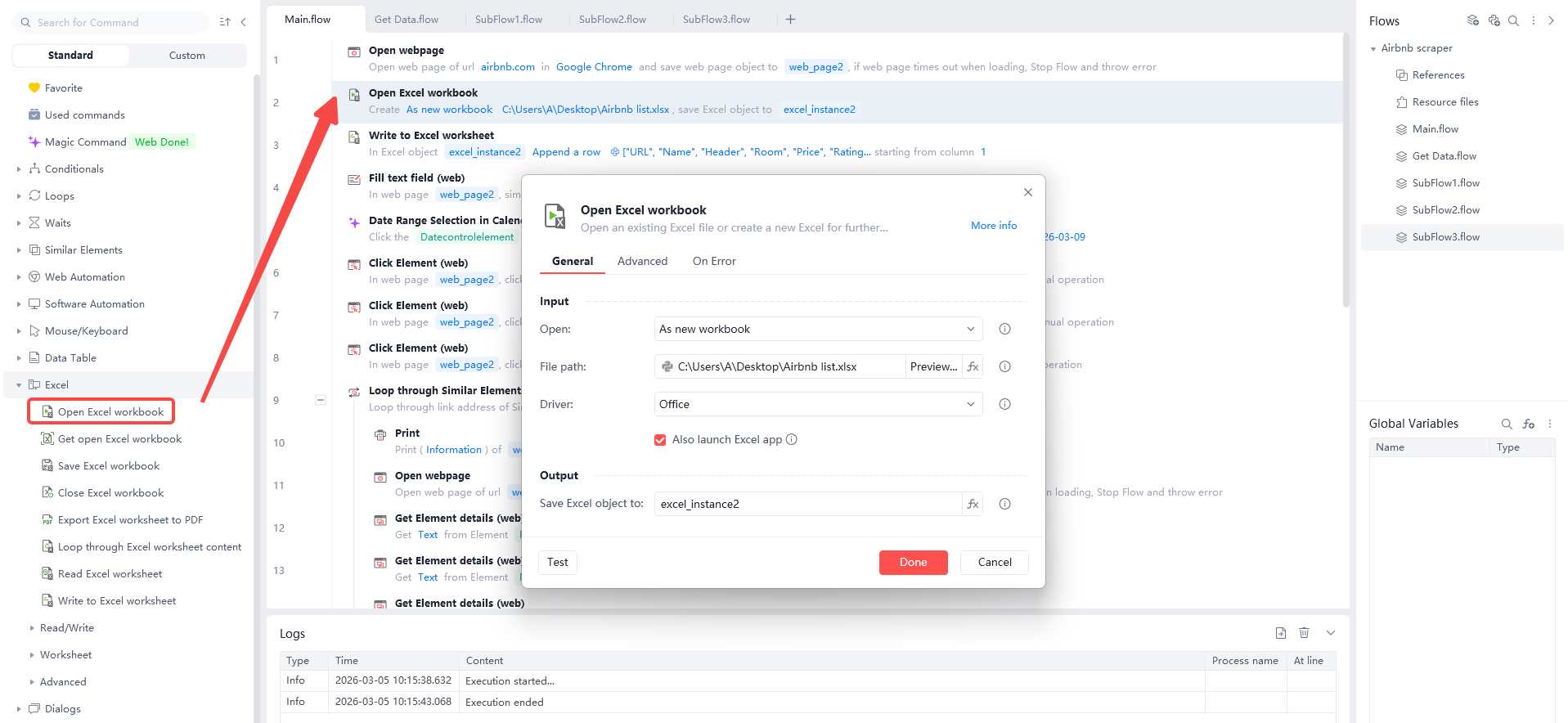
Use the “Open Excel workbook” command at the start of your flow. This creates a file to save your data locally.
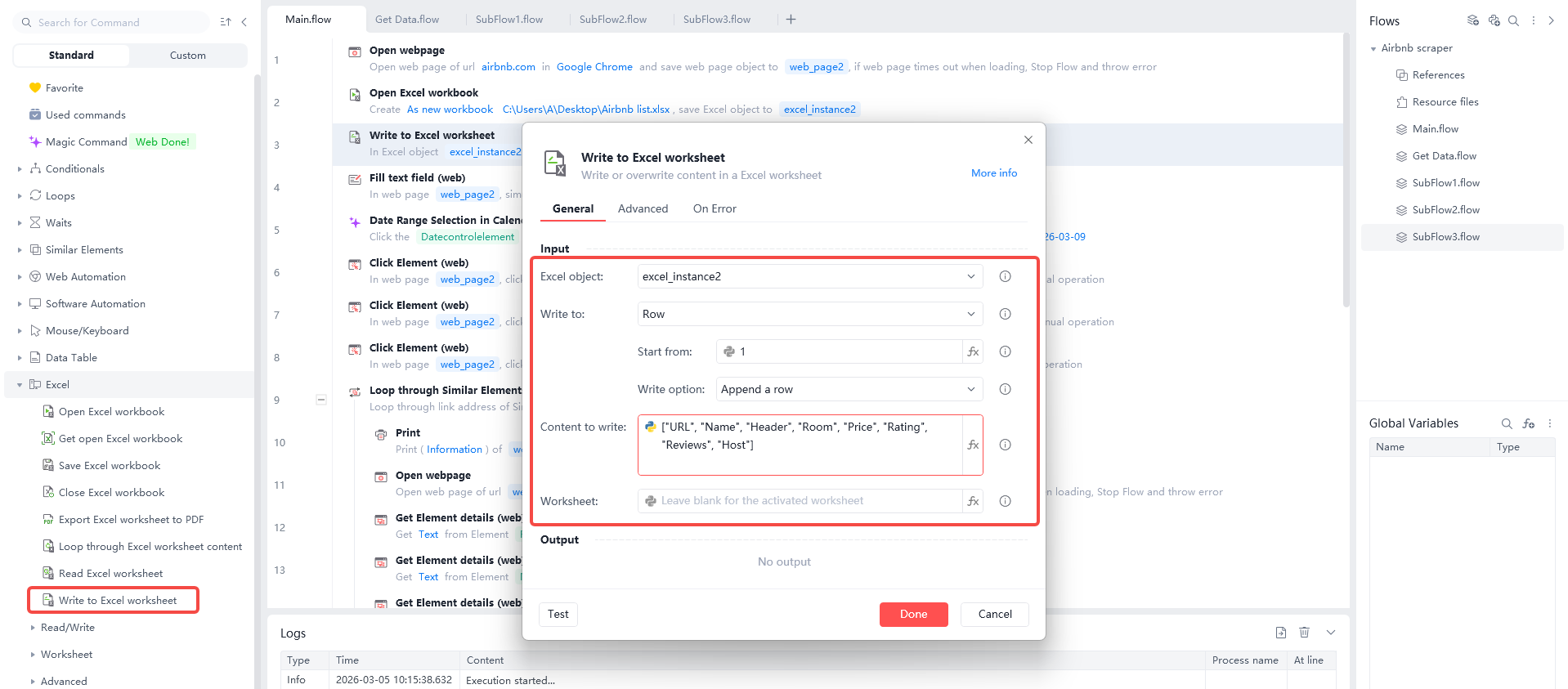
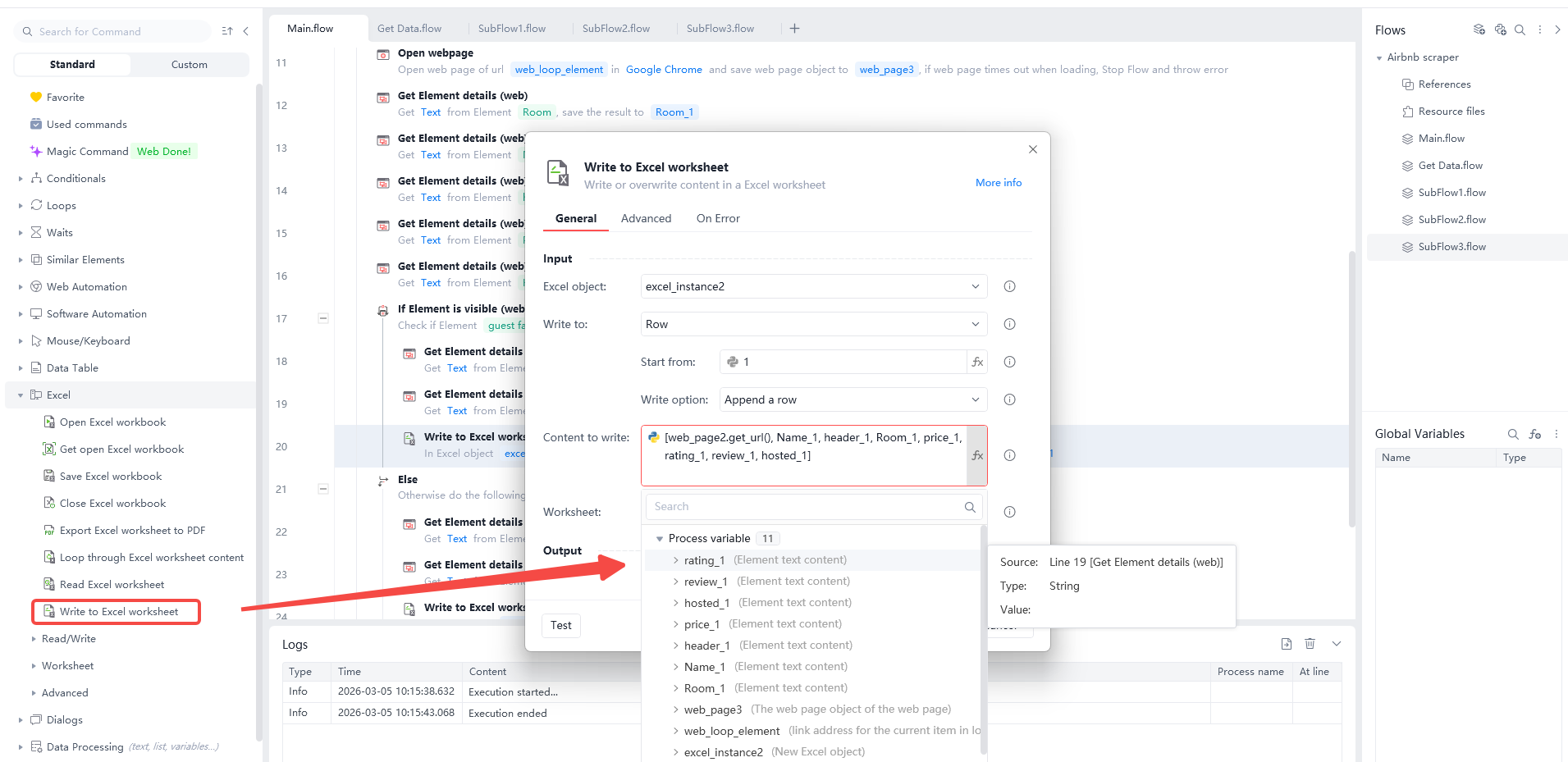
Write the headers first. Use “Write to Excel worksheet” to put your titles in the first row: ["URL", "Name", "Header", "Room", "Price", "Rating", "Reviews", "Host"].
Write the results in the same order. Use the “Write to Excel worksheet” command again. Pick “Append a row” and put your data variables in the “Content to write” box.
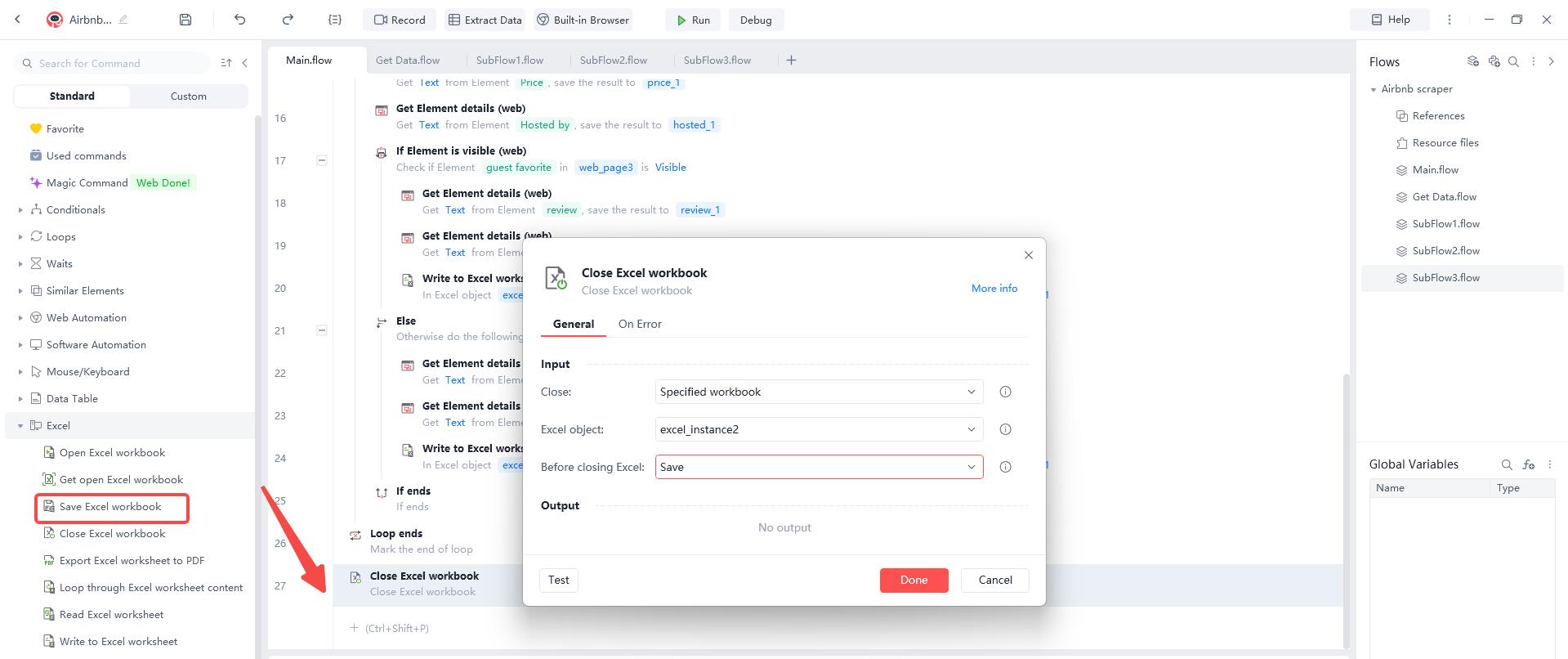
Save and close the file. Use “Close Excel workbook” at the end of the flow to store your results on your computer.
How do I scrape Airbnb without getting blocked?
Airbnb uses very smart security to find and stop bots. If you make 100 requests in one second, they will block your IP address. This is called a "403 Forbidden" error. To stay safe, you must follow these rules.
Use Random Delays: A human takes time to read a page. They do not click a button every 0.1 seconds. In Automa, you can set the "Delay" time. Set it to wait between 5 and 12 seconds after every action. This slow speed makes you look like a real person browsing the site.
Change Your User-Agent: Every browser has a "ID card" called a User-Agent. If you send 1,000 requests with the exact same ID card, Airbnb will get suspicious. You should use a list of different User-Agents. This makes it look like the requests are coming from different browsers like Chrome, Firefox, and Safari.
Use Residential Proxies: This is the most important step for large projects. A proxy hides your real IP address. If you use "residential" proxies, it looks like you are browsing from a normal home internet connection. If one IP gets blocked, the system automatically gives you a new one. This keeps your scraper running for hours without stopping.
Why scrape Airbnb data?
If you start to think of Airbnb listings as data, not just travel pages, you will see a whole new range of uses for them. Scraping Airbnb is not just about finding a place to stay. Airbnb indexes millions of public listings that can provide valuable market insights to support business and research decisions. There are several reasons why people scrape Airbnb data.
Competitive Pricing Strategy
Airbnb does not share the exact pricing logic of its hosts, so scraping listings is an effective way to understand real market performance. By collecting information about nightly rates, cleaning fees, and service charges, hosts can see how their prices compare to neighbors. This helps businesses make an informed decision about their revenue strategy. It also helps you see when prices go up for holidays and find out why certain areas are more expensive.
Market Trend Analysis
Airbnb data can show which neighborhoods are growing in popularity and which types of properties guests prefer. By tracking the number of new listings and their booking frequency, investors can spot "hot" areas before they become too expensive. This information is very useful for real estate development and for comparing the performance of different cities.
Finding New Investment Opportunities
By looking at occupancy rates, amenity trends (like "Work from Home" setups), and guest preferences in different regions, businesses can find new user needs. It also helps you find missing property types in a specific area, like large family homes or pet-friendly apartments. It gives you tips for buying new property or improving your current rental features.
Competitive Intelligence
Scraping Airbnb lets management companies see how their competitors' availability changes, check their titles and descriptions, and spot new professional hosts quickly. You can track if a competitor is offering a new discount or adding better photos to their page. This data is very important for staying ahead in the short-term rental market.
Brand Monitoring and Review Management
By checking review counts and star ratings across many listings, companies can see changes in guest satisfaction and how competitors handle feedback. This helps hospitality teams manage risk and protect their reputation. It also shows which host features, like "Superhost" status, lead to better rankings in the search results.
Local Tourism Insights
Scraping local listing data provides information on regional pricing, average stay lengths, and seasonal shifts in demand. These insights are very important for local tourism boards and businesses that serve travelers, like restaurants or tour guides. It helps them prepare for busy seasons and understand where guests are coming from.
Once you've got your Airbnb data in a simple list, you can filter, sort, and visualise it. This makes it much easier to answer questions about market value that are almost impossible to deal with manually when you're dealing with thousands of homes.
Challenges in scraping Airbnb data
Scraping is not always perfect. You will face challenges that require you to adjust your tools.
Dynamic Loading: Many Airbnb pages do not load everything at once. They use "infinite scroll." This means new listings only appear when you scroll to the bottom of the page. You must tell Automa to "Scroll to Element" before it starts collecting data. If you skip this, you will only get the first few results.
Login Walls: Sometimes Airbnb asks you to sign in to see certain prices or reviews. You should avoid scraping while logged into your personal account. If the scraper gets caught, Airbnb might ban your account forever. It is better to only scrape data that is public and visible without a login.
Frequent layout changes: Airbnb continually experiments with new layouts, map features, and listing card designs. They often use "randomized" CSS class names that change every time the site is updated. A selector that identifies a nightly price today may break next month. This means you must regularly update your scraper logic and focus on more stable attributes like ARIA labels or data attributes instead of just class names.
Tips for scraping Airbnb data
Follow these simple rules to get the best results from your work.
Scrape during off-peak hours: Try running your scraper at night when fewer people are using the site. This makes your high traffic less noticeable to the website's security systems.
Focus on the "Check-out Price": As we said before, the total price is what matters. Set your scraper to look at the final total that includes all fees. This is the only way to do a real competitive analysis.
Define fixed guest counts: Prices on Airbnb change based on how many people are staying. Many hosts charge an "extra guest fee" after the first two people. To get consistent data, you should always set a fixed guest count (e.g., 2 or 4 guests) in your search. This ensures that the prices you scrape are comparable across different listings and neighborhoods.
Conclusion
Airbnb web scraping in 2026 is a vital skill for anyone who wants to win in the rental market. By using a free, no-code tool like Automa, you can turn a huge website into a small table of facts. This data removes the guesswork from your business decisions.
Remember to be patient. Start with small searches and slowly grow your project. Use random delays and proxies to stay safe. With the right data in your hands, you can find the best prices, spot the newest trends, and grow your business faster than ever before.
FAQs
How often should you scrape Airbnb?
For market research, once a week is usually enough to see major changes. If you are tracking a special event like the Super Bowl or a holiday, you might scrape every day for two weeks before the event starts.
Is Airbnb scraping legal?
Scraping public data that everyone can see is generally legal. However, you should never scrape private user data or information behind a login. Always respect the website's robots.txt file and follow local privacy laws like GDPR.
Why do prices change after I click?
Airbnb shows a "starting price" based on one person staying for one night. When you click on the house and add dates or more guests, the price goes up. This is because of cleaning fees and guest fees. Your scraper should always focus on the final "Total Price."
HTML vs API vs browser automation—what should I use?
Browser automation (like Automa) is the best choice for no-code users in 2026. It is free and it handles the complex parts of the website automatically. It is much easier than writing code for HTML scrapers or trying to use private APIs.
What Airbnb fields matter most for pricing analysis?
The most important fields are the Total Price, Neighborhood, and Number of Reviews. These three numbers tell you the most about the value and popularity of a home. Without them, your analysis will be incomplete.