
Automa AI-Driven RPA vs. Automa Automation Extension is a key comparison for businesses choosing the right automation tool for specific workflows. Automation has become closely linked to efficiency and productivity across industries, supporting companies that manufacture products and deliver services worldwide. With the right tools, organizations can reduce costs, improve operations, and replace repetitive work. On average, one RPA robot can complete the work of six employees and save large enterprises about USD 1 million in labor costs each year. This is where RPA stands out. Since starting in 2025, Automa has focused on building a truly AI-driven RPA platform that helps people work more like humans and less like machines, growing into a near-unicorn company serving over 30,000 enterprises. This article compares Automa AI-Driven RPA and Automa Automation Extension, their features, capabilities, and best-fit use cases.
Automa AI-Driven RPA vs. Automation Extension
This table provides a structured comparison of the two tools. It shows differences in their overview, use cases, core features, pricing models, and learning curve.
Aspect | Automa AI-Driven RPA | Automa Automation Extension |
Overview | An intelligent process automation platform that combines AI and robotic execution. | A free browser add-on that reads web page code to find information. |
Use Cases |
|
|
Core Features |
|
|
Pricing Models | Automa Freemium model with Free, Pro, and Enterprise plans. | Completely free and open-source. |
Learning Curve | Low-code drag-and-drop interface allows business users to learn basic operations in 1 to 2 weeks. | Very easy to learn. It uses simple visual blocks. |
What is Automa AI-Driven RPA?
Automa AI-Driven RPA is an automation platform created in 2025. It combines artificial intelligence with robotic process automation. You can think of AI as the brain that thinks and RPA as the hands that execute tasks. The software simulates human actions like clicking a mouse or typing on a keyboard. It works across desktop applications, web browsers, and enterprise systems like SAP.
 What is Automa Automation Extension?
Automa Automation Extension is a free add-on for your web browser. It reads the code behind websites to find specific data. It connects simple actions, like clicking buttons, into a visual flowchart. It only operates inside browsers like Google Chrome or Microsoft Edge.
 Features: Automa AI-Driven RPA vs. Automation Extension
Each tool offers different capabilities to handle your daily tasks. We will look at the exact features they provide to speed up your work.
Core Features of Automa AI-Driven RPA
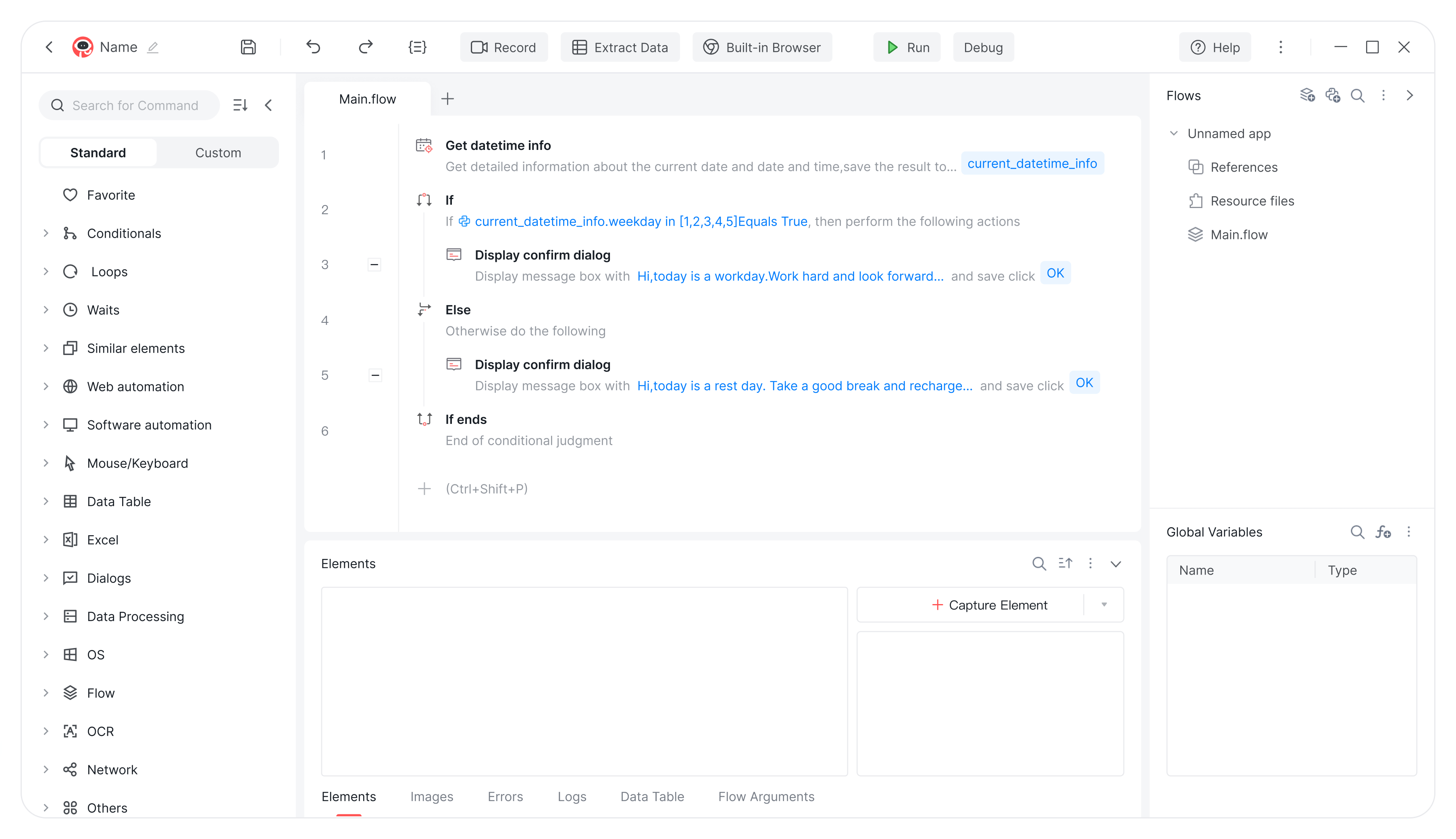
Three-in-One Architecture: Automa combines a designer, a robot, and a console into one platform. This design helps businesses set up and run automation faster.
Deep AI Integration: The platform integrates large language models to act as the brain of the digital worker. This allows the software to understand natural language and process complex tasks easily.
Magic Commands 3.0: Users can build automation workflows just by typing simple instructions. This AI tool turns everyday words into working code instantly.
Intelligent Repair and Smart Assistant: The system quickly finds workflow errors and fixes them automatically with one click. The assistant also lets you start tasks using a chat window.
Full-Platform Automation: The software works across Windows, Mac, and Linux systems. It also controls mobile apps using a dual-engine approach.
Deep System Integration: It connects directly with major business software like SAP and Oracle. You do not need to change your existing systems to use it.
 Core Features of Automation Extension
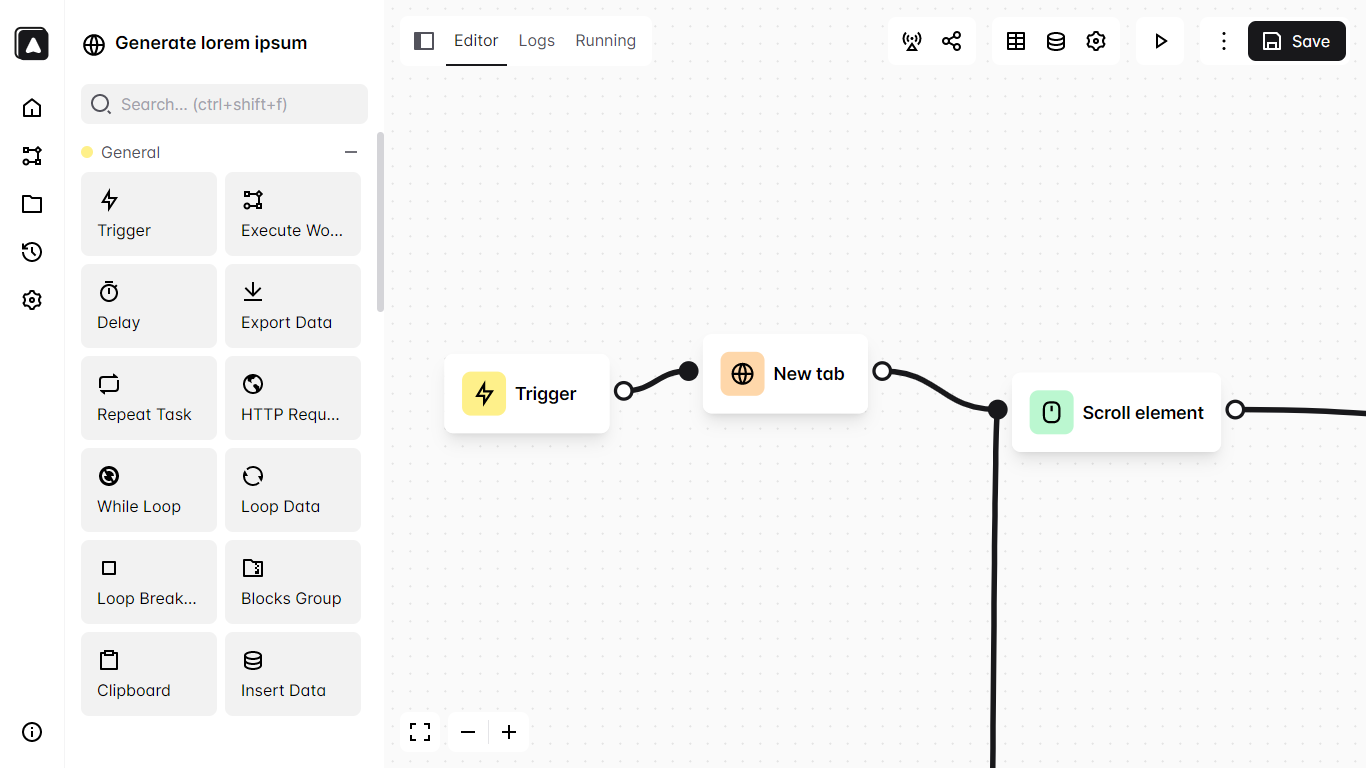
Web Scraping and Export: It copies text, links, and prices from websites. It then exports this data directly into CSV files, JSON formats, or Google Sheets.
Smart Triggers and Scheduling: You can start tasks manually, use keyboard shortcuts, set specific daily times, or run them automatically when you visit a certain website.
Conditional Logic and Multi-Tab Handling: The extension makes decisions based on page elements. For example, it clicks different buttons depending on which promotion appears on a page. It also smoothly switches between multiple open browser tabs during a single task.
Workflow Marketplace: You can visit the Automa Marketplace to browse, download, and share pre-built automation workflows with other users.
Visual Drag-and-Drop Canvas: The extension provides a simple workspace where you drag and drop blocks. You connect these blocks to build workflows without writing any code.
 When to Use Automa AI-Driven RPA or Automa Automation Extension?
You must match the right tool to your specific workflow. Your choice depends on where your data lives and how complex your process is.
When to Choose Automa AI-Driven RPA?
Choose this tool when you face highly repetitive and complex tasks at work. It works best when you need to move data securely between different local software programs and cloud platforms.
When to Choose Automa Automation Extension?
Choose the extension when your work stays entirely inside a web browser. It is the right tool if you only need to scrape data from a public website, handle multiple browser tabs, and paste the information into a spreadsheet.
Use Cases: Automa AI-Driven RPA vs. Automation Extension
Real companies use these tools to solve actual business problems. Here is a detailed look at how different industries use them to save time and reduce manual work.
Automa AI-Driven RPA Use Cases
Automa AI-Driven RPA has an excellent ability to connect different software, reduce manual errors, and speed up daily work. Your team can focus on creative tasks and leave repetitive data entry to this automation tool.
Order Processing in Manufacturing: In the manufacturing industry, Automa AI-Driven RPA can automate order entry. The software reads order details and types them into the company system. By automating this task, factories reduce the time to process a single order from 40 minutes to 5 minutes and drop data errors to exactly zero.
Price Adjustment in E-commerce: Cross-border e-commerce teams use this tool to manage store operations late at night. The software automatically checks competitor prices and updates store inventory while employees sleep. This automation solves time zone differences and keeps the business running without human intervention.
Data Integration in Finance: Finance departments use Automa AI-Driven RPA to process invoices. The tool uses AI to read the total amount on invoice images and types these numbers directly into accounting software like QuickBooks. This process saves time and stops human typing errors.
Automa Automation Extension Use Cases
Automa Automation Extension offers a simple way to collect web data, control browser tabs, and save time on manual copying. You can build fast workflows and let the extension handle your daily website routines.
Competitor Price Monitoring in Marketing: Marketing teams use the extension to track competitor prices. The tool opens Amazon at a scheduled time, copies product prices, and saves the numbers into a spreadsheet. This automation runs in the background and saves the team an hour of manual work every day.
Data Collection for Research: Researchers use the extension to gather information from public websites. The tool clicks through different web pages, extracts text, and downloads the data as a CSV file. This process helps users collect large amounts of data quickly without paying for expensive software.
Form Filling for Administration: Administrative workers use the extension to fill out online forms. The tool reads data from a local file and automatically types it into web input boxes. This automation speeds up repetitive web tasks and stops spelling mistakes.
Who Should Use Automa AI-Driven RPA or Automa Automation Extension?
Different teams require different levels of automation power. We break down the ideal users for each software based on their daily goals.
Who Should Use Automa AI-Driven RPA?
More than 30,000 enterprises worldwide use this tool. It fits companies in consumer retail, manufacturing, logistics, and healthcare. It is designed for business users who want to build workflows without writing complex code.
Who Should Use Automa Automation Extension?
Students, individual researchers, and small teams should use the extension. It helps anyone who needs a quick, free way to collect online data.
Pricing: Automa AI-Driven RPA vs. Automation Extension
Your budget plays a big role in your final decision. The cost differs significantly between the free browser tool and the paid enterprise software.
Automa AI-Driven RPA Pricing
Pricing Plan | Description | Features |
Free | Free version for basic automation. | Includes essential automation tools and screen recording. |
Pro | Costs $14.50 per month when billed annually. | Includes large language model tools, unlimited self-built applications, and unlimited access to third-party applications. |
Enterprise | Custom pricing tailored to specific business needs. | Offers full enterprise system integration, a dedicated management console, and priority support. |
Automa Automation Extension Pricing
Pricing Plan | Description | Features |
Open Source | Completely free to download and use. | Connects visual blocks on a canvas, scrapes web data, and runs on your local machine. |
Conclusion
You must match the tool to your workflow. Use the free Automa Automation Extension to collect simple data and handle tabs in your browser. Choose Automa AI-Driven RPA if you need an intelligent digital worker to operate complex desktop software and reduce manual errors.
FAQs
Can the Automa Extension control my desktop software?
No. The extension only works inside your web browser. It cannot open local folders or control desktop programs like Microsoft Excel.
Do I need to know how to code to use these tools?
No. Both tools use visual interfaces. The extension connects blocks on a canvas. Automa AI-Driven RPA uses a low-code drag-and-drop design. You can build workflows quickly without programming experience.
Are both of these Automa tools free?
The Automa Extension is completely free. Automa AI-Driven RPA offers a Free plan, but you must pay for Pro or Enterprise plans to access advanced AI models and unlimited integrations.
Can I run these tools on a schedule?
Yes. You can schedule both tools to run automatically. You can set the RPA software to process data overnight, or set the extension to scrape web prices every morning at a specific time.