Manual invoice processing can work when invoice volume is low, but it breaks down as your business grows. PDFs, paper invoices, vendor portals, and email attachments pile up fast, leaving AP teams to copy the same fields, chase approvals, and fix errors across ERP or accounting systems. That manual work can cost $12–$15 per invoice and take 10–14 days to complete. Automated invoice processing changes the workflow by capturing invoice data, validating fields, routing approvals, reducing fraud risk, and moving invoices from receipt to payment with less human input. By the end, you will know how to automate invoice processing with AI, RPA, and AP controls.
What is automated invoice processing?
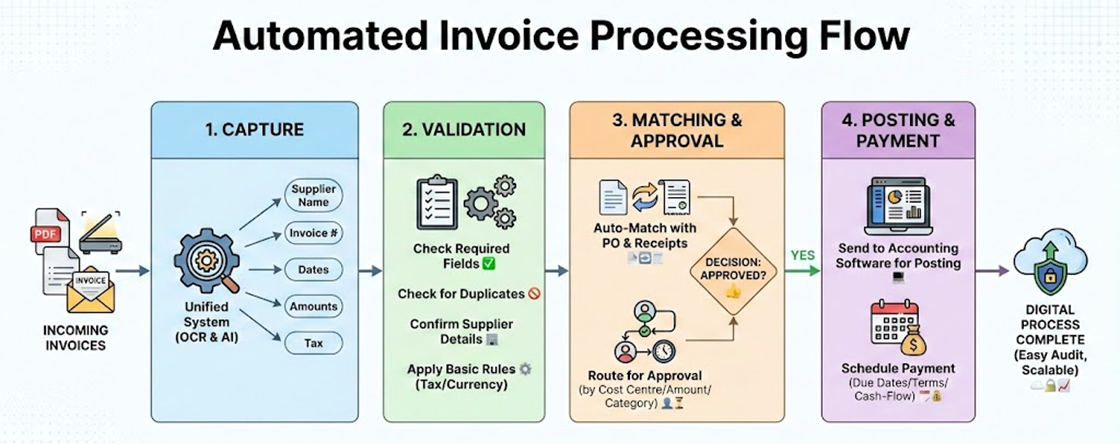
Automated invoice processing is when software and rules-based workflows are used to capture, validate, approve, and post supplier invoices. This means that no manual typing or email chasing is needed. Instead of an AP clerk reading each invoice, entering it into the system, and sending it off manually, the platform does most of the work. Invoice automation can be split into four stages:
Capture
All incoming invoices, whether in PDF, scanned or electronic formats, are collected into one system. Optical character recognition (OCR) and AI data extraction tools can read information such as the supplier name, invoice number, dates, amounts and tax.
Validation
The system does the following:
Checks that all the required fields have been filled in
Checks that there are no duplicates
Confirms the supplier details
Applies basic rules (for example, tax calculations or currency checks)
Matching and approval
Invoices are automatically matched against purchase orders and receipts when available. They are then sent to the right people for approval. This is based on the cost centre, amount, thresholds or category.
Posting and payment
Once approved, the invoice is sent straight to your accounting software for posting and is scheduled for payment based on due dates, discount terms, and cash-flow policies.
Automated invoice processing moves the accounts payable department away from manual, paper-heavy work and towards a digital process that is easy to audit and can be made bigger.
Automated vs manual invoice processing
Manual AP invoice processing is built on email inboxes, spreadsheets, shared drives, and physical folders. It might seem “good enough” when volumes are low, but problems appear quickly as you grow. Comparing manual with invoicing automation highlights why many finance teams are rethinking their approach.
Dimension | Manual Processing | Automated Processing (AI-Driven) |
Data Entry | Manual typing into accounting software. | AI-powered OCR (Optical Character Recognition). |
Cost per Invoice | High ($12.00 – $20.00+): Mostly driven by labor hours and overhead. | Low ($1.50 – $3.50): Significant reduction through software efficiency. |
Cycle Time | Slow (14–20 days): Dependent on physical mail and manual routing. | Fast (<3 days): Immediate digital capture and instant routing. |
Staff Capacity | ~6,000 invoices/year per FTE. | 23,000+ invoices/year per FTE. |
Approvals | Email chains or physical paper routing. | Digital workflows with automatic notifications. |
Visibility | Fragmented. Requires checking inboxes. | Real-time dashboards and audit trails. |
Error Rate | 1% – 5%: Prone to typos, duplicates, and missed line items. | < 0.5%: AI validation and automatic duplicate detection. |
Validation | Manual checking against POs and receipts (time-consuming). | Automated 3-Way Matching: Instant sync between Invoice, PO, and GRN. |
Fraud Risk | High: Vulnerable to "social engineering" and fake vendor scams. | Low: AI-driven anomaly detection and bank detail verification. |
Audit & Compliance | Paper-based or fragmented emails. Difficult to reconstruct during audits. | Digital Audit Trail: Every action is timestamped and logged for 100% transparency. |
Scalability | Linear: Hiring more staff is the only way to handle growth. | Elastic: System handles 10x volume with zero headcount increase. |
Data Insight | Siloed: Limited to total amounts. No granular spend analysis. | Granular: Extracts line-item data for real-time spend and price tracking. |
Cash Flow | Reactive: Missed discounts. Risk of late payment penalties. | Proactive: Enables Dynamic Discounting and precise cash forecasting. |
Supplier Experience | Frequent friction due to lost invoices and "payment status" inquiries. | Self-Service: Suppliers use portals to track payments, building trust. |
Employee Role | Data Entry: High turnover due to repetitive, low-value tasks. | Finance Analyst: Staff focus on exceptions, strategy, and cost-saving. |
The Manual Approach: Why it Persists
Manual processing involves humans receiving, sorting, entering, and physically (or via email) routing invoices for approval.
Pros
Low Initial Cost: No software fees or implementation time.
Human Nuance: Experienced staff can catch oddities that simple software might miss.
Direct Control: Total oversight over every payment decision.
Cons
High Error Rate: Typos, duplicate payments, and lost paper are common.
Hidden Costs: The "labor cost" per invoice is high when you factor in hourly wages.
Friction: Suppliers often call asking for status updates because there is no transparent tracking.
The Automated Approach: The Modern Standard
AP automation uses software to "read" invoices, verify them against purchase orders (POs), and route them for approval digitally.
Pros
Massive Cost Savings: Can reduce processing costs by up to 80%.
Strategic Productivity: Employees are no longer just "data entry clerks" but "financial analysts" who only deal with exceptions.
Early Payment Discounts: If you pay early, you can get a discount from the vendor.
Checking for fraud: AI can quickly identify duplicate invoices or unusual vendor behaviour.
Cons
Upfront Investment: Requires a subscription or implementation fee.
Technical Setup: Integration with your existing ERP (like QuickBooks, Xero, or NetSuite) is required.
Adoption Curve: The team needs training to trust the software's data extraction.
When Should You Switch?
Most experts say that you should think about using automation if you process more than 100 invoices every month. When you have over 500 invoices a month, you need to use automated systems to make sure your financial records are accurate.
Step-by-step: How to automate invoice processing with Automa
Moving from a manual invoice processing workflow to an automated one is mostly about reducing repetitive handling while keeping controls in place. Automa works well here because it can replicate the steps your team already does across email, Excel, ERP/accounting systems, and invoice portals, then standardize the output so you don’t have to retype the same information again and again. Below is a practical way to approach it.
Step 1: Assess your current invoice workflow
Map how an invoice moves from intake to payment. Capture where invoices arrive (email, PDF, paper, vendor portals), what data gets keyed in, who approves, and how exceptions are handled. Note cycle time, rework drivers, and the top failure points (missing PO, mismatched amounts, unclear approvers).
Your goal is to find the parts that repeatedly cost time: renaming files, copying invoice numbers and amounts, checking tax rates, matching PO numbers, and chasing approvals. If invoice entry takes hours every week, causes frequent errors, or delays month-end closing, this is exactly the kind of process worth automating.
Step 2: Define the automation scope
Next, determine what you want Automa to automate and what should remain as a control step. In most invoice processes, the best starting point is “capture + validation + entry,” not “full auto-pay.” For example, you can automate:
Collecting invoices from a shared mailbox or folder
Reading invoice data (invoice no., supplier name, tax ID, line items, totals)
Validating rules (duplicate invoices, amount tolerance, vendor whitelist, PO match checks)
Entering invoices into your ERP/web system
Exporting logs and exception lists for review
If your invoices are structured PDFs, automation is usually faster to stabilize.

Step 3: Planning & budgeting (time, not only software)
With Automa, the key “budget” is not just licensing, but the time to build, test, and maintain the bot. Estimate effort across process design, data cleanup, integrations, testing, and change management. Budget time for vendor master hygiene, template coverage, and exception playbooks—these determine ROI more than the license cost. Also decide the expected volume (per day/week) because that affects how you schedule bots and how you handle peak periods.
Note: you can create a small proof of concept using real invoices. Marketing can be promising, so test with your messy cases: multi-page invoices, different tax formats, discounts, freight charges, and invoice revisions.
Step 4: Build, integrate, and test end-to-end
Configure Automa to capture invoices, extract key fields, validate against your rules, and route approvals automatically. Integrate with your accounting/ERP to sync vendors, POs, GL codes, and payment status so data stays consistent.
Test the full path include edge cases (credit notes, split coding, partial receipts) and confirm controls, permissions, and logging meet audit requirements.
A typical Automa invoice bot flow looks like:
Monitor mailbox/folder and download attachments
Classify files (invoice vs. other documents)
Extract fields (via OCR/template rules when needed)
Validate business rules (duplicates, totals, vendor mapping, PO status)
Enter data into the target system (ERP web page, client software, or upload template)
Save the invoice and post results (success/fail) into an Excel/DB log
Send notifications to AP or the requester for exceptions
Make sure to test this process multiple times with actual invoices and confirm that the output matches your ERP fields exactly. If you find errors, like misread invoice numbers, wrong tax rounding, or UI changes in the ERP screen, write them down and use them to refine the bot steps, retry logic, and validation rules.
Step 5: Training & rollout
Train by role: AP processors, approvers, and finance admins need different workflows and dashboards. Training is less about teaching people “automation,” and more about aligning new responsibilities. Provide quick reference guides for common exceptions and approval actions. Roll out in waves by entity, supplier group, or invoice type to keep disruption low. Keep a clear escalation channel during the first weeks so exceptions don’t revert back to manual workarounds.
Ensure the team knows:
Where invoices should be sent so the bot can pick them up
How to handle exceptions (missing PO, vendor not found, mismatch)
How to read the bot’s processing log and what to do when it fails
When to override the bot versus when to fix the source data
The training should take far less time than onboarding extra staff for manual entry, because the goal is to keep people focused on approvals, supplier communication, and exception resolution instead of typing.
Step 6: Monitoring and optimization
Track performance weekly and tune rules based on real exceptions. Track a few practical metrics: invoices processed per day, straight-through rate, average handling time per exception, and top failure reasons (OCR uncertainty, ERP page changes, vendor mapping gaps).
Expand invoice template coverage, refine validation thresholds, and shorten approval loops with better routing logic. Review supplier issues that drive rework and standardize invoice requirements. As stability improves, widen scope to more complex invoices and add automation around related tasks like vendor onboarding, PO matching, and month-end accrual support.
Finally, keep monitoring the process so the team doesn’t drift back to manual work due to small failures or unclear exception handling. The goal is not to remove humans from the loop completely, but to reduce manual workload by a large margin while improving consistency, speed, and auditability.
PO and Non-PO invoice automation
Invoices can be different, and the ways they are automated depend on whether they are for a purchase order or not. It is very important to handle both correctly for efficient AP invoice processing.
PO invoice automation
PO invoices relate to a pre-approved purchase order. The automation platform uses PO data as the backbone for controls and matching. Key capabilities include:
Automatic PO lookup using PO number on the invoice
2-way match (PO vs invoice) or 3-way match (PO vs receipt vs invoice)
Tolerance rules for price and quantity differences
Straight-through processing for perfect matches
When PO automation is well configured, a large portion of your invoices can be posted without manual review.
Non-PO invoice automation
Non-PO invoices cover spend categories such as utilities, rent, professional services, and many indirect expenses. They do not have an associated PO, so the system must rely on:
Supplier-based rules (default cost center, GL codes)
Templates for recurring invoices (e.g., monthly subscriptions)
Approval processes based on who owns each cost centre and the thresholds for each one.
If you apply clear rules and standard ways of working, you can control non-PO spend without making it harder for business users. This balances control and speed in your invoicing automation strategy.
The benefits of automated invoice processing
If you're still relying on humans to process invoice, you aren't just behind the curve—you’re actively capping your company's ability to scale. Here is why automated invoice processing is the only logical path forward for a modern finance department.
Reduce Invoice Processing Errors
Manual invoice handling is notoriously prone to mistakes. Errors can occur at every step: miskeyed amounts, incorrect vendor codes, wrong dates, or duplicated invoices. A single misplaced decimal can derail an entire audit, these numbers are unacceptable.
By implementing finance-focused OCR and intelligent document processing, you can reduce these mistakes to between 4% and 0.05%. High-accuracy automation transforms your payables data into a reliable asset, ensuring your financial statements and cash flow management are actually based on reality.
Outpace Manual Entry by 10x
The average speed of a professional typist is between 50 and 80 words per minute. This slows down a lot when dealing with complicated financial information and tax codes.
The system can process invoices automatically and quickly. It can find and take out the important information from an invoice in about 20 seconds. Things that used to take several minutes, like opening emails, downloading attachments and checking details, now happen almost instantly. This saves time and makes sure you get the early payment discounts that manual teams often miss.
Scale Operations Without Increasing Headcount
Human productivity has a hard ceiling. An AP specialist might process an invoice in 3 minutes at 9:00 AM, but by the end of a long shift, fatigue sets in. That same invoice often takes 10 minutes to process by the afternoon as focus wanes.
Modern workflow automation tools don't get tired. They can ingest hundreds or thousands of invoices in bulk, PDFs, scanned images, or electronic formats, and process them in a fraction of the time it would take a human team. This enables your business to handle growing invoice volumes, new suppliers, and additional locations without constantly hiring and training new AP staff. You scale your revenue, not your overhead.
Standardized Output
The biggest problem with manual entry is that it is subjective. Every clerk understands formats and vendor codes in their own way, which can lead to "dirty data". Automation replaces human intuition with strict, pre-set rules.
Once you have set your validation checks, the system will apply them every time in the same way. This makes sure all your invoice data is in the same format, with the same vendor names, GL codes, and tax treatments. If your data is always organised, audits will be simple and you can be sure that you know exactly how money is spent.
Trim Training Cycles from Months to Hours
Onboarding a new AP staffer is a resource sink. It typically takes three months of training for a data entry clerk to reach peak performance and understand your specific chart of accounts.
With automated invoice processing, the complexity is managed by the algorithm, not the employee. Setting up extraction rules takes hours, and most users become proficient with the interface in one to two days. Instead of teaching basic data entry for months, you can train your team to manage exceptions and focus on high-value tasks like vendor relationships and cash flow optimization.
Stop Managing Paper. Start Managing Strategy. Automating your invoice processing is no longer an alternative to outsourcing—it is the foundation of a modern finance function. If your team is still spending hours on data entry, you are losing money every single day.
How to choose an automated invoice processing solution?
For CFOs and finance leaders, the wrong choice can lock the team into rigid workflows, hidden costs, or partial automation that fails at scale. Below are the key criteria to evaluate before committing to any solution.
ERP Compatibility Without Heavy Rebuilding
Many invoice automation tools claim “easy integration,” but in reality rely heavily on APIs that only work well with modern cloud ERPs.
You should assess:
Can the solution work with your existing ERP, including legacy or on-prem systems?
Does it require custom API development or ERP upgrades?
Can it handle web-based, desktop, or hybrid systems?
For organizations running mixed environments, solutions that support UI-level automation (RPA) offer far greater flexibility than API-only tools.
Invoice Coverage and Data Accuracy
Not all invoices look the same. A practical solution must handle:
Multi-page invoices
Different supplier layouts
Taxes, discounts, freight, and currency variations
Credit notes and revised invoices
Ask vendors:
What is the real extraction accuracy on non-standard invoices?
How are low-confidence fields handled?
Can validation rules catch errors before posting?
PO and Non-PO Process Support
Many tools perform well for PO invoices but struggle with non-PO spend. You should confirm:
Does the system support 2-way and 3-way matching?
Are non-PO invoices routed using supplier rules, cost centers, and thresholds?
Can approvals be customized without IT involvement?
If non-PO invoices are forced back to manual handling, automation ROI drops quickly.
Workflow Flexibility and Controls
Finance teams evolve. Your invoice workflows will change as volumes grow, entities expand, or compliance requirements tighten.
Evaluate:
Can business users modify rules and workflows?
Are approval paths configurable by amount, department, or entity?
Are audit logs and approval histories automatically captured?
Rigid workflows create future bottlenecks.
Total Cost of Ownership (Not Just License Fees)
Automation ROI is driven more by process stability and exception rates than by subscription pricing.
Consider:
Time required to configure and maintain automation
Ongoing effort to handle new suppliers or formats
Dependency on IT or external consultants
The best solution minimizes long-term operational effort, not just upfront cost.
RPA and AI in Invoice Processing
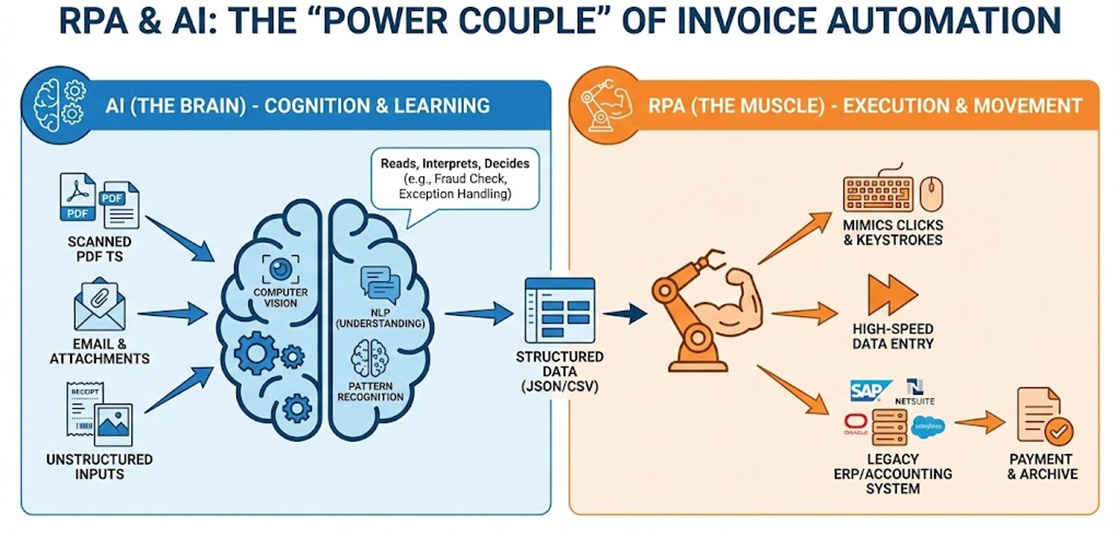
Invoice automation is becoming automated, combining AI to understand documents and RPA to execute processes.
The Role of AI
AI technologies are primarily used where interpretation is required.
In invoice processing, AI helps with:
OCR and intelligent document processing (IDP);
identifying invoice fields across different layouts;
detecting duplicates, anomalies, and unusual vendor behaviour;
improving extraction accuracy over time.
AI excels at reading, classifying, and flagging risk, but it cannot move data across systems independently.
The Role of RPA
RPA handles the execution layer — the repetitive, rules-driven actions that humans normally perform.
RPA is used to:
Download invoices from emails or vendor portals
Enter invoice data into ERP or accounting systems
Navigate legacy or web-based applications
Trigger approvals, notifications, and status updates
Log results and exceptions for audit purposes
Unlike APIs, RPA can work wherever a human can click and type, making it ideal for fragmented system landscapes.
Why choose Automa for automated invoice processing?
Although many platforms rely on API integrations, your business may still experience issues with 'fragmented' workflows, such as downloading invoices from vendor portals or entering data into legacy ERP systems that are incompatible with other software. This is where Automa can help. As a leading robotic process automation (RPA) solution, Automa acts as a digital employee, mimicking human actions to handle repetitive, click-heavy tasks that standard automation often misses.
Automate data extraction with AI-powered OCR
The first bottleneck in any invoicing workflow is manual data entry. Automa integrates seamlessly with advanced OCR (Optical Character Recognition) technologies to "read" paper-based or PDF invoices with human-like accuracy.
Execute cross-platform data synchronization
Unlike traditional software, which is limited by its own ecosystem, Automa operates across any interface, including web browsers, desktop applications and green-screen legacy systems. Once the data has been extracted, the bot can log into your accounting software (such as QuickBooks), navigate to the relevant modules and record the entries in the same way as a human would — only faster and available 24/7.
End-to-end reconciliation and notifications
Automa can perform automated reconciliation, comparing invoice data against purchase orders or bank statements to flag discrepancies instantly. After that workflow is complete, Automa can automatically trigger status updates via Telegram, Whatsapp, or email, keeping all stakeholders informed.
Conclusion
The move from using pen and paper to digital tools is not just a future idea. It is now an essential part of how a business should operate in today's world. Manual processing uses up resources, and it will reduce morale and visibility of finances. By automating invoice processing, companies can save a lot of money, reduce the risk of making mistakes, and improve their relationships with suppliers.
As we have seen, the journey involves more than just buying software. It needs a careful plan for how work is done, how information is managed, and how the team will use it. The tools we have today, which use RPA and AI, can do things that we couldn't imagine a decade ago. Now is the time to accept these changes. If you have a good system for automatically sending invoices, you can make sure that your finance department is strong, efficient, and ready for the future.
FAQs
Is automated invoice processing secure with Automa?
Automa keeps your data safe by keeping all processing within your local environment or private cloud, so there is no risk of data being stolen from outside. Sensitive information for ERPs and banking portals is stored in an encrypted vault, keeping passwords hidden even from developers. Every action made by a bot is recorded in a complete record of what happened, which makes it much clearer and easier to see what is happening than if the information had been entered manually.
How does Automa RPA help in AP invoicing?
Automa is an AI-driven RPA tool that automatically downloads invoices from emails or tax portals and uses AI to extract key data like amounts and vendor details. It can do complicated things like checking that invoices, purchase orders and receipts are all matching, so that only valid charges are processed. If there are any problems or fake invoices, the bot finds them straight away and tells the finance team to check them manually.
How does Automa automated invoice processing integrate with accounting software?
Automa works with any accounting software by interacting with the user at the level of the user interface. It copies human actions, such as clicking and typing. This means you won't need to spend money on expensive API development or on overhauling your current IT infrastructure. Automa can transfer data from older ERP systems to the latest cloud-based financial platforms.
How long does AP automation take to implement?
It's quick and easy to set up. You can automate simple tasks, such as downloading invoices, in less than a week. Complex workflows involving full ERP integration and approval routing usually take two to four weeks. Automa is a low-code platform, so your finance team can learn to use the interface quickly. This means they can update the bot logic as your internal processes change.
Can small businesses benefit from invoicing automation with Automa?
Automa helps small businesses grow without having to hire more people. By using technology to deal with lots of paperwork, teams with fewer staff can avoid making mistakes and late payment penalties that use up money. Automa handles the boring data entry, so business owners and accountants can focus on more important tasks like planning the company's future and making financial predictions.