
The Monday morning panic is a ritual many IT managers know too well. You arrive at the office to find that a critical "Order-to-Cash" workflow failed over the weekend because the CRM provider pushed a minor UI update, shifting the "Submit" button by ten pixels. Your RPA bots, blindly clicking coordinates or searching for specific DOM elements, crashed instantly. Meanwhile, the team using a direct backend integration didn't even notice the update happened.
This scenario encapsulates the fundamental tension in modern digital transformation. While Robotic Process Automation (RPA) offers a rapid, low-code entry point into efficiency, Application Programming Interfaces (API) promise robust, long-term stability. For decision-makers, the choice isn't just about technology. It is a strategic wager on technical debt versus upfront investment.
In this guide, we will move beyond basic definitions to dissect the architectural trade-offs of RPA vs. API integration. We will analyze the hidden costs of maintenance, provide a rigorous decision framework, and explore how a hybrid strategy—augmented by emerging AI agents—can future-proof your automation stack.
Beyond Definitions: The "Band-Aid" vs. The "Surgery"
To understand the architectural implications, we must stop viewing these technologies merely as "tools" and start viewing them as "intervention methods."
RPA is the digital equivalent of a high-tech prosthetic. It mimics human behavior. It interacts with the User Interface (UI automation), navigating screens, typing into fields, and clicking buttons just as a human employee would. It is non-invasive. It doesn't require the underlying application to change. It is perfect for bridging gaps where no door exists.
API Integration is reconstructive surgery. It bypasses the surface entirely to communicate directly with the application's database or logic layer via Backend integration. It speaks the native language of the software (usually JSON or XML), exchanging structured data payloads rather than visual cues.
The "Invoice Processing" Reality Check
Let’s visualize this difference through a recent implementation I audited for a global logistics firm. They needed to extract invoice data from an ERP system and upload it to a shipping portal.
The RPA Approach: The bot launched a browser, logged into the portal, waited for the page to load (adding artificial delays to prevent timeouts), scraped the screen for the "Amount" field, and pasted the data. The process took about 45 seconds per invoice. When the portal introduced a "Holiday Banner" that pushed the input fields down, the bot failed for three days until a developer recalibrated the script.
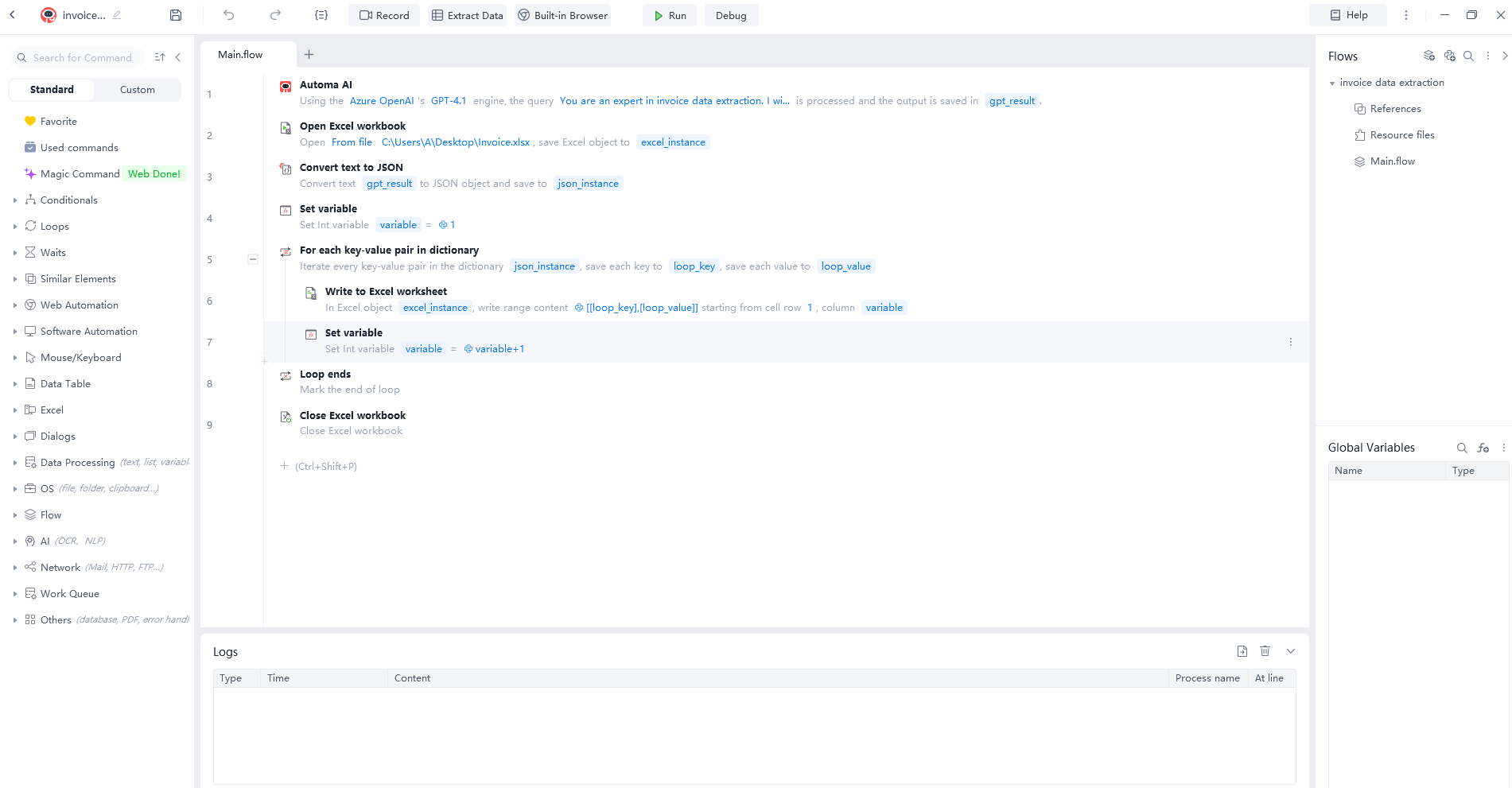
The API Approach: We refactored this using a direct REST API call. The script authenticated via a secure token, sent a JSON packet containing the invoice data, and received a confirmation code. The execution time dropped to 0.8 seconds per invoice. More importantly, when the portal changed its entire front-end design a month later, the API integration continued running without a single error.
This is the stark reality of RPA vs. API integration: RPA is often faster to build but fragile to maintain. APIs are harder to build but resilient to change.
The Core Conflict: Stability, Speed, and Cost
The debate often settles on a triangle of constraints: Stability, Speed of Implementation, and Cost. Most vendors will sell you on the speed of RPA, but as an architect, you must calculate the Total Cost of Ownership (TCO).
The Hidden Cost of RPA (The "Break-Fix" Loop)
RPA is seductive because it offers immediate gratification. However, the maintenance cost of RPA is the iceberg beneath the surface. Industry data suggests that for every $1 spent on RPA licensing, organizations spend approximately $3 to $4 on maintenance and consulting over three years.
Why? Because UI automation is inherently brittle. It relies on the presentation layer, which is the most volatile part of any application.
The "Zombie Bot" Phenomenon: I’ve seen organizations where 30% of their bot fleet is inactive at any given time, stuck in a "break-fix" loop. A browser update, a slow internet connection, or a pop-up window can render a script useless.
Technical Debt: Every RPA bot you deploy on a system that could have been integrated via API is technical debt. You are building a dependency on a screen that was designed for human eyes, not machine logic.
The Barrier of API (The "Developer Tax")
If APIs are superior in stability, why don't we use them for everything? The answer lies in the "Developer Tax."
Development Time: Building a robust API integration requires specialized knowledge of authentication protocols (OAuth, API keys), rate limiting, and error handling. It is not a "drag-and-drop" exercise.
Accessibility: Not all legacy systems have APIs. If you are dealing with a mainframe from 1995 or a "SaaS" product that charges a premium for API access, the barrier to entry becomes insurmountable.
However, as we move into 2026, the scalability argument for APIs is becoming undeniable. When transaction volumes spike from 100 to 10,000 per day, RPA requires more virtual machines and licenses (linear cost increase). API integrations usually just require a slightly larger server bandwidth (marginal cost increase).

The Ultimate Decision Framework: When to Use Which?
As a leader in digital transformation, you need a rule of thumb to delegate these decisions. We don't guess, we assess. Here is the decision matrix I use to determine when to choose RPA versus API.
The "API First" Rule
Principle: If a reliable API exists, and you have the resources to access it, use the API. Do not use RPA for high-volume, mission-critical data transfers just because it seems easier today. The long-term stability of automation integration depends on reducing surface-level dependencies.
The 4 Scenarios Where RPA is the Only Choice
Despite the superiority of APIs, RPA remains an indispensable tool in the architect's arsenal. You should deploy RPA in the following specific scenarios:
Legacy Systems & Mainframes: When the underlying application is a "Black Box" with no available endpoints, or accessing the database directly violates warranty terms. RPA is the only bridge to these islands of data.
Prohibitive API Costs: Some SaaS vendors gate their APIs behind expensive "Enterprise Plus" tiers. If the API access costs $50,000/year and an RPA license costs $4,000, and the process isn't mission-critical, the economics favor RPA.
The "Swivel Chair" Interface: Processes that involve multiple disparate systems where no central integration platform (iPaaS) exists. For example, copying data from a public government website (which definitely has no API) into an internal Excel sheet. Screen scraping is the only viable method here.
Proof of Concept (PoC) & Short-Term Projects: If you need to migrate data for a one-time system consolidation, spending weeks building an API connector is wasteful. RPA can be spun up in days, do the job, and be decommissioned.
Decision Scorecard (Mental Model)
When evaluating a process, ask these four questions:
Is the data structured? (Yes = Lean API / No = Lean RPA)
Does the target system change frequently? (Yes = Avoid RPA / No = RPA is safe)
Is real-time processing required? (Yes = API / No = RPA batching is fine)
Is the volume >10,000 transactions/month? (Yes = API / No = RPA)
Security & Compliance: The Deal Breakers
In the boardroom, the conversation often shifts from efficiency to risk. This is where the RPA vs. API integration debate takes a serious turn regarding security and data governance.
RPA's "Screen Scraping" Risks
RPA bots often operate with what we call "God Mode" privileges. To function, they need a user account.
Credential Exposure: I have audited systems where bot credentials were stored in plain text configuration files or, worse, hardcoded into the script.
PII Leakage: When a bot performs screen scraping, it "sees" everything on the monitor. If a bot takes a screenshot for error logging, it might inadvertently capture Personally Identifiable Information (PII) or sensitive financial data that was visible on the screen but not part of the transaction. This is a compliance nightmare for GDPR or HIPAA.

API's Governance Advantages
APIs are designed with security as a feature, not an afterthought.
Granular Access Control: Using OAuth and Token-based authentication, you can grant an API integration permission to only "Write Invoices" without giving it permission to "Read Salaries."
Audit Trails: Every API call is logged at the server level. You know exactly what data was requested, by whom, and when. This level of data governance is difficult to achieve with RPA, which often looks like just another user clicking around in the logs.
The Hybrid Strategy: Orchestrating RPA and API Together
The most mature organizations do not choose one over the other. They orchestrate them. This is hybrid automation.
In a modern architecture, we treat RPA and APIs as complementary forces. We use APIs for the "heavy lifting" of data movement and RPA for the "last mile" of user interaction.
The "Sandwich" Architecture: Imagine a complex employee onboarding process.
Layer 1 (API - The Foundation): An HR system triggers a workflow. An API integration instantly creates the user's email account in Microsoft 365 and provisions their Slack access. This is fast, secure, and critical.
Layer 2 (RPA - The Bridge): The workflow then hits a roadblock: the legacy building security system for ID badges. It has no API. An RPA bot is triggered to log into the security web portal, fill in the new employee's details, and request a badge.
Layer 3 (API - The Feedback): Once the bot confirms success, it passes a status flag back to the central orchestrator via API, which then updates the HR ticket.
By using backend integration for 80% of the work and UI automation only where necessary, you maximize stability while maintaining 100% process coverage.
The Future: How GenAI is Blurring the Lines
As we look toward 2025 and 2026, the rigid boundary between RPA vs. API integration is dissolving due to the rise of AI Agents and Large Language Models (LLMs).
We are witnessing the evolution from "Scripted Automation" to "Intelligent Automation."
Self-Healing RPA: GenAI is solving the fragility issue. New generations of RPA tools can use vision-based AI to "understand" a UI. If the "Submit" button moves, the AI Agent doesn't look for a specific coordinate. It looks for the concept of a "Submit button" and adapts automatically. This significantly lowers maintenance costs.
API-on-the-Fly: Conversely, LLMs are lowering the barrier to API adoption. Developers can now use AI to read API documentation and write the integration code in seconds.
The future isn't just RPA or API. it is autonomous agents that can decide in real-time whether to use an API endpoint or interact with a GUI to complete a task.
Conclusion
The choice between RPA vs. API integration is not a binary switch. It is a spectrum of risk and reward. If your goal is a quick win to eliminate a tedious task on a legacy system, RPA is your tactical ally. But if your goal is to build a scalable, secure, and high-performance digital backbone, API integration must be your strategic priority.
Currently, Automa is in Stage Two: AI-Driven Automa RPA. In this stage, AI assists humans in workflow creation, optimization, and self-healing. Our latest capability, Magic Commands 3.0, allows users to generate complex automation workflows through natural language conversations, dramatically lowering the development barrier. Looking forward, the Automa Agent (Stage Three) will lead decision-making with minimal human intervention, effectively choosing the best path—API or UI—autonomously to ensure maximum reliability and speed.
This strategic shift aligns with global industry trajectories. Gartner emphasizes that by 2026, hyperautomation will be a core driver of operational excellence, with AI-driven autonomous orchestration taking center stage. Request a custom demo today to see how Automa’s Hybrid AI Automation can future-proof your digital transformation.
FAQ
Is RPA always cheaper than API integration?
In the short term, RPA often has a lower upfront cost because it is faster to deploy and requires less specialized coding. However, when factoring in maintenance costs, license fees, and the cost of downtime (break-fix cycles), API integration usually offers a lower Total Cost of Ownership (TCO) over a 3-5 year period.
Can RPA and API integration work together in the same workflow?
Absolutely. This is known as hybrid automation. A common best practice is to use APIs for reliable data transmission between modern systems and use RPA to interact with legacy systems or external websites that lack API access. Orchestrating them together ensures end-to-end process coverage.
Why is API integration considered more secure than RPA?
APIs use token-based authentication (like OAuth) and allow for granular permission scopes (e.g., read-only access). RPA typically requires a "user" account with broad permissions and often involves storing credentials that can be vulnerable. Furthermore, APIs avoid the screen scraping risks associated with inadvertently capturing sensitive PII data displayed on a monitor.
How will AI affect the choice between RPA and API?
AI is improving both. AI Agents are making RPA more resilient by allowing bots to "see" and adapt to UI changes (reducing maintenance). Simultaneously, AI coding assistants are making it faster and cheaper to build backend integrations. The trend is moving toward intelligent agents that can utilize both methods dynamically.
What is the biggest risk of using RPA for mission-critical processes?
The biggest risk is "fragility." Since RPA relies on UI automation, a minor change to the application's interface (an update, a color change, or a pop-up) can cause the bot to fail immediately. For mission-critical processes, this unpredictability can lead to significant business disruption compared to the stability of an API.