
In 2026, checking Walmart prices by manually refreshing web pages is a waste of your valuable business time. As a global retail giant, Walmart’s online store has millions of SKUs. If you want to win in the competitive retail market, you need high-volume, accurate, and real-time product data. This guide shows you how to use Automa, a free and no-code tool, to collect this critical information automatically.
What is Walmart Web Scraping?
Walmart web scraping is the process of using software to extract information from the Walmart website automatically. Think of it as a "digital robot." This robot performs repetitive tasks for you: it visits pages, reads prices, records stock levels, and saves this info neatly into Excel or Google Sheets.
Web pages look like nice pictures and text on your screen, but computers see a pile of code called HTML. A scraper scans this code to find specific "tags." For example, a price is usually wrapped in a specific tag. The scraper finds this tag, extracts the number, and puts it in your database. In the past, this required professional Python coding skills. In 2026, you can do it directly using visual tools.
What data can you get from Walmart?
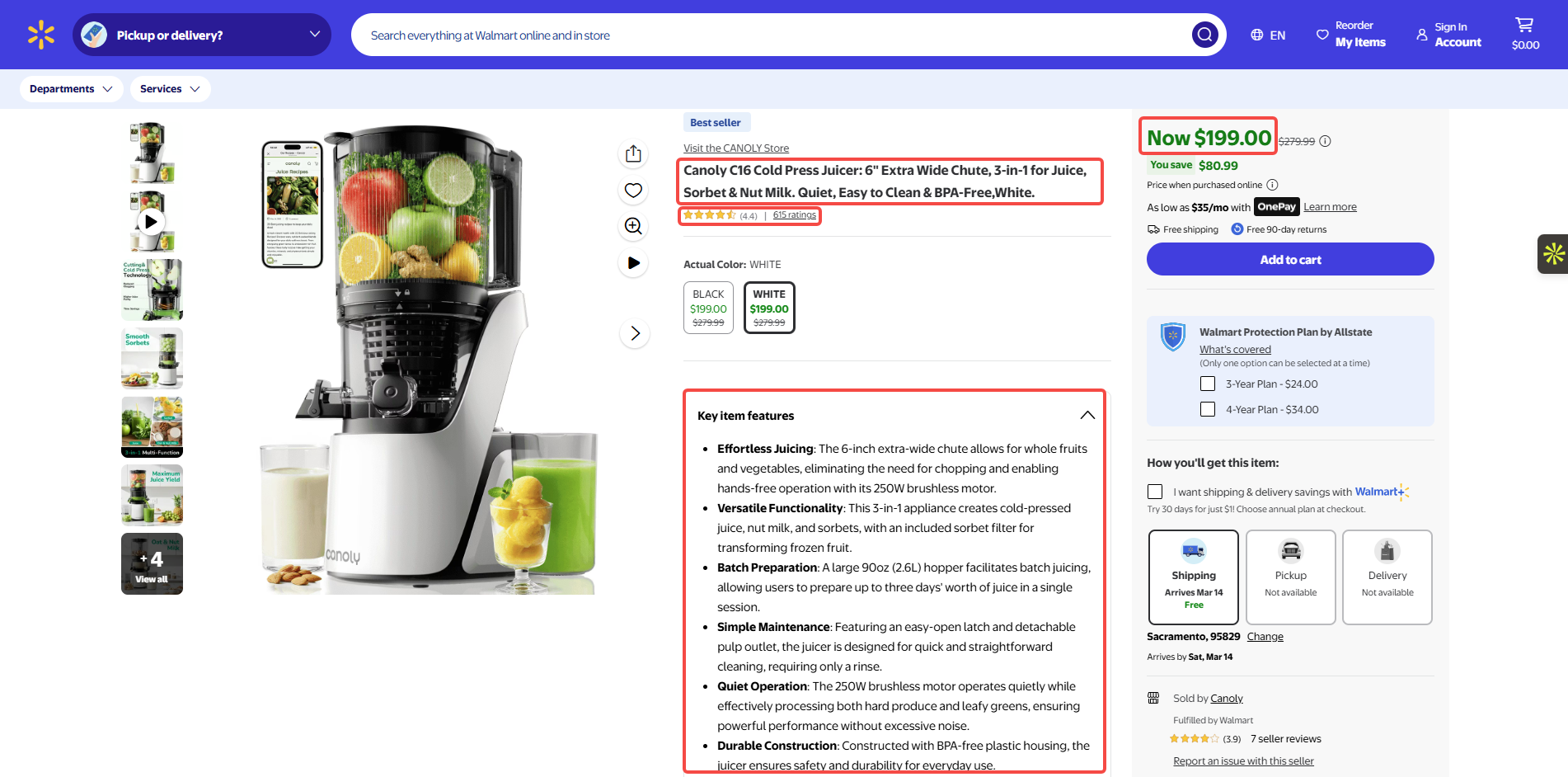
Walmart data is very rich, and almost all publicly visible info can be extracted:
Pricing & Promotions: Current price, original price, Rollback labels, and Clearance prices.
Product Core Attributes: Product title, brand name, SKU number, UPC barcode, and category.
Stock & Fulfillment: Availability, delivery speed (e.g., "2-day delivery"), in-store pickup availability, and region-specific pricing based on zip code.
Third-party Seller Info: Seller name, seller ratings, and whether the item is "Sold and Shipped by Walmart."
Reviews & Social Proof: Average rating, total review count, and actual customer feedback text.
 Who Uses Walmart data?
Retail data is not just for big companies, its uses are very broad:
E-commerce Competitors: Sellers on Amazon or Target. They need to keep their prices competitive to win sales.
Brand Owners: Companies like Procter & Gamble (P&G). They monitor product display and check for out-of-stock items on the site.
Arbitrage Traders: Individual sellers looking for clearance deals to resell on other platforms for a profit.
Investment Analysts: They track sales trends and discounts in specific categories to predict retail industry trends.
How to Web Scrape Walmart with Automa?
Prerequisites
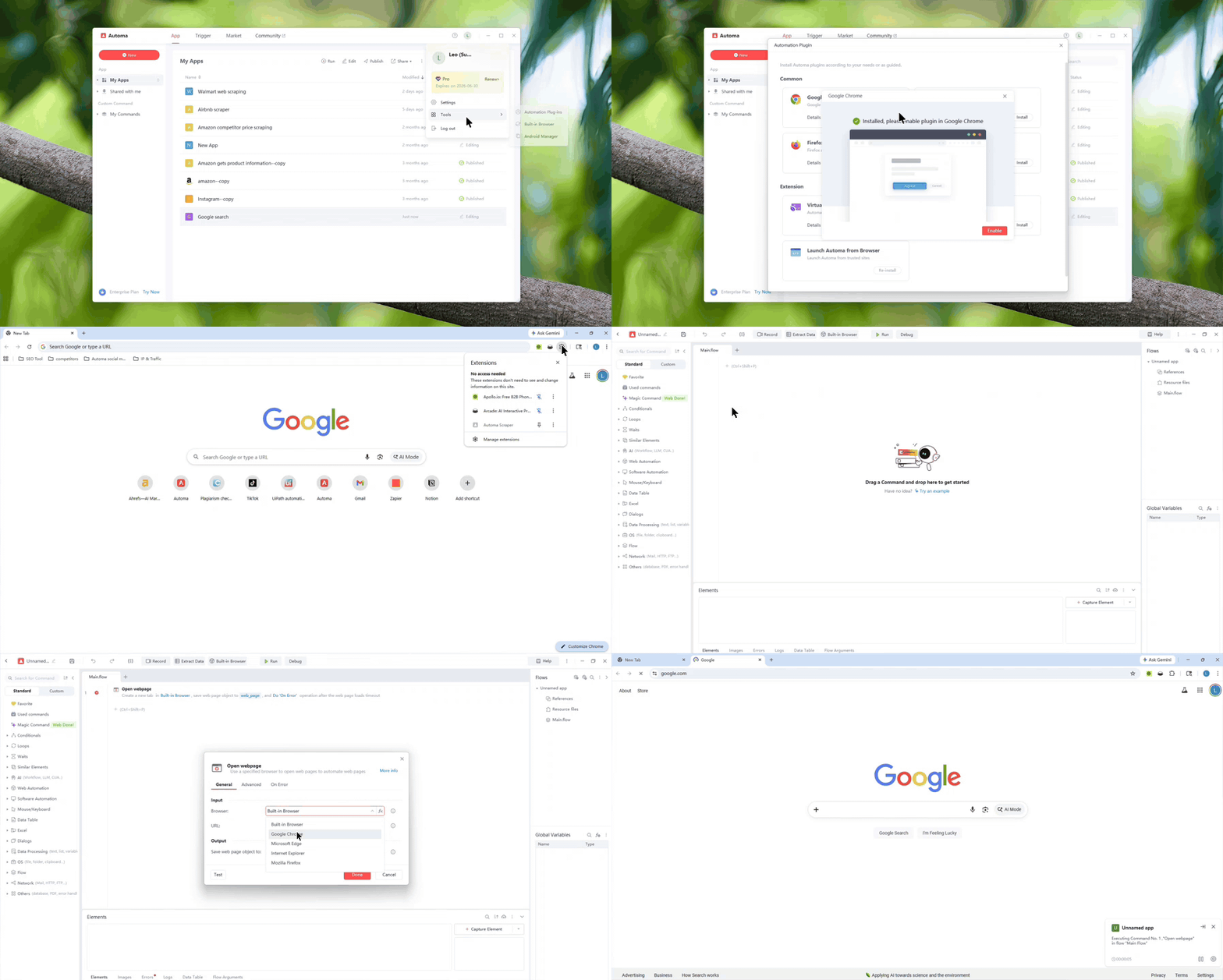
Sign up for an Automa account. You can also log in directly using your Google or GitHub account.
Add the Automa Scraper browser extension.
Note: Once you have finished adding the Automa Scraper extension, please use the "Open Webpage" command to verify the installation. If the webpage opens correctly, the extension has been successfully installed.
 Planning the Walmart web scraping
Before you start building a workflow, think about the data you need to collect. Map out how you will get that data. This helps the building process go much smoother. Let’s look at an example using Walmart listings. We want to collect the URL, title, price, key features, and rating for each item. Here are the manual steps:
Go to Walmart.com.
Type the product into the search bar.
Click a product link from the results page.
Open Excel, create your headers, and enter the data.
Review your final product comparison sheet.
Build an Automa Workflow
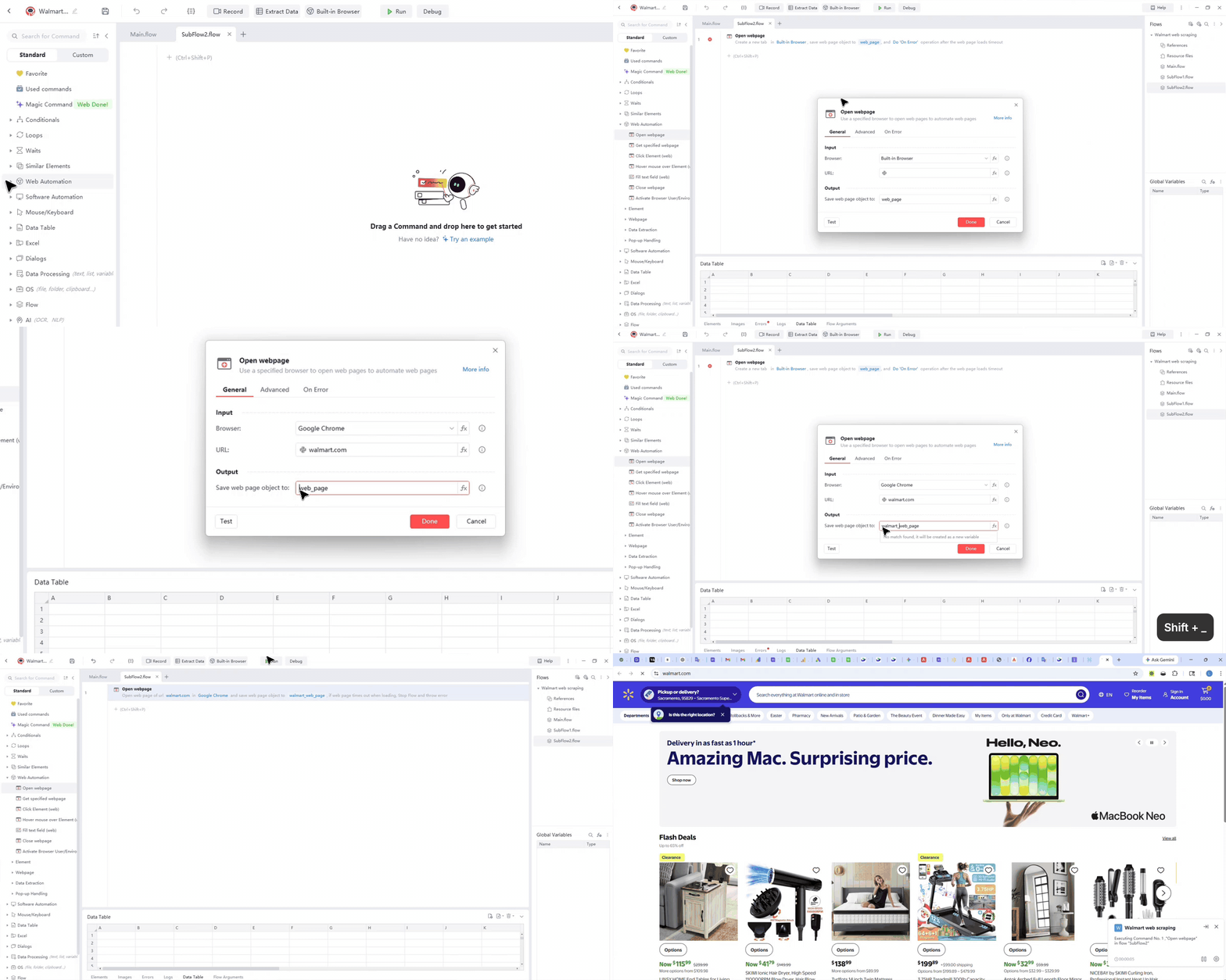
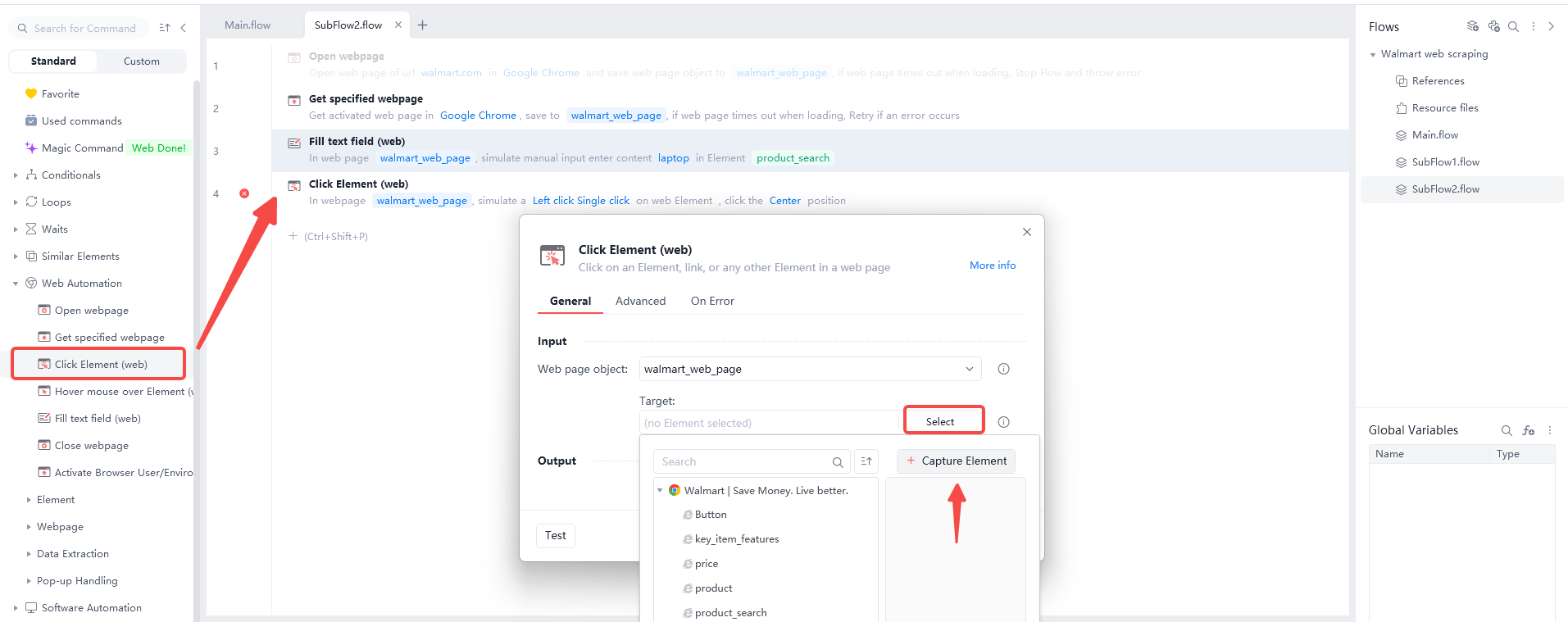
Step 1: Open the Walmart Homepage. Find the "Open webpage" command. Enter "walmart.com" as the URL. After clicking "Run", the tool opens the site automatically.
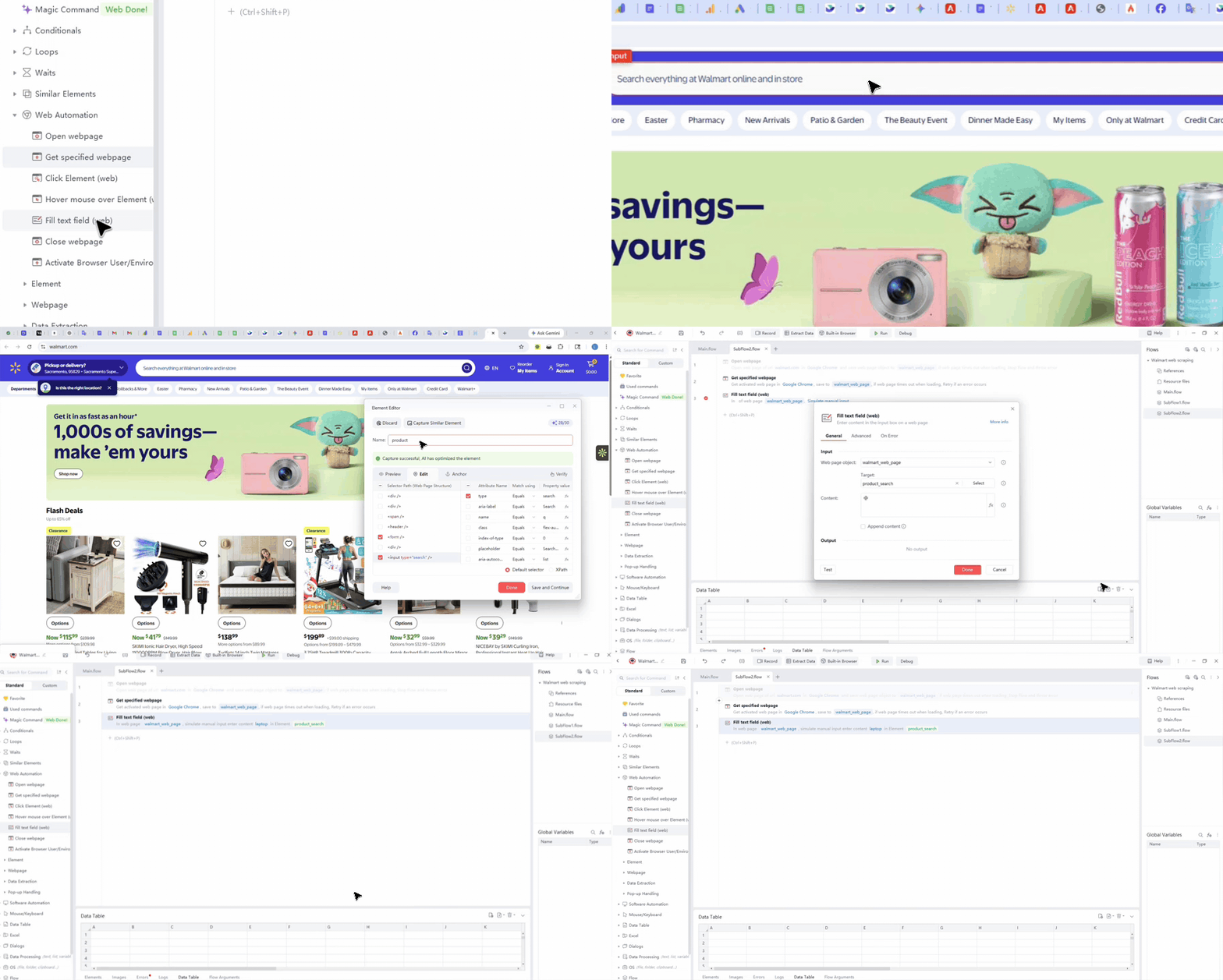
 Step 2: Enter the Product Name. Use the "Fill text field (web)" command to find the search box. Name this step "product_search". Enter "laptop" in the "Content" box.
 Step 3: Click Search. Use the "Click Element (Web)" command on the search icon. The flow runs and redirects you to the product search results page.
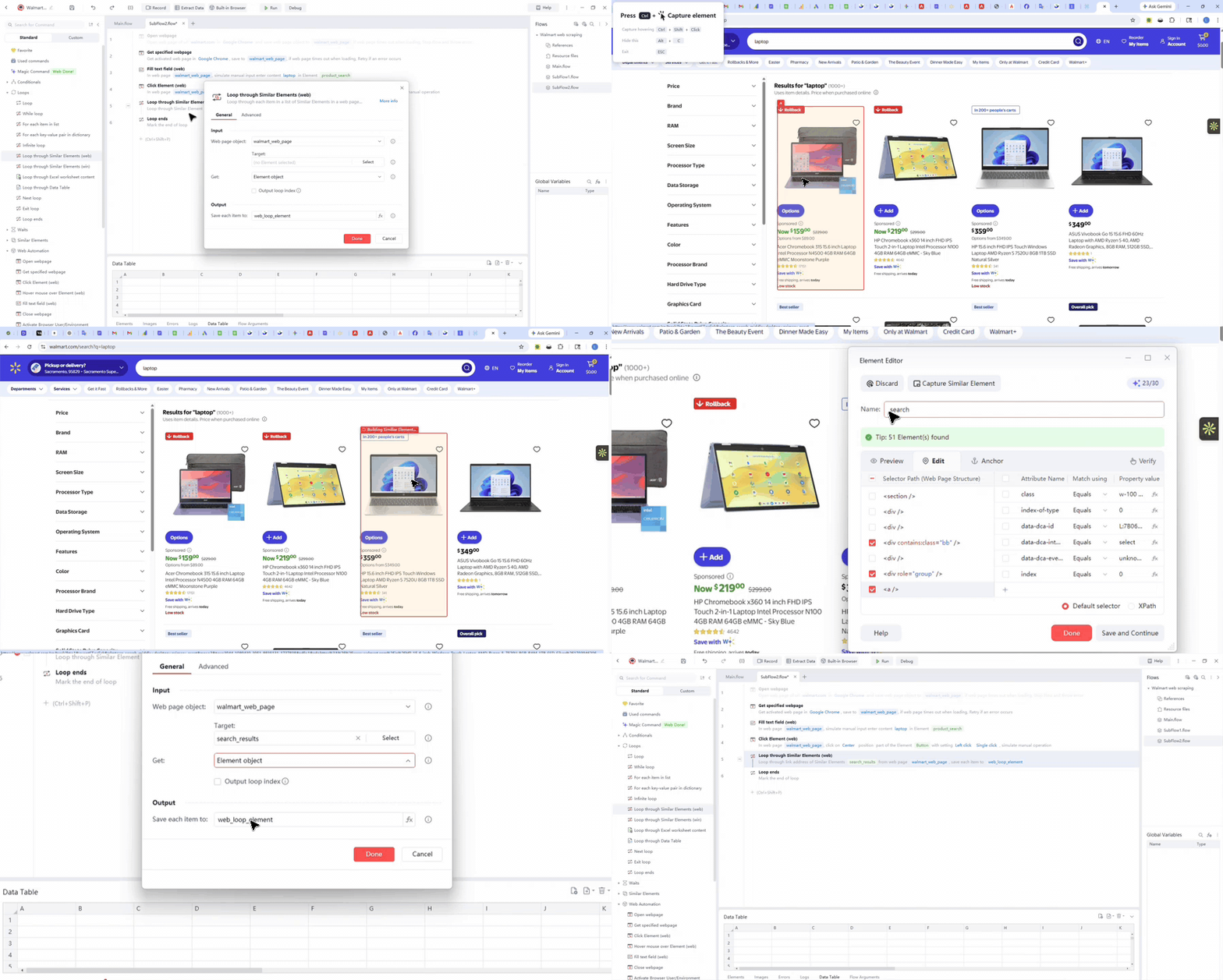
 Step 4: Collecting Product Links. You should use the "Loop through Similar Element (Web)" command to start this specific automation process. First, you must select the very first product link that you see on your current web page. Next, click the "Capture Similar Element" button so the software can find every other matching link automatically. Finally, save all the links you gathered into a new list called "web_loop_element" for your records. This tool works like a digital net that catches every single item on the screen at once.
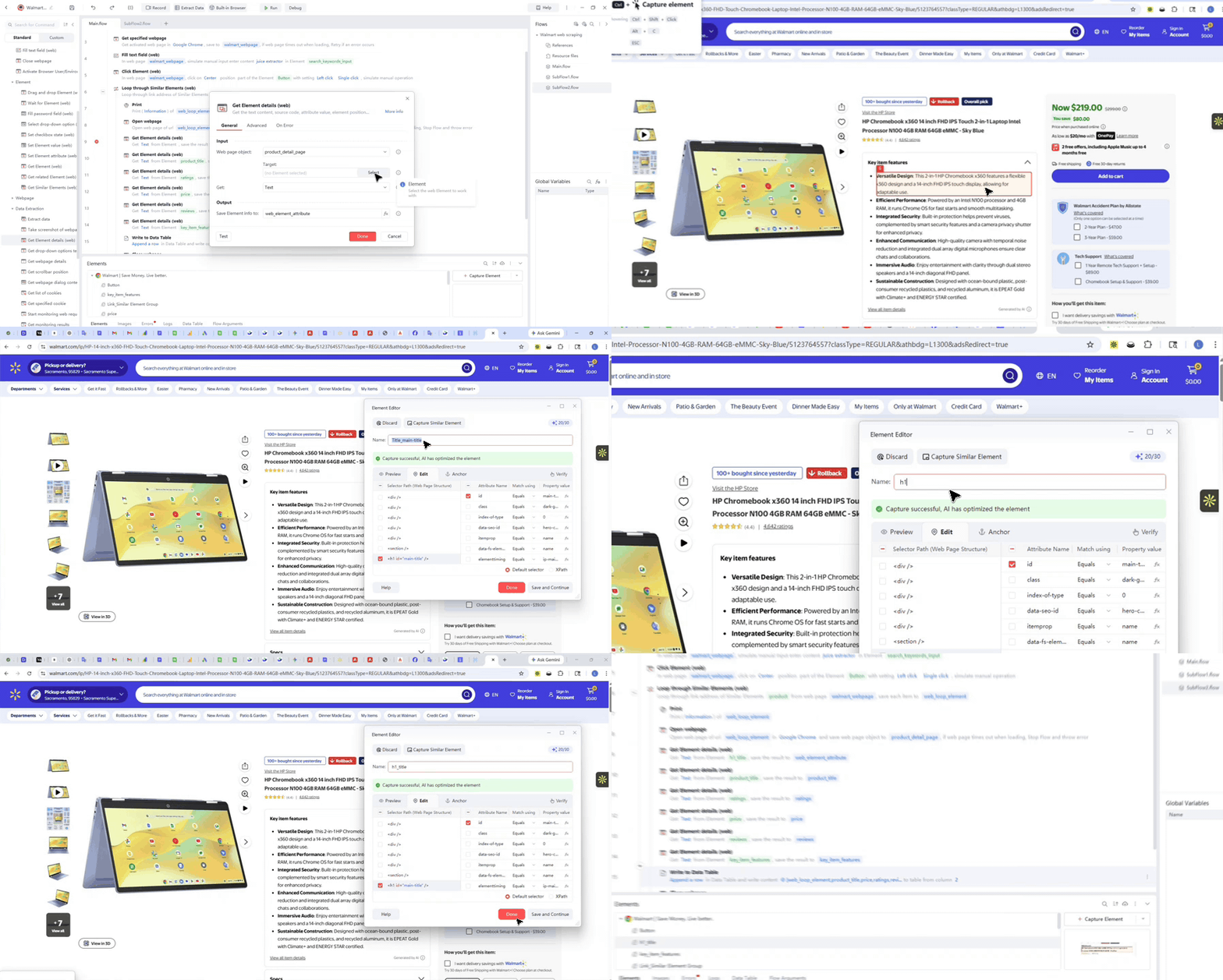
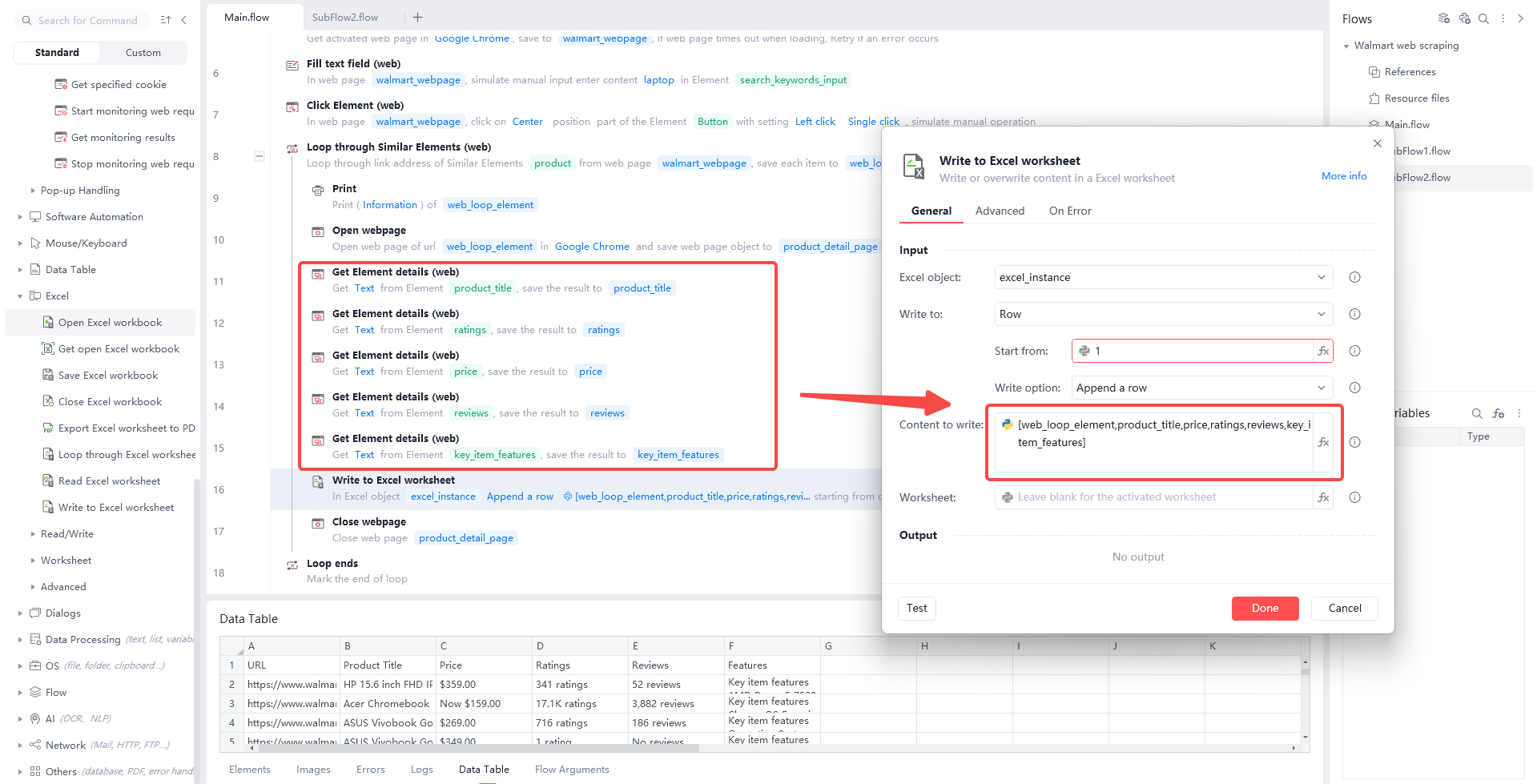
 Step 5: Scrape Product Details. You can use the "Open webpage" command to visit each link saved in your "web_loop_element" list automatically. After opening product detail page, use the "Get Element details(web)" command to find the specific parts of the page that you want. You can extract the Product Title, Ratings, Price, Reviews and Key Item Features for every single item on your list. This process helps you build a complete database of product facts without any manual typing or slow searching.
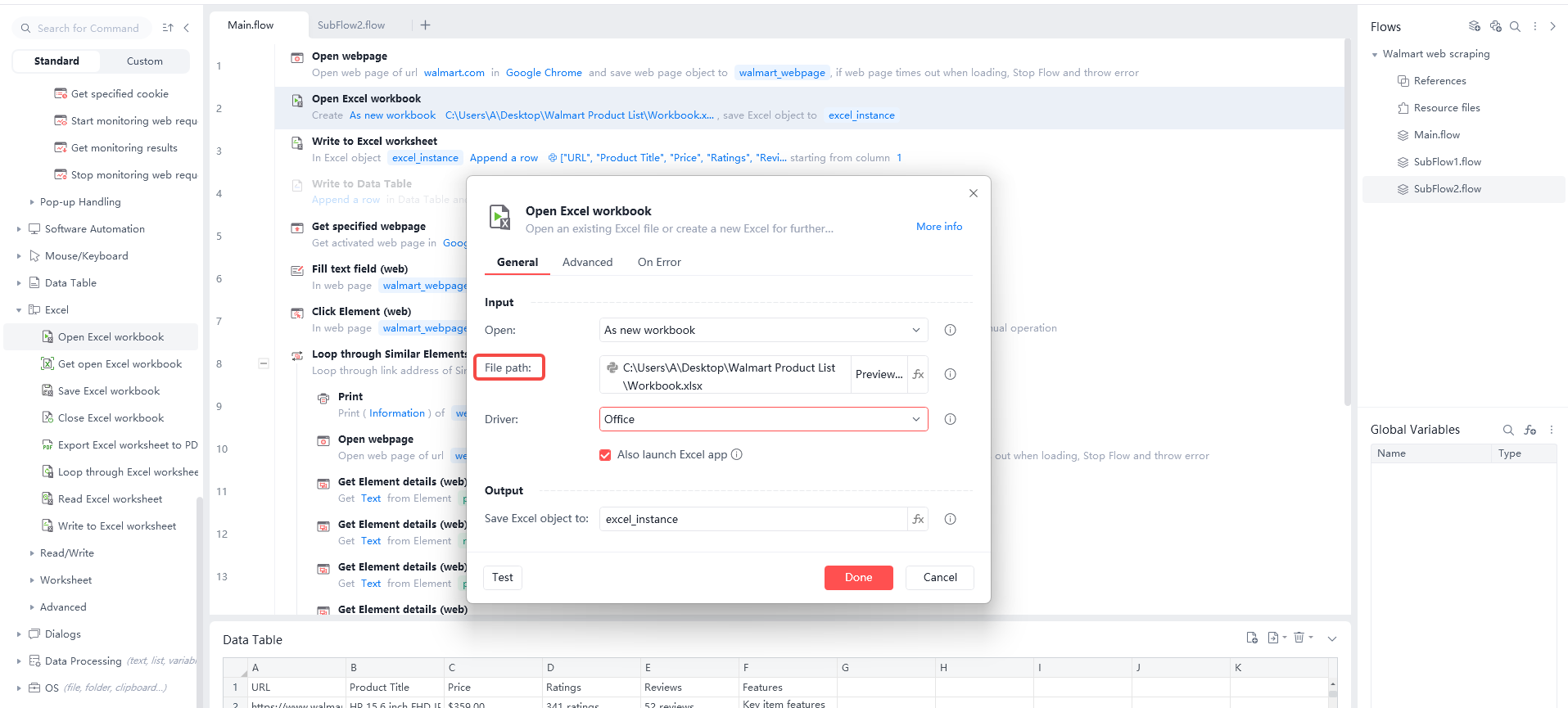
 Step 6: Creating a Local Spreadsheet. You need use the "Open Excel workbook" command at the start of your flow to create a local file. You must use the “File Path” module to select the exact folder where your spreadsheet is stored on your computer.
 Step 7: Writing Data to Excel. First, use the "Write to Excel worksheet" command to put your specific headers into the very first row. You should include titles like "URL," "Product Title," "Price," "Ratings", "Reviews", and "Features" to keep your data organized and easy to read.
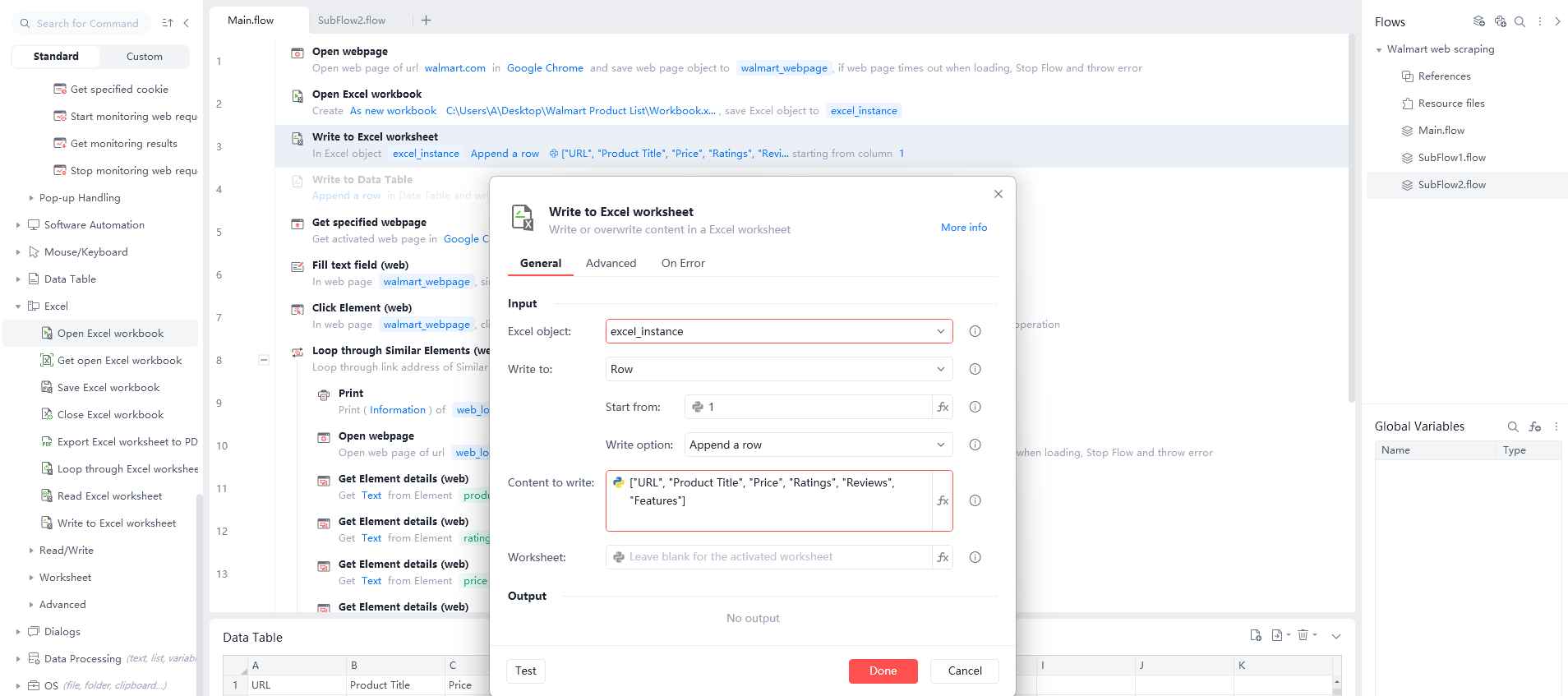 Next, use the same command to write your actual results into the spreadsheet in that same exact order. You must pick the "Append a row" option and place your data variables inside the "Content to write" box.
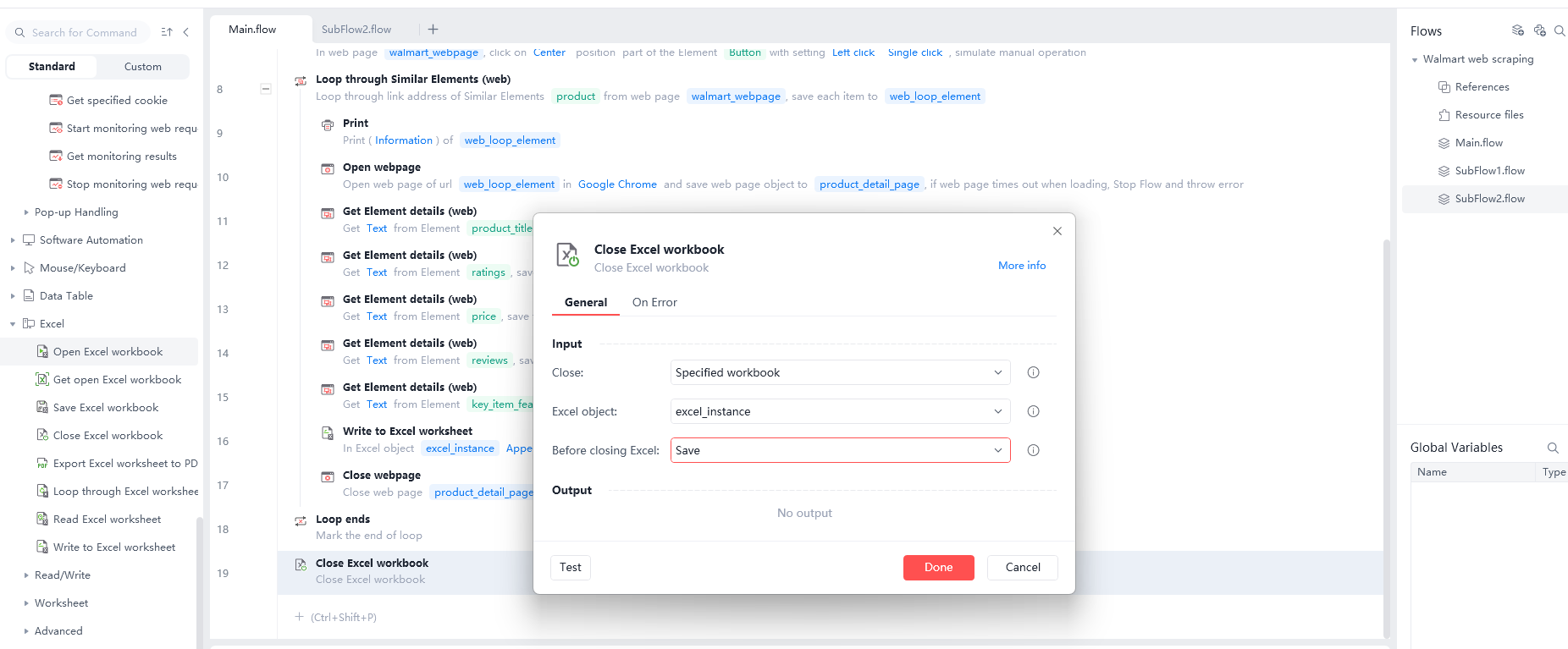
 Finally, use the "Close Excel workbook" command at the end of your process to save your results safely. This method ensures your computer stores all the gathered information correctly for you to use later.
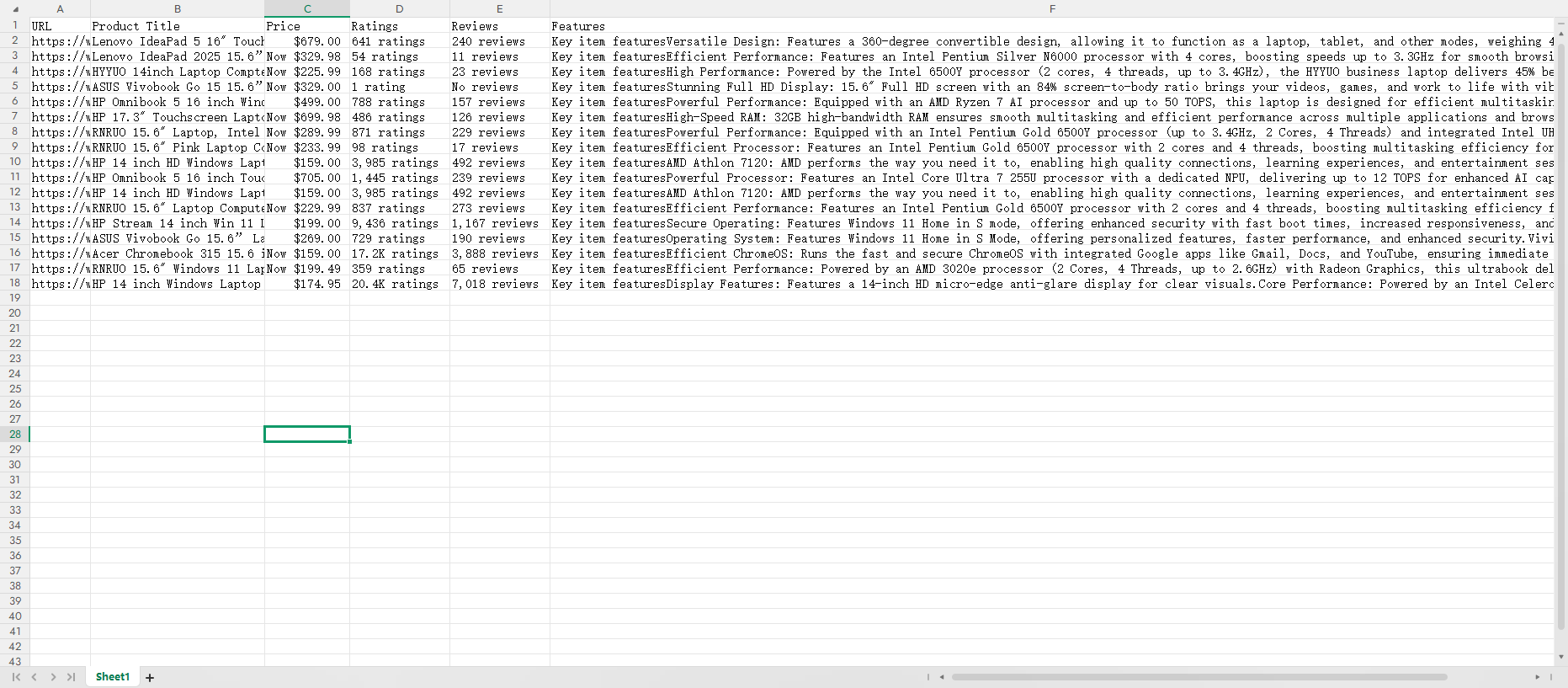
 Step 8: Review your results. Finally, open your saved Excel file and check your data. Use these facts for market research and competitor analysis. This information helps you stay ahead of other sellers.
 Why Web Scrape Walmart?
Because Walmart has a huge market share, its pricing is often a market "indicator."
Because Walmart has a huge market share, its pricing often sets the trend for the whole market.
Dynamic Pricing: Walmart adjusts prices based on rivals and stock levels. Automated scrapers let you get hourly price updates instead of daily.
Monitoring "Rollback" Trends: Rollback deals often show that a category’s clearance cycle is starting.
Regional Pricing Analysis: Walmart prices change by location. By using different zip codes, you can see price gaps across the entire country.
Challenges in Scraping Walmart Data
Scraping Walmart data is very hard. It uses advanced tech to stop bots. This is like a digital battle. Here are the main challenges when scraping Walmart data.
Anti-Bot Systems
Walmart uses a security system called PerimeterX. It acts like a digital guard watching your actions.
Behavior Tracking: The system records your mouse moves. It blocks you if you move too fast or like a machine.
Fingerprinting: Walmart checks your browser settings. The system knows you are a bot if settings look wrong.
Advanced CAPTCHAs
Walmart shows CAPTCHAs when it thinks you are a bot.
Press and Hold: This CAPTCHA asks you to press and hold a button. Simple scripts cannot do this action easily.
Hidden Scoring: Sometimes you see no CAPTCHA, but the system scores you. Low-score users cannot see the data.
Dynamic Content Loading
Walmart pages are not just text, they are code running live.
JavaScript Reliance: Prices and stock often load after the page opens. Simple tools only see an empty page.
Hidden JSON: Walmart stores data in hidden scripts at the bottom. You need expert skills to find this data.
IP Blocking and ZIP Codes
IP Limits: Walmart blocks IP addresses from data centers. You must use expensive residential proxies to act like a real home.
ZIP Code Variation: Prices and stock change in different areas. The data is wrong if you do not use the right ZIP code.
Layout Changes
Random Classes: Walmart changes the names of tags in the code often.
Broken Code: A script that works today might fail tomorrow. This requires you to check and fix code constantly.
Scraping Methods Comparison
Methods | Manual | Python | Automa |
Key Features | Humans click, copy, and paste in a browser. It uses one IP address. | Programmers write scripts to scrap data. It supports proxy rotation and custom logic. | AI Agents combine robotic execution with AI reasoning. |
Challenges | Walmart has millions of items. Manual work is too slow. | Walmart uses PerimeterX to block scripts. You need to solve complex CAPTCHAs. | Walmart updates pages often. AI agents can auto-find price tags. |
Pros | Zero cost. No technical skills needed. It handles complex human verification. No bans. Because you are a real user operating. | High performance. It handles millions of rows. It supports auto cleaning and storage. Very fast. It can scrap thousands of product pages per hour. | No-code. It connects to 1000+ apps like SAP and Salesforce. Easy maintenance. Even if Walmart changes, AI understands the goal. |
Cons | Very slow. Human errors happen often. It cannot handle large tasks. No scale. You cannot update 1000 items daily by hand. | Hard to build. Walmart detects and blocks normal Python requests. Hard to learn. Code needs updates when websites change. Maintenance is expensive. | Subscription cost. Pro plan costs $14.50 monthly. It depends on the platform. Limited speed. It depends on browser speed. Costs are high for huge tasks. |
Best For | Quick checks: Checking stock or price for one item. | Mass mining: Monitoring price changes for 100k+ items daily. | Business automation: Auto-filling web data into office systems. |
Conclusion
In 2026, Walmart web scraping is no longer just for programmers. With no-code tools like Automa, any business analyst or individual seller can build their own data collection system.
While Walmart has strong anti-bot tech, as long as you stay low-key, mimic human behavior, and use the right tools, you can get the key facts that help you make smarter decisions. Remember: data is money, and automation is the fastest shovel to get it.
FAQs
Is web scraping Walmart legal?
Scraping public prices everyone can see is usually legal. However, you must follow local laws (like GDPR) and not scrape any info involving user privacy. Also, try not to put too much stress on Walmart’s servers with your scraper.
Do I need a headless browser?
For beginners, running Automa in a visible browser is better. This lets you see exactly where things go wrong. If you want to run at scale, use headless mode to save computer resources.
How do I avoid being blocked?
At the start of your Automa workflow, add a step to click "Store Finder" and enter a specific zip code. This ensures you scrape the specific prices and stock for that area.