Most organizations are drowning in "automation debt." They bought the tools, signed the contracts, and deployed the scripts, yet their operational costs remain stubbornly high. The reality in 2026 is that software automation has shifted from a tactical convenience to an infrastructure discipline. If you are an IT Director or Operations Lead, your challenge isn't finding a tool that can automate a task, it is building a governance model that prevents your automation strategy from becoming a maintenance nightmare.
You don't need another definition of efficiency. You need a roadmap to navigate the "Fragility Factor"—the tendency for bots to break when a UI changes—and a framework to calculate the true Total Cost of Ownership (TCO). This guide strips away the marketing fluff to provide a pragmatic architecture for implementing automation software that scales without breaking.
What Is Modern Enterprise Software Automation?
We need to clear the air: automation is not just writing a Python script to move a file. In a modern enterprise context, software automation is the orchestration of tools, people, and processes to execute complex workflows with minimal human intervention. It is the transition from "people working on computers" to "computers doing the work, with people managing the exceptions."
At its core, automation software acts as the connective tissue between disparate systems that refuse to talk to each other. Whether it is a legacy ERP that lacks an API or a modern SaaS stack, the software must perform three non-negotiable functions:
Triggering: detecting a specific event (e.g., an email arrival or a database update).
Processing: applying logic to data (e.g., "If invoice > $5k, route to CFO").
Actioning: executing the final step (e.g., entering data into SAP).

Software Analytics vs. Automation: Key Differences
Many leaders conflate analytics with automation. Here is the distinction: Analytics diagnoses the patient; Automation performs the surgery.
Software Analytics: Tells you that your accounts payable process takes 14 days and bottlenecks at approval.
Software Automation: Automatically routes the invoice, sends reminders, and processes the payment, reducing that cycle to 2 days. You cannot automate what you do not measure, but measurement without execution is just overhead.
From Scripts to Intelligent Automation: The Evolution
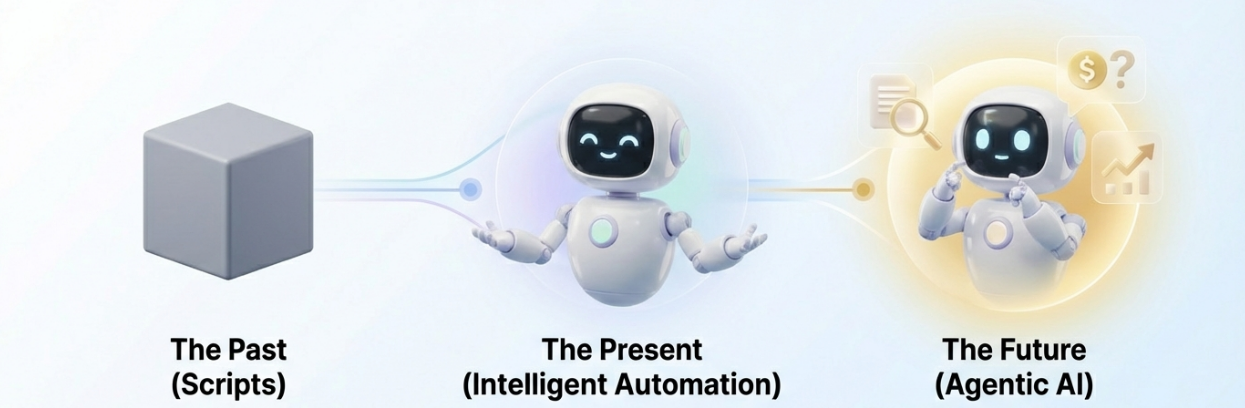
We are currently witnessing a shift from "Stage 1: Manual-Driven" automation to "Stage 2: AI-Driven" execution.
The Past (Scripts): Rigid code. If a button moved one pixel, the script failed.
The Present (Intelligent Automation): Tools like Automa utilize computer vision and AI to "see" the screen like a human. If a UI element shifts, the bot adapts rather than crashing.
The Future (Agentic AI): Systems that don't just follow rules but make decisions (e.g., "This invoice looks suspicious, I will hold it for review" without being explicitly told).
Why Software Automation Is Critical for Digital Transformation?
Digital transformation is often a vague buzzword. Let’s make it concrete: It is about reshaping the time structure of your workforce. In a non-automated firm, 80% of employee time is "Execution-Oriented" (data entry). In a transformed firm, that 80% shifts to "Judgment-Oriented" work. Automation is the only mechanism that physically frees up the hours required to make that shift.
Types of Automation Software You Need in 2026
Decision paralysis happens when you try to use one tool for every problem. You need the right tool for the specific layer of the tech stack you are touching.
Robotic Process Automation (RPA) for Legacy Systems
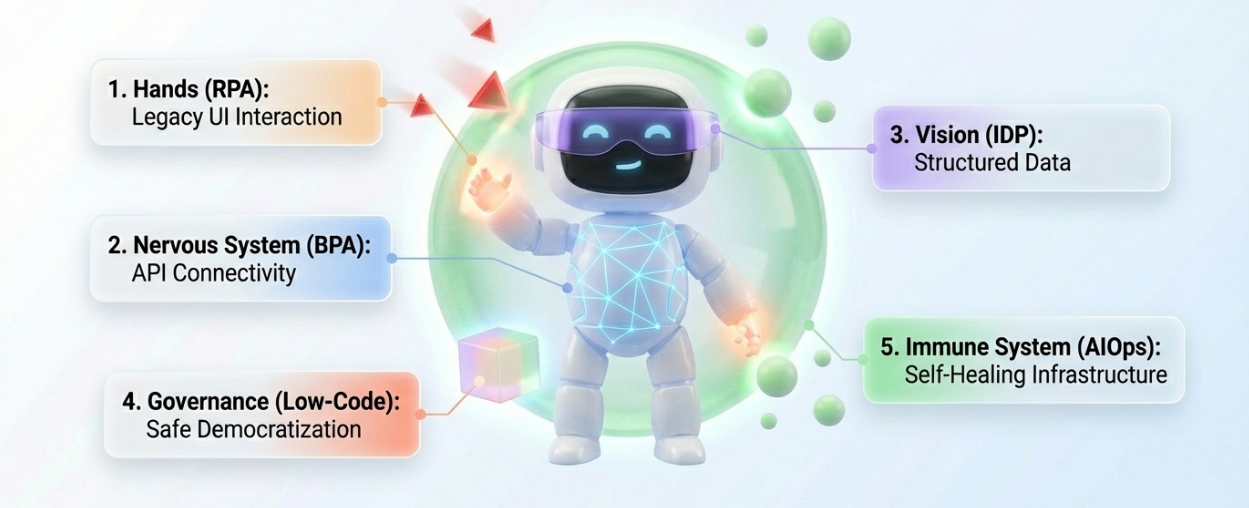
RPA is the "hands and feet" of your digital workforce. It excels at User Interface (UI) automation.
Use Case: Your 20-year-old ERP system has no API. You need to copy data from Excel into this legacy system.
Best For: High-volume, rule-based tasks where backend integration is impossible or too expensive.
Modern Shift: Platformsp like Automa have evolved RPA from fragile scripts to AI-powered agents that use "Magic Commands" to generate workflows via natural language, drastically lowering the barrier to entry.
Business Process Automation (BPA) for End-to-End Workflows
BPA is the "nervous system." It typically relies on APIs rather than UI clicks.
Use Case: Onboarding a new employee triggers actions in Slack, Gmail, Zoom, and Asana simultaneously.
Best For: Connecting modern SaaS applications where stability is paramount.
Low-Code and No-Code Automation Platforms
The rise of the "Gray Engineer"—business users who build their own solutions—is driven by no-code platforms.
Reality Check: IT departments often fear "Shadow IT" here. The solution is not to ban these tools but to provide a governed platform (like Automa’s Console) where business units can build bots, but IT retains visibility and security control.
Intelligent Document Processing (IDP) and OCR
Data is rarely structured. It comes in PDFs, scanned images, and messy emails. IDP uses Optical Character Recognition (OCR) combined with AI to turn a scanned invoice into a JSON file your database can read.
Metric: Standard OCR has high error rates on handwriting. AI-driven IDP can achieve 99%+ accuracy by learning from corrections over time.
AIOps: Automating IT Operations with AI
AIOps (Artificial Intelligence for IT Operations) automates the maintenance of the infrastructure itself. It predicts server outages and automates the restart scripts before users even notice downtime.
Benefits of Automation Software for Enterprises
Stop pitching "efficiency" to your CFO. Pitch "Operating Leverage." Here is the math behind the benefits.
Cost Savings and ROI Through Human-to-Bot Replacement
The most accurate metric for ROI in 2025 is the Human-to-Bot Replacement Ratio. Data from top enterprise implementations shows that one robot should do the work of six people. If an RPA license costs $10k/year and it performs the work of 3 FTEs (Full-Time Employees) costing $150k total, your ROI is immediate. If you aren't seeing at least a 3x return, you are automating the wrong processes.
Improving Accuracy and Reducing Human Error
Humans are terrible at repetitive data entry. Fatigue sets in after 20 minutes. In manufacturing order processing, switching to automation software reduced data error rates from 8% to 0%. This isn't just about neatness, it's about preventing shipping errors that trigger costly returns and client churn.
Scaling Operations Without Adding Headcount
Scalability means decoupling revenue growth from expense growth. An e-commerce company uses automation to check competitor prices and update inventory at 2:00 AM. They can handle 10x the order volume during Black Friday without hiring a single temporary worker for the back office.
Accelerating Software Development Cycle Time
In the IT sector, automation reduces the "Cycle Time"—the time from code commit to deployment. Automated testing and CI/CD pipelines allow teams to release features daily rather than monthly, directly impacting time-to-market competitiveness.
Real-World Applications of Software Automation
Let’s look at where the rubber meets the road. These are not theoretical, they are the standard for 2026 operations.
Streamlining Finance and Invoice Processing
Finance is the "Patient Zero" for automation.
The Workflow: Bot monitors email -> Extracts PDF invoice -> IDP reads data -> Bot logs into ERP -> Matches PO number -> Schedules payment.
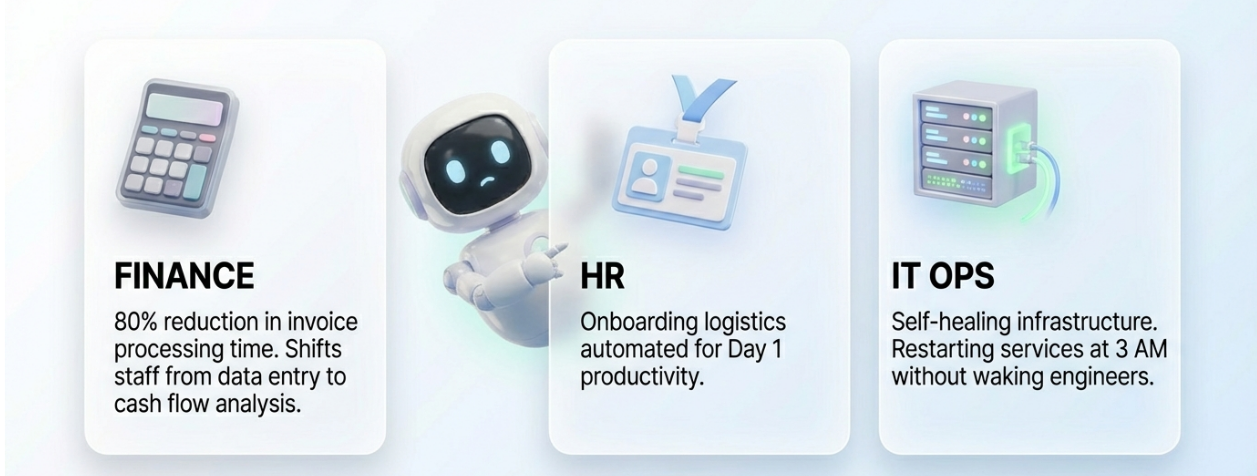
The Impact: Automa users report an 80% reduction in invoice processing time. This moves the finance team from "data entry clerks" to "cash flow analysts."
Automating Human Resources and Onboarding
Onboarding is a logistical heavy lift involving IT, HR, and Security.
The Workflow: New hire signs contract -> Bot creates Active Directory account -> Provisions hardware request -> Sends welcome email -> Enrolls in payroll.
The Impact: A 60% reduction in manual workload, ensuring new hires are productive on Day 1, not Day 5.
Enhancing Customer Support with Chatbots and Routing
We aren't talking about annoying "I don't understand" bots. We mean intelligent routing.
The Workflow: AI analyzes ticket sentiment and keywords -> Auto-resolves Tier 1 issues (password reset) -> Routes complex issues to the specific specialist with a summary of the problem.
The Impact: 70% of Tier-1 tickets can be resolved autonomously, drastically lowering the cost per ticket.
Optimizing IT Operations and Incident Response
When a server crashes at 3 AM, you don't want to wake up an engineer just to restart a service.
The Workflow: Monitoring tool detects high CPU -> Triggers automation script -> Dumps logs for analysis -> Restarts service -> Notifies team on Slack.
The Impact: Reduced Mean Time To Resolution (MTTR) and preserved employee sanity.
How to Implement Software Automation in 5 Steps
Most implementations fail because they start with "What tool do we buy?" instead of "What problem do we solve?"
Step 1: Audit Your Current Processes for Bottlenecks
Warning: Do not automate a broken process. If you automate a bad process, you just get bad results faster.
Action: Use "Process Mining" or simple observation to map workflows. Look for high-volume, low-variance tasks. If a task requires "creative judgment" every time, it is not ready for automation.
Step 2: Select the Best Automation Software Vendor
The market is split between expensive "Service-Based" legacy vendors (high consulting fees) and modern "Product-Based" platforms.
Selection Checklist:
Deployment Flexibility: Can it run On-Premise, Cloud, and Hybrid? (Crucial for data privacy).
No-Code Capability: Can business users actually use it, or do you need a C# developer?
AI Integration: Does it have built-in AI (like Automa’s Magic Commands) or is it just a script runner?
Security: Does it support role-based access control (RBAC) and audit logs?
Step 3: Start Small with Incremental Improvements
Avoid the "Big Bang" rollout. Pick one painful, visible process (e.g., "Weekly Sales Report Generation").
Strategy: Build it, test it, measure the time saved, and publicize the win. This builds political capital for the larger budget required later.
Step 4: Orchestrate Workflows Across Multiple Systems
Don't build silos. Your bot shouldn't just live on one laptop.
Action: Use a central Console to manage bots. Ensure your automation tool integrates natively with your core stack (SAP, Salesforce, Excel, Chrome).
Step 5: Standardize Governance to Scale Your Automation
This is the step that separates amateurs from professionals. You need a Center of Excellence (CoE).
The CoE Role: They don't build every bot. They set the rules: "Here is how we handle passwords," "Here is the naming convention," "Here is the error logging standard."
Automa’s Approach: Supports CoE creation by providing tools for demand discovery and personnel training, creating a flywheel of internal adoption.

Common Challenges and Risks in Software Automation
If a vendor tells you there are no risks, show them the door. Here is how to manage the downsides.
Managing High Initial Costs and Upfront Investment
Legacy RPA was notorious for million-dollar entry fees.
The Fix: Shift to modern, product-led vendors that offer flexible licensing (Free/Pro/Enterprise tiers). Move from CapEx (buying servers) to OpEx (subscription models) to align costs with value delivery.
Overcoming Technical Debt and Maintenance Burdens
The "Fragility Factor" is the #1 killer of ROI. If an app updates and the bot breaks, you are in debt.
The Fix: Utilize Intelligent Repair features. Modern tools use AI to detect that a button has changed shape or ID and self-heal the workflow without human intervention.
Rule: If a bot requires more hours to maintain than it saves, kill it.
Addressing Job Displacement Concerns and Culture
Employees will fear the "robots taking over."
The Reality: Automation creates "Super Individuals." It removes the drudgery.
The Strategy: Position the tools as "Iron Man suits" for your staff, not replacements. Identify the "Willing Doers"—employees eager to learn new tech—and train them to become your internal developers.
Mitigating Security Risks in Automated Workflows
A bot is a user with super-speed. If compromised, it can do damage fast.
The Fix:
Non-intrusive operations: The bot should simulate clicks, not hack the backend database.
Encryption: Bank-level encryption for all credentials.
Isolation: Use Single-Tenant or Private Cloud deployments for sensitive data (Finance/Healthcare).
The Future of Software Automation and AI Trends
We are moving from "doing" to "thinking."
The Rise of Agentic AI and Autonomous Systems
We are transitioning to agent technology (Stage 3). This is where AI leads decision-making. Instead of telling the bot "Click X, then Y," you give it a goal: "Find the cheapest supplier for these parts and place the order." The agent figures out the steps.
Hyperautomation and the Convergence of Tools
The lines between RPA, BPA, and AI are blurring. The future is a single platform that handles UI automation, API integration, and Data Analysis in one interface. You won't buy three separate tools, you will buy one Automation Platform.
Predictive Analytics Driving Self-Healing Systems
Future systems won't just fix themselves after a break, they will predict the break.
Trend: Predictive analytics will flag a process that is slowing down before it fails, triggering a maintenance workflow automatically.
Conclusion
The era of manual data entry is ending. The companies that survive the next decade will be those that successfully transition their workforce from "execution" to "orchestration." By selecting the right automation software—one that balances power with usability and security—you aren't just saving time, you are building the digital backbone of your future enterprise. Start with the audit, choose a platform that scales (like Automa), and govern it with discipline. Efficiency defeats inefficiency, every single time.
FAQs About Automation Software
How to Choose the Right Automation Software?
Prioritize Ease of Use and Resilience. If your team needs a PhD to run it, adoption will fail. Look for platforms that combine "Designer, Robot, and Console" into one integrated architecture to reduce complexity.
What Is the Difference Between RPA and Traditional Automation?
Traditional automation (scripts/macros) is rigid and code-heavy. RPA simulates human behavior on the User Interface (UI), allowing it to bridge legacy systems that don't have APIs.
How Accurate Is Automation Software in Practice?
When configured correctly, it is 100% accurate regarding rule adherence. However, data inputs (like OCR) can vary. Modern AI-driven tools have pushed data extraction accuracy to over 99%, far exceeding human average accuracy.
Can Small Businesses Benefit from Enterprise Automation Tools?
Yes. The price of entry has dropped. With "freemium" models and cloud deployment, a small business can automate invoice processing or customer onboarding just as effectively as a Fortune 500 company, often gaining a significant competitive speed advantage.