
It’s 8:00 PM on day three of the month-end close. Your team is exhausted. They aren't analyzing variances or strategizing for the next quarter, they are copy-pasting data from a legacy ERP into Excel, hunting for a $0.05 discrepancy. This isn't a lack of skill. It’s a waste of talent.
Finance leaders often feel trapped between the demand for strategic insight and the reality of manual grunt work. The solution isn't hiring more bodies. It is building a digital workforce. RPA in accounting (Robotic Process Automation) has moved from a theoretical concept to a mandatory survival tactic for modern finance departments. Gartner predicts that by 2026, 90% of finance functions will deploy at least one AI-enabled solution to manage increasing volatility. But buying a tool is easy, making it work without disrupting your general ledger is the hard part.
This guide skips the marketing hype. We will break down exactly how to deploy automation, where the risks lie, and how to turn your finance function into a precision engine.
What Is Robotic Process Automation in Accounting
Let’s clear up a misconception immediately. When we talk about RPA in accounting, we aren't talking about physical robots walking around the office. We are talking about software bots—"digital workers"—configured to execute specific tasks on your computer servers.
Think of an RPA bot as a digital intern. It never sleeps, never makes typos, and follows instructions exactly as written. It logs into applications, moves files, copies data, and fills out forms just like a human would, but at lightning speed.
Understanding the Role of Software Bots in Finance
Your finance team likely works across multiple systems that don't talk to each other: a CRM for sales, a legacy ERP for the ledger, and banking portals for cash management. Humans act as the "glue" between these systems.
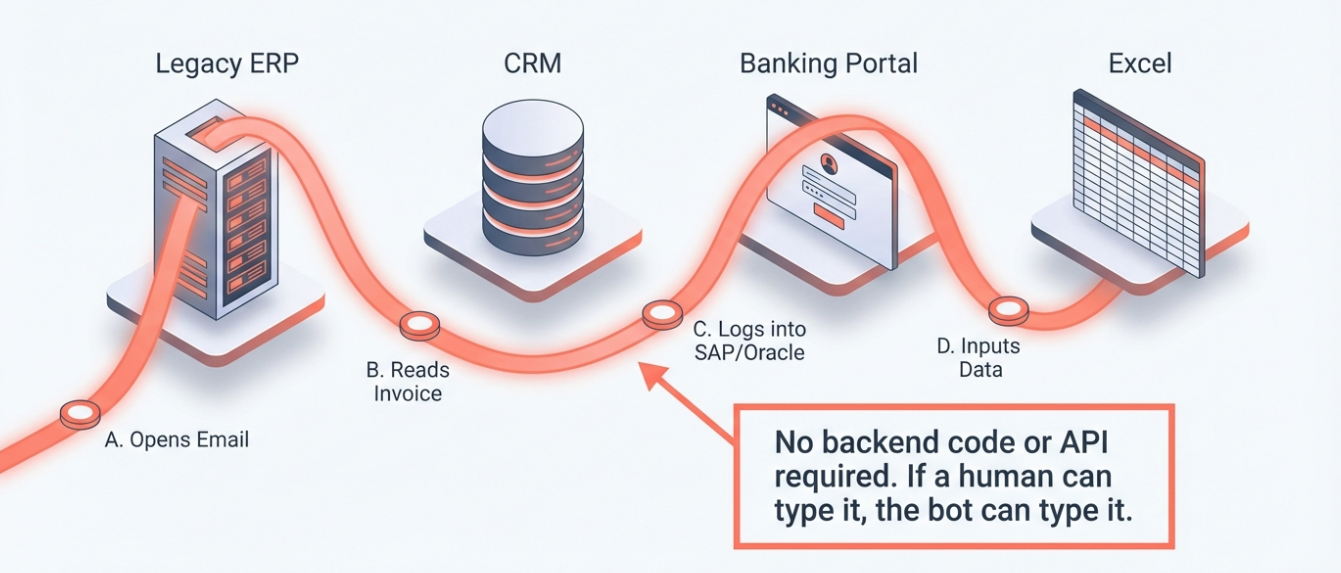
RPA takes over that "glue" role. For example, a bot can open an email attachment, read the invoice data, log into your accounting software (like SAP, Oracle, or QuickBooks), input the data, and send a confirmation email. It interacts with the user interface (UI) layer. This means you don't need to rebuild your expensive legacy systems. The bot uses the software exactly how your staff uses it—it just does it faster.
Key Differences Between RPA and AI
Many Controllers confuse RPA with Artificial Intelligence (AI). This confusion leads to failed projects. You need to know the difference to pick the right tool.
RPA is the Hands (Doing): It follows strict, rule-based logic. "If invoice amount is under $5,000, approve it. If over $5,000, email the CFO." It cannot think, it only executes.
AI is the Brain (Thinking): It handles ambiguity. It uses Machine Learning to look at a messy, handwritten receipt and guess, "This looks like a meal expense."
Here is the breakdown:
Feature | RPA (Robotic Process Automation) | AI (Artificial Intelligence) |
Core Function | Rule-based execution. | Pattern recognition and decision-making. |
Data Type | Structured data (Excel, database fields). | Unstructured data (emails, images, voice). |
Best For | RPA in accounting tasks like reconciling bank feeds. | Forecasting cash flow or detecting fraud patterns. |
Outcome | 100% predictability. | Probabilistic accuracy. |
If your process has clear rules, you need RPA. If it requires judgment, you need RPA vs AI working together. The future lies in Agentic AI. 40% of enterprise apps will feature task-specific AI agents by 2026, shifting RPA from simple rules to reasoning-first workflows.
Why Finance Teams Must Invest in RPA Tools
The pressure to "do more with less" is constant. But the argument for automation goes beyond just speed. It is about control.
Reduce Human Error and Improve Data Accuracy
Fatigue is real. After four hours of data entry, even the best accountant’s error rate climbs. A misplaced decimal point or a transposed account number can trigger hours of reconciliation work or, worse, an audit finding.
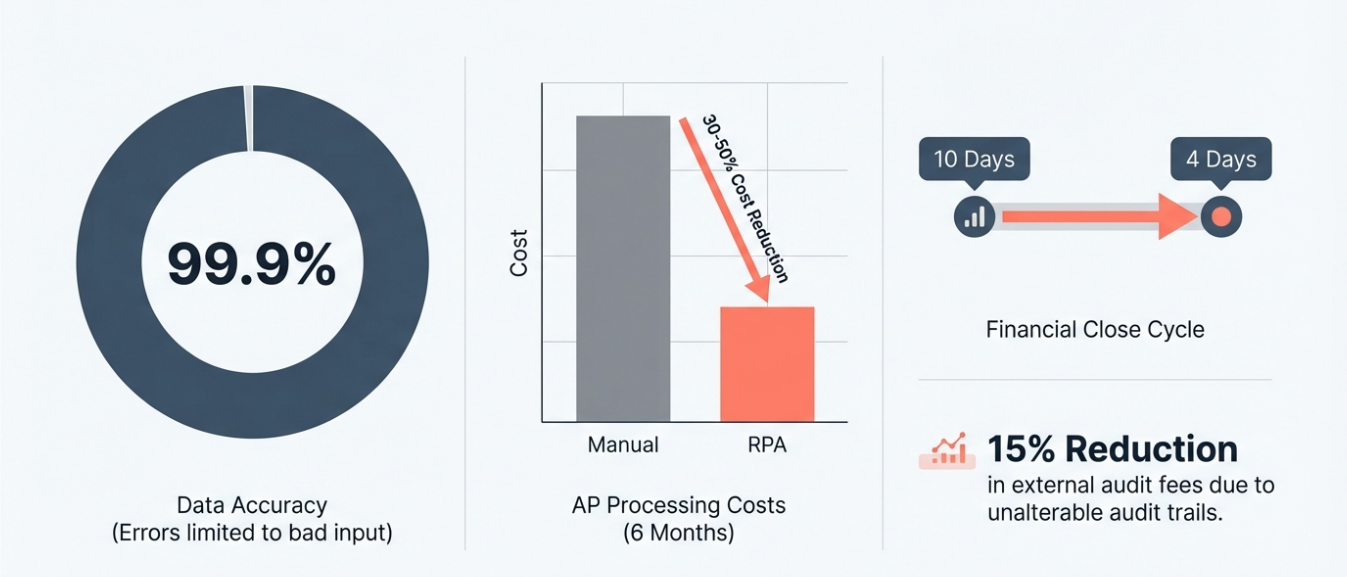
Industry benchmarks show that bots achieve 99.9% accuracy once the rules are correctly defined. The only errors that occur are typically due to bad input data, not processing mistakes. When you reduce human error, you don't just save time on corrections, you restore trust in your financial reporting.
Cut Labor Costs and Boost Productivity
Your CPA-qualified staff shouldn't be doing data entry. That is an expensive misuse of resources. By deploying bots for low-value tasks, you shift your labor spend. Finance teams adopting RPA for accounts payable report a 30–50% reduction in processing costs within the first six months. This isn't about firing staff. It’s about freeing them to do the high-value analysis they were hired for. Cost savings come from capacity creation—your existing team can handle double the transaction volume without adding headcount.
Standardize Processes for Better Compliance
Every action a bot takes is logged. When an auditor asks, "Who approved this transfer and why?" you don't have to dig through email chains. You pull the bot’s execution log. It provides a perfect, unalterable audit trail.
Recent automation compliance studies indicate that finance teams using RPA for financial controls can reduce external audit fees by approximately 15% due to improved traceability and audit readiness. Workvia studies show organizations can save over $340,000 on auditing tasks by automating control testing and documentation. Bots don't take shortcuts. They follow the compliance policy every single time.

Top Use Cases for RPA in Finance and Accounting
Don't try to automate everything at once. Start where the volume is high, and the tasks are repetitive. Here are the battle-tested areas where robotic process automation in finance delivers the quickest wins.
Automate Accounts Payable and Invoice Processing
This is the classic bottleneck. Invoices arrive via email, portal, or paper. They need to be matched against purchase orders (PO) and goods receipts.
The Workflow:
Capture: A bot monitors a dedicated email inbox (e.g., invoices@company.com).
Extract: It downloads the PDF and uses OCR (Optical Character Recognition) to scrape data: Vendor Name, Date, Amount, PO Number.
Match: The bot logs into the ERP, searches the PO number, and compares the amounts.
Process: If it matches (3-way match), the bot posts the invoice for payment. If there is a discrepancy, it flags it for human review.
Accounts payable automation transforms a process that takes days into one that takes minutes. Plus, invoice processing speed means you can finally take advantage of early payment discounts.
Streamline Accounts Receivable and Collections
Cash is king. But chasing customers for payment is tedious. RPA can manage the dunning process. The bot checks the aging report daily. For any account 5 days past due, it sends a polite reminder. At 15 days, it sends a firmer notice and attaches the original invoice copy. At 30 days, it alerts the Collections Manager. This ensures consistent follow-up without your team spending hours drafting emails.
Accelerate the Financial Close Process
The "month-end close" is often a series of data aggregations. Bots can pre-populate reconciliation templates. They can log into bank portals, download statements, and compare transaction lines against the general ledger. Automa users report cutting their financial close cycle from 10 days down to 4 days by automating these sub-ledger reconciliations. Forrester reports that automation and AI-driven ERPs improve finance team productivity by 40% while accelerating close and reporting cycles.
Simplify Expense Management and Reporting
Reviewing expense reports for policy violations is mind-numbing. A bot can scan thousands of line items instantly.
Is the dinner expense under the $100 limit?
Is the receipt attached?
Is the vendor on the approved list?
If the rules are met, the bot approves the reimbursement. If not, it rejects it with a specific reason code.
Integrate Legacy Systems Without New APIs
This is the "secret weapon" of RPA.
Many companies run on legacy systems—old mainframes or custom-built ERPs that don't have modern APIs. Building a custom integration could cost $100,000 and take six months.
RPA interacts with the user interface. If a human can type it in, the bot can type it in. It acts as a bridge, moving data between your modern CRM and your 20-year-old accounting system without a single line of backend code.
[Action Step: The RPA Suitability Checklist] Before you build, check your process against these 5 criteria. If you check fewer than 4, do not automate it yet.
Rule-Based: Can the decision be mapped in a "If This, Then That" flowchart?
Digital Input: Is the data already digital (Excel, PDF, Database)?
Structured Data: Is the data in a consistent format?
High Volume: Does this happen frequently enough to justify the build cost?
Stable Process: Is the process unlikely to change in the next 6 months?
How to Implement RPA in Your Accounting Firm
Most RPA projects fail not because of the technology, but because of poor planning. Here is your implementation roadmap to ensure success.
Step 1 Identify the Right Processes for Automation
Don't start with your most complex process. Start with the "low-hanging fruit." Look for tasks that are high volume, low complexity, and prone to human error. Accounts Payable or Bank Reconciliation are usually the best starting points. Use the "Suitability Checklist" above. If a process requires "gut feeling" or frequent human negotiation, skip it.
Step 2 Standardize Data Before Automating
This is where 60% of projects die. If you automate a chaotic process, you just get chaos faster. Before you write a single script, you must map the process and standardize the data inputs.
The "Garbage In, Garbage Out" Risk: If your vendors send invoices in 50 different formats, a basic RPA bot will fail. You must enforce standard templates or implement an intermediate data cleaning step. At Automa, we advise clients to spend 40% of their project timeline on process re-engineering. Clean the data first. Build the bot second.
Step 3 Design and Test Your Bot Workflows
Once the process is clean, use a visual workflow builder. Design the "Happy Path" (when everything goes right) first. Then, design the "Exception Paths" (what happens when the vendor name is misspelled?).
Testing Protocol: Never deploy straight to production. Run the bot in a sandbox environment. Compare the bot’s output against a human’s output for the same 100 transactions. Do not go live until the bot matches or beats human accuracy for three consecutive test runs.
Step 4 Train Staff and Manage Change
Your team will be nervous. They hear "robot" and think "layoffs." You must control the narrative. Position the bot as an assistant, not a replacement.
The "Bot Trainer" Strategy: Select your most skeptical accountant and make them the "Bot Owner." Their job is to teach the bot the rules. This gives them ownership over the project. When the bot succeeds, they succeed. Show them that by offloading the data entry, they now have time to focus on the strategic analysis that leads to promotions.

Overcoming Common Challenges in Robotic Accounting
Robotic accounting is powerful, but it is fragile. You need a maintenance plan.
Handling Unstructured Data and Exceptions
RPA hates ambiguity. If a vendor sends a handwritten invoice, the bot will stop.
To solve this, you need a "Human-in-the-Loop" workflow. When the bot encounters data it doesn't understand (unstructured data), it shouldn't just crash. It should route that specific item to a human queue. The human fixes it, and the bot continues. Over time, you can add AI modules to handle these exceptions, but always start with a human safety net.
Ensuring Continuous Maintenance and Governance
Bots break. If your ERP software updates its login screen and the "Submit" button moves two pixels to the right, the bot might fail.
You cannot just "set it and forget it." You need an IT governance strategy.
[Action Step: The Governance Maintenance Checklist]
Change Management: Does IT notify the RPA team before updating the ERP?
Access Control: Does the bot have its own unique login ID (e.g.,
Bot_AP_01) so its actions are traceable?Error Logs: Who reviews the bot's error logs every morning?
License Management: Are we optimizing our bot licenses, or are they sitting idle?
Conclusion
The era of manual data entry in finance is ending. The question is no longer if you will use RPA in accounting, but how fast you can implement it to stop the bleeding of time and resources.
By automating the repetitive tasks—invoice processing, reconciliations, and reporting—you aren't just cutting costs. You are buying your team the time to actually be financial strategists. You are building a department that is scalable, compliant, and audit-ready.
Your Roadmap for Monday Morning:
Audit: Pick one process (like AP).
Measure: Track exactly how many hours your team spends on it this week.
Test: Use Automa’s Workflow Builder to map out that single process.
Don't let another month-end close destroy your team's morale. Start small, standardize ruthlessly, and let the bots handle boring stuff.
Frequently Asked Questions
Will RPA replace my accountants?
No. RPA replaces tasks, not jobs. It takes over the repetitive data entry and reconciliation work (the "copy-paste" tasks). This frees up your accountants to focus on high-value activities like financial analysis, strategy, and exception handling.
How long does it take to implement an RPA solution?
A simple bot for a standardized process (like downloading bank statements) can be built and deployed in 2-4 weeks. More complex workflows like end-to-end accounts payable automation typically take 8-12 weeks, including testing and process standardization.
Does RPA work with my old ERP system?
Yes. This is one of RPA's biggest strengths. Because bots interact with the user interface (screens) just like a human does, they work with virtually any application, including legacy mainframes, Citrix environments, and web portals, without needing expensive backend API integration.
What happens if the bot makes a mistake?
Bots follow the rules you give them. If the rule is wrong, the bot will make the same mistake consistently and quickly. This is why the "Testing" and "Standardization" phases are critical. However, unlike humans, bots do not make random errors due to fatigue or distraction.
Is RPA expensive for mid-sized firms?
The cost has dropped significantly. While enterprise-grade setups used to cost six figures, modern platforms like Automa offer flexible pricing. The ROI is usually realized within 6 to 9 months through labor savings and error reduction.